

Key takeaways
- We compare the best 10GbE network adapters for faster NAS transfers: five PCIe, Thunderbolt, SFP+, and multi-speed cards for home servers and editing rigs.
A one-gigabit link moves roughly 125 megabytes per second at best, and that ceiling shows up the moment a NAS holds large video files, photo libraries, or virtual machine images. Backups crawl, editing timelines stutter, and a multi-terabyte restore turns into an overnight job. A 10GbE adapter lifts that ceiling by a factor of ten, and for a home server or editing workstation it is often the single most useful network upgrade available.
The catch is that 10GbE adapters are not interchangeable. Some slide into a PCIe slot, some hang off a Thunderbolt port, some take fiber modules, and some negotiate slower speeds when the switch on the other end cannot keep up. This guide compares five adapters that cover those shapes, so the choice comes down to the computer, the cabling, and the switch already in place.
As an Amazon Associate, we earn from qualifying purchases.
Quick answer
Start with the TP-Link TX401 if the computer has a free PCIe slot and the network runs on copper cabling. It is the simplest path to 10GbE for a NAS or desktop, with a single RJ45 port, multi-speed support, and both full-height and low-profile brackets in the box. Thunderbolt-only machines should look at the Sonnet Solo10G, while fiber runs call for the 10Gtek single-port SFP+ card.
TP-Link TX401 10GB PCIe Network Card

Specs
- PCIe 3.0 x4 interface; single RJ45 10GBase-T port; speeds of 10, 5, 2.5, and 1 Gbps plus 100 Mbps; Marvell AQC107 controller; Windows 11, 10, 8.1, 8, and 7, Windows Server 2019, 2016, and 2012 R2, and Linux support; CAT6A cable included; full-height and low-profile brackets included.
The TX401 is the most straightforward way to give a desktop or home server a 10GbE port. It occupies a PCIe 3.0 x4 slot, presents a single RJ45 jack, and connects to an existing switch or directly to a NAS with a CAT6A cable, which TP-Link includes in the box. There is no transceiver to buy, no fiber to terminate, and no external power brick to find a socket for.
Multi-speed support is the detail that makes this card forgiving in mixed networks. A switch with only 2.5GbE ports still negotiates a useful link, and an older gigabit device on the same cable drops to 1 Gbps without any configuration.
The card is built around the Marvell AQC107 controller, a widely used 10GBase-T part, and its driver support covers current Windows releases, Windows Server, and Linux. Both bracket heights ship in the box, so the same card fits a full tower and a small-form-factor case.
The limitation is the obvious one. A single copper port cannot serve a fiber run, and a machine with no free PCIe slot cannot take the card at all. Laptops and compact mini PCs need a different shape of adapter, which is where the Thunderbolt pick below comes in.
Sonnet Solo10G Thunderbolt 3 to 10GBASE-T Ethernet Adapter

Specs
- Thunderbolt 3 host interface; single RJ45 10GBASE-T port; NBASE-T support at 10, 5, 2.5, and 1 Gbps; fanless aluminum enclosure; bus powered; supports Apple M series and Intel Macs with Thunderbolt 3 ports, plus Windows computers with Thunderbolt 3.
The Solo10G exists for computers that have no PCIe slot to spare. It connects over Thunderbolt 3, draws power from the same cable, and gives a Mac or a compact Windows machine a full 10GbE port without opening the case. The enclosure is a solid block of aluminum with no fan, so it stays silent on a desk and sheds heat through the case itself.
NBASE-T support means the adapter negotiates 5 and 2.5 Gbps links as well as full 10 Gbps, which keeps it useful on switches that top out below 10GbE.
Sonnet lists support for Apple M series Macs and Intel Macs with Thunderbolt 3 ports, and for Windows machines with Thunderbolt 3. The single RJ45 port takes standard CAT6 or CAT6A copper cabling, with the listing noting up to 55 meters on CAT6 and 100 meters on CAT6A.
The trade-off is cost and a single connection. One port serves one link, and Thunderbolt adapters generally cost more than an equivalent PCIe card. Availability is also worth a glance before ordering, since this adapter has appeared as discontinued at some retailers even while it remains listed elsewhere. For a laptop-first workflow, though, it is the cleanest route to 10GbE.
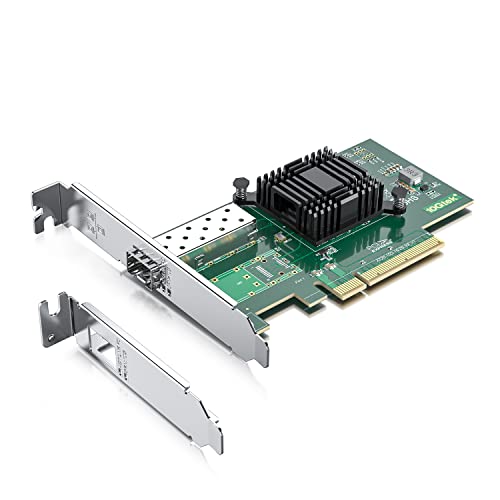
10Gtek 10Gb PCI-E NIC Network Card, Single SFP+ Port
Specs
- PCIe x8 interface; single SFP+ port; Intel 82599EN controller; 10 and 1 Gbps link rates; jumbo frames up to 15.5KB; SR-IOV support; Windows 7, 8, and 10, Windows Server 2008, 2012, 2016, and 2019, Linux, VMware ESXi, and FreeBSD support; transceivers and cables sold separately.
The 10Gtek card is the fiber pick of this guide, built around the Intel 82599EN controller. It offers a single SFP+ cage on a PCIe x8 card, and it pairs with a direct-attach copper cable or an optical transceiver to reach a switch, a NAS, or another server. For a home lab that already runs fiber between rooms or racks, this is the cheapest way to add a fast optical link.
The 82599 is a long-serving server controller, and that age is a strength here: drivers for it exist in Windows Server, Linux, VMware ESXi, and FreeBSD, and it has been used in servers for years.
The honest caveat is that the card ships bare. No transceiver and no cable come in the box, so the total cost of the link includes a DAC cable or a pair of SFP+ modules plus fiber. Buyers should confirm the exact module and cable combination with their switch before ordering, since an SFP+ port with nothing plugged into it moves no data at all.
Intel Ethernet Converged Network Adapter X540-T2

Specs
- PCIe 2.1 x8 interface; two RJ45 10GBASE-T ports; Intel X540 controller; 10 and 1 Gbps link rates; up to 64 virtual functions with VMDq; FCoE and iSCSI support; low-profile bracket; Windows and Linux support.
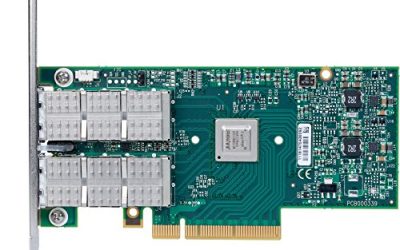
The X540-T2 is the dual-port pick, and its appeal is the second RJ45 jack. Two 10GbE ports let a server talk to a NAS on one link and to the rest of the network on the other, or bond the two ports for redundancy and extra throughput. The Intel X540 controller behind it is a server-grade part with support for virtualization features such as VMDq, which assigns up to 64 virtual functions, and for storage protocols including FCoE and iSCSI.
For a home server that doubles as a virtualization host, the combination of two ports and mature drivers is hard to beat.
There are two things to know before buying. The X540 line has been withdrawn from marketing, so the listing reflects remaining stock rather than a current product line, and availability is worth a glance before ordering. The card also negotiates only 10 and 1 Gbps, with no 5 or 2.5 Gbps middle speeds, so a switch that tops out at 2.5GbE drops the link to 1 Gbps.
ASUS XG-C100C 10G Network Adapter PCI-E x4 Card

Specs
- PCIe x4 interface; single RJ45 10GBase-T port; Aquantia AQC107 controller; speeds of 10, 5, 2.5, and 1 Gbps plus 100 Mbps; built-in QoS; passive cooling; Windows 10, 8.1, 8, and 7 and Linux kernel 4.4, 4.2, 3.6, and 3.2 support; short bracket included.
The XG-C100C is the multi-speed pick of this guide, and its headline feature is backward compatibility. The Aquantia AQC107 controller negotiates 10, 5, and 2.5 Gbps as well as gigabit and 100 Mbps, so the card keeps working at the fastest speed the switch supports instead of falling back to 1 Gbps. That makes it a good fit for a network that is partway through an upgrade, where the switch may gain 10GbE ports before every device does.
Its listed operating-system support names Windows 10, 8.1, 8, and 7 and older Linux kernels, so users on newer Linux distributions should confirm driver availability for their exact kernel before ordering. For a desktop that needs one flexible, quiet 10GbE port, it covers the most ground of any card here.
How to choose
Start with the computer, not the adapter. A free PCIe slot points to a card such as the TX401, the 10Gtek SFP+ card, the X540-T2, or the XG-C100C. A laptop or mini PC with no slot and a Thunderbolt port points to the Sonnet Solo10G. A NAS with an empty PCIe slot takes a card, while a NAS with only USB ports needs an external adapter instead.
Next, match the port to the cabling already in place. Copper CAT6A runs call for an RJ45 card. Fiber runs or direct-attach copper between racks call for an SFP+ card, and the transceiver or DAC cable must be budgeted alongside the card. Mixing the two without a media converter wastes money and time.
Then check the switch. A 10GbE adapter only reaches full speed when the port on the other end supports it. If the switch tops out at 2.5GbE, a multi-speed card such as the TX401 or the XG-C100C still delivers a useful link, while a card with no middle speeds drops to 1 Gbps. Count the ports too: a NAS that serves several clients benefits from a dual-port card, while a single workstation rarely needs more than one fast link.
Finally, confirm the operating system. Windows and Linux cover most of these cards, but older controllers and Thunderbolt adapters have narrower support lists. The driver situation matters more than the headline speed, since an adapter without a working driver is a paperweight.
Who should skip
Anyone whose NAS and computers all connect over Wi-Fi should skip 10GbE for now. A wireless link cannot feed a 10GbE adapter, and the money is better spent on a wired run or a better access point first. The same applies to a network where every device is a gigabit switch hop away from the NAS: the adapter would sit idle at 1 Gbps.
Users with a single small NAS and light file sharing can also skip this upgrade. If the workload is documents, photos, and the occasional backup, a gigabit link already keeps up, and the cost of a card, a switch port, and cabling buys nothing noticeable. A single-port gigabit connection is also fine for streaming media to a television, since even high-bitrate video uses a fraction of a gigabit link.
Finally, anyone without a free PCIe slot, a Thunderbolt port, or a switch with a 10GbE port should hold off. The adapter is only one piece of the chain, and it delivers its speed only when the computer, the cable, and the switch all support it.
Frequently Asked Questions
Does a 10GbE adapter speed up internet downloads?
No. A 10GbE adapter speeds up traffic inside the local network, such as transfers between a computer and a NAS. Internet downloads remain limited by the connection from the internet provider, which is far slower than 10GbE in almost every home.
Is CAT6A cable required for 10GbE?
CAT6A is the safe choice for full 10GbE over copper, with the listing for the Sonnet adapter noting up to 100 meters on CAT6A and 55 meters on CAT6. Short CAT6 runs can carry 10GbE, but longer runs should use CAT6A to avoid dropped links.
Do I need a 10GbE switch to use one of these adapters?
A 10GbE switch is needed for full speed, but it is not strictly required to use the adapter. A multi-speed card still negotiates 5, 2.5, or 1 Gbps with a slower switch, and two devices can also connect directly to each other with a single cable.
Can I use an SFP+ card with a regular RJ45 switch?
Not directly. An SFP+ port needs an optical transceiver or a direct-attach copper cable, and an RJ45 switch has no SFP+ cage to accept either. A copper SFP+ transceiver exists for some setups, but the simpler answer is to choose an RJ45 card when the switch has RJ45 ports.
Final verdict
For most home servers and desktops, the TP-Link TX401 is the right first 10GbE adapter: one RJ45 port, multi-speed support, both brackets in the box, and a CAT6A cable included. Thunderbolt-only machines should take the Sonnet Solo10G, fiber networks should take the 10Gtek single-port SFP+ card, and a server that needs two copper links should take the Intel X540-T2. The ASUS XG-C100C is the pick for a network that is still upgrading, since its 5 and 2.5 Gbps steps keep it useful at every stage. Whichever shape fits, check the slot, the cabling, the switch, and the operating system first, and the adapter will deliver the speed it promises.
Product and ASIN Reference
| Product | ASIN |
|---|---|
| TP-Link TX401 10GB PCIe Network Card | B08D71PVXG |
| Sonnet Solo10G Thunderbolt 3 to 10GBASE-T Ethernet Adapter | B07BZRK8R8 |
| 10Gtek 10Gb PCI-E NIC Network Card, Single SFP+ Port | B01LZRSQM9 |
| Intel Ethernet Converged Network Adapter X540-T2 | B0077CS9UM |
| ASUS XG-C100C 10G Network Adapter PCI-E x4 Card | B072N84DG6 |
More from Amazon
Programs that pair well with the guide above. Offers and eligibility are set by Amazon and may change.
A free business account with business pricing and bulk-buying tools for work, shop or home office.
Create a business accountFree shipping on eligible items, Prime Video and more. Eligible new members can start with a free trial.
Start a Prime free trialAudiobooks and podcasts to listen to on the go. Eligible new members can start with a free trial.
Try Audible freeAd-free music streaming. Eligible new subscribers can start with a free trial.
Try Music Unlimited freeAs an Amazon Associate we earn from qualifying purchases.
Write Your Review
No reviews yet. Be the first to share your experience!