

Key takeaways
- Samsung SSD 990 EVO 1TB review: PCIe Gen 4x4 and Gen 5x2 speeds up to 5,000 MB/s in an M.2 2280 stick, with the checks to run before you buy one.
The Samsung SSD 990 EVO asks a different question from most NVMe drives. It is not the fastest stick Samsung sells, and it is not a cut-price Gen3 leftover either: it connects as PCIe 4.0 x4 or PCIe 5.0 x2, so the performance you get depends on how your motherboard or laptop wires its M.2 slot. Add a confusing family tree — 990 EVO, 990 EVO Plus and 990 PRO are three different drives — and the decision is whether this model matches your slot and your workload.
This review covers the 1TB version, model MZ-V9E1T0B/AM, and is written for laptop owners replacing a slower drive, desktop builders with a spare M.2 slot, and anyone moving up from SATA storage. Every figure below comes from the specifications and naming on the drive’s Amazon product page, and the checks in this guide focus on the mistakes buyers make with this model: ordering the Plus by accident, expecting full Gen5 bandwidth, or forgetting about heat in a thin laptop.
Quick Picks
As an Amazon Associate we earn from qualifying purchases
There is only one pick in this review, because the whole point is deciding whether this exact drive — not its Plus or PRO siblings — is the right upgrade for your machine.
| Product | Best for | Key spec from title |
|---|---|---|
| Samsung SSD 990 EVO 1TB (MZ-V9E1T0B/AM) | Laptop and desktop upgrades on Gen4 or Gen5 x2 slots | Speeds up to 5,000 MB/s |
How to Choose
A single-model review still leaves you with homework. The 990 EVO is sold in two capacities, behaves differently depending on the slot it lands in, ships without a heatsink, and relies on Samsung software for firmware care. Work through the four checks below before ordering and the drive that arrives will be the drive you expected, running at the speed your system can actually feed it.
Pick the capacity before anything else
The 990 EVO line comes in 1TB and 2TB, and the listing reviewed here is the 1TB model, MZ-V9E1T0B/AM. Capacity is the one choice you cannot undo later, so size it against your real library: an operating system, everyday applications and a handful of large games fill 1TB faster than most buyers expect. If your current drive is already more than about two-thirds full, the 2TB version of the same drive is the safer long-term pick. If you are replacing a small 256GB or 512GB boot drive and keep bulk files elsewhere, 1TB is a comfortable step up.
Check how your M.2 slot is wired
This drive’s party trick is its dual-mode interface: it runs over PCIe 4.0 x4 or PCIe 5.0 x2, and either link gives it the bandwidth behind its rated speeds. On a Gen4 board it behaves like a normal Gen4 drive. On a Gen5 board it uses two lanes instead of four, which matters on boards where the top slot shares lanes with the graphics card. Check your manual for how the slot is wired and whether populating it drops the GPU slot to x8. In an older Gen3 slot the drive still works, but it negotiates down to Gen3 link speeds.
Decide how the drive will shed heat
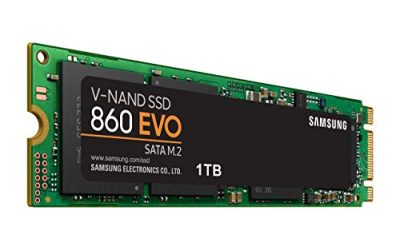
The 990 EVO is a bare M.2 2280 stick with no heatsink in the box, and Samsung leans on its Smart Thermal Control to keep temperatures in check during long transfers. That is fine in a desktop case with airflow, and many motherboards include an M.2 shield that doubles as a heatsink. Thin laptops are the tighter squeeze: some have room only for a bare stick, which suits this drive, while others trap heat against the bottom panel. Before ordering, confirm your machine accepts a standard 2280 stick and decide whether a slim aftermarket heatsink fits your chassis.
Plan the firmware and software setup
Samsung supports its SSDs through the Magician software, and the listing notes the 990 EVO works with the latest Magician release for health monitoring and firmware updates. Plan ten minutes after installation to install Magician, check for a firmware update before you clone or copy data across, and confirm the drive reports the expected capacity. Doing the update first matters because a firmware flash later can mean re-checking your setup. If you are cloning an old boot drive, keep the original untouched until the new drive has booted cleanly a few times.
The Best Option
One model, one listing, one decision. The section below pulls together what the Amazon product page states about the 1TB 990 EVO, where it fits, and the two checks worth making before your order ships.
Samsung SSD 990 EVO 1TB (MZ-V9E1T0B/AM)

The 990 EVO suits buyers who want a modern, efficient NVMe drive without paying for flagship bandwidth they cannot use. Its rated sequential speeds of up to 5,000 MB/s read and 4,200 MB/s write are well beyond SATA and older Gen3 sticks, and the dual PCIe 4.0 x4 / 5.0 x2 interface means it keeps that pace in both current Gen4 machines and Gen5 boards where only two lanes are free. Samsung also rates it far more power-efficient than the older 970 EVO Plus, which counts in laptops that spend the day on battery.
Specs
- Capacity: 1 TB
- Model number: MZ-V9E1T0B/AM
- Interface: PCIe Gen 4×4 / PCIe Gen 5×2, NVMe
- Form factor: M.2 2280
- Sequential read speed: up to 5,000 MB/s
- Sequential write speed: up to 4,200 MB/s
- Flash memory: Samsung V-NAND
- Encryption: AES 256-bit
- Thermal management: Smart Thermal Control
- Power efficiency: rated 70 percent more efficient than the 970 EVO Plus
- Compatible devices: Laptop, Mac, PC
- Color: Black
Best for: Laptop and desktop upgraders who want Gen4-class speed, low power draw and Samsung’s Magician software support in a standard M.2 2280 stick.
Watch out for: Read the model code on the listing before checkout — MZ-V9E marks this 990 EVO, while the 990 EVO Plus uses MZ-V9S codes, higher rated speeds and different capacities; the two are easy to confuse. No heatsink is included.
ASIN: B0CRCC9863
Which One Fits Your Situation
Same drive, different reasons to buy it. The situations below map the 1TB 990 EVO reviewed here — and its 2TB sibling — to the machines and habits it serves best.
You are upgrading a laptop that still runs a SATA or Gen3 drive
The 1TB 990 EVO is the natural landing spot. A standard M.2 2280 stick with no heatsink fits the space most laptops allow, the rated speeds are a large jump from any SATA drive, and the efficiency focus helps battery life. Just confirm your laptop’s slot is an NVMe M-key slot rather than a SATA-only one before ordering.
Your desktop board has a Gen5 slot that shares lanes
This is the scenario the 990 EVO was designed around. Because it can run at full pace over PCIe 5.0 x2, it does not need four lanes from a slot that competes with your graphics card. Check your board manual for lane sharing, and the 1TB model gives you fast storage without forcing a compromise on GPU bandwidth.
You are torn between the 1TB and 2TB versions
Choose by how full your current drive is, not by the rated speeds, which are the same across both capacities. The 1TB model reviewed here fits an operating system, work files and a moderate game library. If you keep large game installs, raw photo folders or video projects on the same drive, pick the 2TB version of the 990 EVO instead of planning a second drive later.
You want a cool, frugal drive for an always-on machine
For a home server, mini PC or media box that runs around the clock, the 990 EVO’s efficiency rating and Smart Thermal Control make the 1TB model a sensible pick. It sips power compared with older performance drives, and Magician gives you a simple way to watch drive health and apply firmware updates over the machine’s life.
Common Mistakes
- Ordering the 990 EVO Plus by mistake: the Plus is a different drive with MZ-V9S model codes and higher rated speeds, so always match the full model number MZ-V9E1T0B/AM at checkout.
- Expecting full PCIe 5.0 x4 bandwidth: the 990 EVO is a Gen5 x2 drive, so it will not match the headline speeds of four-lane Gen5 flagships even in a Gen5 slot.
- Assuming a heatsink is in the box: this listing is the bare stick, so plan on your motherboard’s M.2 shield or a slim heatsink if your case runs warm.
- Buying for a SATA-only M.2 slot: some older laptops have M.2 slots wired for SATA drives only, and this NVMe drive will not be detected in one.
- Skipping the firmware check after installation: install Samsung Magician first and update the firmware before cloning your old drive or filling the new one with data.
Frequently Asked Questions
Is the Samsung 990 EVO the same drive as the 990 EVO Plus?
No, they are separate models with confusingly similar names. The 990 EVO reviewed here uses MZ-V9E model codes and is rated at up to 5,000 MB/s in 1TB and 2TB capacities. The 990 EVO Plus uses MZ-V9S codes, carries higher rated speeds and is sold in larger capacities. Always check the model code on the listing before you buy.
Will the 990 EVO work in an older PCIe Gen3 M.2 slot?
Yes, provided the slot supports NVMe drives. PCIe is backward compatible, so the 990 EVO will install and run in a Gen3 slot, but it will negotiate Gen3 link speeds rather than the Gen4 or Gen5 rates on the box. It still makes sense as an upgrade if you plan to move the drive into a newer machine later.
Does the 990 EVO come with a heatsink?
No. The listing for this 1TB model is the bare M.2 2280 drive, and Samsung relies on its Smart Thermal Control firmware to manage temperatures. Many desktop motherboards include a metal M.2 shield that serves as a heatsink. In a laptop, check the clearance above the slot; most thin machines are designed for a bare stick like this one.
Which capacity should I choose, 1TB or 2TB?
Match the capacity to what you store, because both versions share the same rated speeds and interface. The 1TB model suits an operating system, applications and a moderate game library. If your current drive is nearly full, or you keep big game installs and media projects on the same disk, the 2TB version saves you from juggling files or adding a second drive sooner.
More from Amazon
Programs that pair well with the guide above. Offers and eligibility are set by Amazon and may change.
A free business account with business pricing and bulk-buying tools for work, shop or home office.
Create a business accountFree shipping on eligible items, Prime Video and more. Eligible new members can start with a free trial.
Start a Prime free trialAudiobooks and podcasts to listen to on the go. Eligible new members can start with a free trial.
Try Audible freeAd-free music streaming. Eligible new subscribers can start with a free trial.
Try Music Unlimited freeAs an Amazon Associate we earn from qualifying purchases.

Write Your Review
No reviews yet. Be the first to share your experience!