

Our Short List of 3
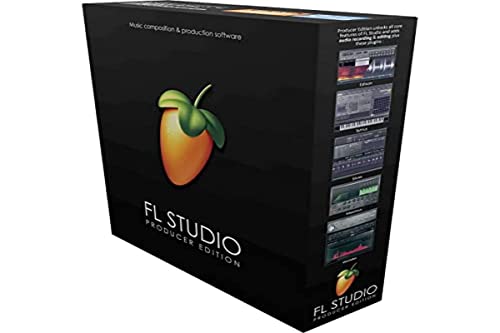
- Best for: Beat makers and producers who want pattern sequencing, full song creation and mic recording in one Mac and Windows DAW.
- Audio recording and MIDI multi-track recording for Mac and Windows
- Full song creation and mic recording
- 26 instruments and 54 effects
- Registration card with printed instructions and a serial key to authenticate

- Best for: Producers who want everything in the Producer Edition plus a larger set of signature instruments and effects for electronic music and beat making.
- Includes FL Studio 20 Producer Edition plus the Signature plug-in bundle
- 28 instruments and 57 effects
- Multitrack Mac and Windows MIDI audio recording
- Software Key Card format

- Best for: Songwriters, engineers and producers who want a studio standard DAW for recording, editing, mixing and mastering demanding sessions.
- Sealed box with download card, activated with iLok Cloud
- Create, record, edit, mix and master advanced music productions
- Pro Tools Sketch, a non-linear clip-based creation window, also available as a free iPad app
- 32-bit audio engine for high dynamic range recording
All 4 Picks at a Glance
| Product | Specs | Action |
|---|---|---|
| Image Line FL Studio 20 Producer Edition |
| Check price on Amazon |
| Image Line FL Studio 20 Signature Edition |
| Check price on Amazon |
| Avid Pro Tools Studio |
| Check price on Amazon |
 Avid Pro Tools Artist |
| Check price on Amazon |
Key takeaways
- Compare the best digital audio workstations for beat making, recording, mixing and mastering. Find the DAW that fits your workflow and music style.
Choosing a digital audio workstation is really choosing how you will make music every day, because the layout, the recording tools, the MIDI editing and the mixing workflow shape every session from the first idea to the finished track. A DAW that matches the way you think about songs will feel fast and natural, while one that fights your habits will slow down even simple tasks such as arranging a chorus, fixing a vocal take or building a beat from a loop.
This guide is for beat makers, singer-songwriters, home studio owners and producers moving from a free starter app to a full production environment, and it compares four DAW software products using the edition names, included instruments and effects, delivery formats and platform details shown on their Amazon listings. Each option below covers composing, recording, editing, mixing and mastering in one application, so the real choice comes down to workflow, included sounds and the kind of music you make most often.
Quick Picks
As an Amazon Associate we earn from qualifying purchases
| Product | Best for | Key spec from title |
|---|---|---|
| Image Line FL Studio 20 Producer Edition | Beat makers who want pattern sequencing and full song creation | 26 instruments and 54 effects |
| Image Line FL Studio 20 Signature Edition | Producers who want the Producer Edition plus a larger signature plug-in bundle | 28 instruments and 57 effects |
| Avid Pro Tools Studio | Songwriters and engineers who want a studio standard for recording and mixing | 32-bit audio engine with Pro Tools Sketch |
| Avid Pro Tools Artist | Home and project studio creators who want a perpetual Pro Tools license | 32-bit float and 192 kHz audio capture |
How to Choose
Match the workflow to how you build songs
Some producers start with a drum pattern and build outward, while others start with a vocal, a guitar part or a chord progression recorded live, and the DAW should support the starting point you return to most often. Pattern-based tools make it easy to loop a beat, try variations and arrange sections by moving blocks around, while a linear timeline suits recorded performances that need careful editing across many tracks. Think about your last three finished songs and notice whether they began as loops, as MIDI parts or as audio recordings, then choose the environment that made that beginning feel easiest rather than the one with the longest feature list.
Check recording, MIDI and editing depth before you commit
A DAW can look complete on a feature list and still feel limited when you need to comp a vocal, tighten MIDI timing or automate a mix, so look closely at the recording and editing tools in each edition. Multi-track audio recording, a strong piano roll, time stretching, pitch shifting and flexible automation matter far more in daily use than a large loop library, because those tools decide how quickly you can fix a timing slip, reshape a melody or build a clean arrangement. If you record vocals or live instruments often, prioritise clean audio editing and low-latency monitoring, and if you program most parts, prioritise MIDI editing, step sequencing and pattern control.
Count the instruments, effects and sounds you actually get
Editions of the same DAW can differ mainly in the included instruments, effects and sound content, so compare those bundles against the music you make instead of assuming that a higher edition is always the better buy. A beat maker needs strong drums, samplers, synths and creative effects, while a songwriter recording acoustic instruments needs solid EQ, compression, reverb and vocal tools, and a mixer needs flexible routing, automation and mastering support. Make a short list of the five tools you reach for in every project, check whether each edition includes them, and treat anything beyond that list as a bonus rather than a reason to choose a larger bundle.
Confirm the computer, format and licence details
DAW software is delivered in different ways, and the listing details matter because they decide what arrives, how you activate the software and which computers it runs on. Some products arrive as a sealed box with a download card and a serial key, others arrive as a software key card, and activation may need an online account or an additional authorisation system such as iLok Cloud. Check the supported operating systems, the delivery format and the licence type on the listing before ordering, and make sure your computer, audio interface and storage have room for the application, the included instruments and the sound library that comes with it.
The 4 Best Options
Image Line FL Studio 20 Producer Edition
- Best for: Beat makers and producers who want pattern sequencing, full song creation and mic recording in one Mac and Windows DAW.
- Audio recording and MIDI multi-track recording for Mac and Windows
- Full song creation and mic recording
- 26 instruments and 54 effects
- Registration card with printed instructions and a serial key to authenticate
Beat makers and producers who want pattern sequencing, full song creation and mic recording in one Mac and Windows DAW.
The software arrives as a registration card with a serial key, so you still need an online download, registration and installation, and you should confirm that your computer and audio interface match the listing before ordering.
FL Studio 20 Producer Edition suits beat makers and songwriters who build tracks from patterns, loops and MIDI parts and record vocals over the top, because the piano roll, step sequencing and playlist arrangement keep ideas moving quickly. The Producer Edition is described on its listing as the version for full song creation and mic recording, so it covers the whole path from a rough beat to a finished arrangement without forcing a switch to another application. Its multitrack mixer, automation and VST plugin support give a producer room to shape sounds and polish a mix, while Mac and Windows support keeps projects portable between computers.
Watch out for: The software arrives as a registration card with a serial key, so you still need an online download, registration and installation, and you should confirm that your computer and audio interface match the listing before ordering.
Image Line FL Studio 20 Signature Edition
- Best for: Producers who want everything in the Producer Edition plus a larger set of signature instruments and effects for electronic music and beat making.
- Includes FL Studio 20 Producer Edition plus the Signature plug-in bundle
- 28 instruments and 57 effects
- Multitrack Mac and Windows MIDI audio recording
- Software Key Card format
Producers who want everything in the Producer Edition plus a larger set of signature instruments and effects for electronic music and beat making.
The Signature Edition is a step up in scope rather than a different workflow, so check the included instrument and effect counts against the Producer Edition and confirm that the extra bundle matches the sounds you actually use.
FL Studio 20 Signature Edition builds on the Producer Edition by adding the Signature plug-in bundle, which makes it a strong choice for producers who already know they want more instruments and effects without buying extra plugins straight away. The listing describes a reworked scalable interface, multi-touch support in the mixer and a piano roll with auto-zoom, so the workspace adapts to different screen sizes. Its multitrack Mac and Windows MIDI and audio recording, live music performance support and playlist drag and drop suit electronic producers, beat makers and songwriters, and the larger included bundle gives them more sounds to start from.
Watch out for: The Signature Edition is a step up in scope rather than a different workflow, so check the included instrument and effect counts against the Producer Edition and confirm that the extra bundle matches the sounds you actually use.
Avid Pro Tools Studio
- Best for: Songwriters, engineers and producers who want a studio standard DAW for recording, editing, mixing and mastering demanding sessions.
- Sealed box with download card, activated with iLok Cloud
- Create, record, edit, mix and master advanced music productions
- Pro Tools Sketch, a non-linear clip-based creation window, also available as a free iPad app
- 32-bit audio engine for high dynamic range recording
Songwriters, engineers and producers who want a studio standard DAW for recording, editing, mixing and mastering demanding sessions.
Activation uses iLok Cloud and the product arrives as a sealed box with a download card, so check the activation steps, the supported operating systems and the account setup before ordering.
Avid Pro Tools Studio suits songwriters, engineers and producers who want a widely used studio environment for recording, editing, mixing and mastering, because the listing presents it as a complete end-to-end system for every stage of creation. Its Pro Tools Sketch window gives a non-linear, clip-based way to capture ideas anywhere, and it is also available as a free iPad app, so sketches can move into a full session later. The 32-bit audio engine, the large collection of plugins, instruments, loops and samples, and stereo and spatial audio mixing suit demanding vocal sessions, band recordings and projects that need careful editing and polished mixes.
Watch out for: Activation uses iLok Cloud and the product arrives as a sealed box with a download card, so check the activation steps, the supported operating systems and the account setup before ordering.
Avid Pro Tools Artist
- Best for: Home and project studio creators who want a perpetual Pro Tools licence for songwriting, recording, mixing and mastering.
- Download card with printed instructions and a serial key to authenticate
- Perpetual licence with 1-year updates and support plan
- Create, record, edit, mix and master music
- 32-bit float and 192 kHz audio capture
Home and project studio creators who want a perpetual Pro Tools licence for songwriting, recording, mixing and mastering.
The product is sold as a download card rather than installed software, so you need an internet connection, an online download and serial key activation, and you should confirm the licence and update terms on the listing.
Avid Pro Tools Artist suits home and project studio creators who want the Pro Tools workflow in a more focused edition, because the listing describes it as the go-to audio production software for songwriters, musicians, creators and engineers working in home and project studios. It covers creating, recording, editing, mixing and mastering in one application, and its 32-bit float and 192 kHz audio capture gives recordings depth and dynamic range. The perpetual licence with a one-year updates and support plan suits buyers who prefer to own a licence rather than rent access, while the download card format keeps the purchase simple for a single computer.
Watch out for: The product is sold as a download card rather than installed software, so you need an internet connection, an online download and serial key activation, and you should confirm the licence and update terms on the listing.
Which One Fits Your Situation
You mainly make beats and electronic tracks
Choose FL Studio 20 Producer Edition if you build songs from patterns, drum loops and synth parts, because its piano roll, step sequencing and playlist arrangement suit beat making and electronic production. The 26 instruments and 54 effects give you drums, synths and creative effects to start with, and the full song creation and mic recording support means you can add vocals without leaving the DAW.
You want the largest FL Studio bundle in this guide
Choose FL Studio 20 Signature Edition if you already like the FL Studio workflow and want more instruments and effects from the start, because it includes the Producer Edition plus the Signature plug-in bundle. The 28 instruments and 57 effects suit producers who layer synths, samplers and vocal tools, and the scalable interface and multi-touch mixer keep large sessions easy to navigate.
You record bands, vocals or sessions for clients
Choose Avid Pro Tools Studio if you record live performances, comp vocals or mix sessions that other engineers may open, because it is presented as a complete studio system for recording, editing, mixing and mastering. Pro Tools Sketch helps you capture ideas quickly, while the 32-bit audio engine and the stereo and spatial audio mixing support suit demanding studio work.
You want Pro Tools for a home studio at a smaller scope
Choose Avid Pro Tools Artist if you write and record songs at home and want the Pro Tools workflow with a perpetual licence and a one-year updates and support plan. Its 32-bit float and 192 kHz audio capture suits vocal and instrument recording, and the download card format keeps the setup straightforward for a single home studio computer.
Common Mistakes
- Choosing a DAW for its largest bundle instead of checking whether its workflow matches how you build songs.
- Buying an edition without checking the delivery format, activation method and supported operating systems on the listing.
- Assuming that a download card is installed software, when it still needs an online download, registration and a serial key.
- Ignoring the included instruments and effects, then buying extra plugins for tools the chosen edition already includes.
- Picking a studio-grade edition for simple beat making, or a loop-focused edition for detailed vocal editing and mixing.
Frequently Asked Questions
What is the best DAW for a beginner who makes beats?
FL Studio 20 Producer Edition is a strong starting point for a beginner beat maker, because its pattern sequencing, piano roll and playlist arrangement make it easy to build a beat, try variations and arrange a full song. It also includes 26 instruments and 54 effects, plus full song creation and mic recording, so a beginner can compose, record and mix without buying extra tools straight away.
Do I need a different DAW for recording vocals?
No, you do not need a different DAW just for vocals if your chosen edition has solid multi-track audio recording, editing and mixing tools. Pro Tools Studio and Pro Tools Artist are both built around recording, editing, mixing and mastering, while FL Studio Producer Edition also covers mic recording and full song creation, so choose based on your workflow and the sessions you record most often.
What is the difference between FL Studio Producer Edition and Signature Edition?
The Signature Edition includes everything in the Producer Edition plus the Signature plug-in bundle, so the main difference is the included instrument and effect set. The Producer Edition lists 26 instruments and 54 effects, while the Signature Edition lists 28 instruments and 57 effects, and both cover multitrack recording, MIDI editing, live performance and mixing on Mac and Windows.
Does Pro Tools Artist include the same tools as Pro Tools Studio?
No, Pro Tools Artist is the more focused edition for home and project studios, while Pro Tools Studio is presented as a broader studio system for advanced music production. Both cover creating, recording, editing, mixing and mastering, but Studio adds Pro Tools Sketch, a larger plugin, instrument, loop and sample collection, and stereo and spatial audio mixing support.
More from Amazon
Programs that pair well with the guide above. Offers and eligibility are set by Amazon and may change.
A free business account with business pricing and bulk-buying tools for work, shop or home office.
Create a business accountFree shipping on eligible items, Prime Video and more. Eligible new members can start with a free trial.
Start a Prime free trialAudiobooks and podcasts to listen to on the go. Eligible new members can start with a free trial.
Try Audible freeAd-free music streaming. Eligible new subscribers can start with a free trial.
Try Music Unlimited freeAs an Amazon Associate we earn from qualifying purchases.

Write Your Review
No reviews yet. Be the first to share your experience!