

Key takeaways
- Compare the best tether cables for studio photography, from a 10 Gbps USB-C flagship to Micro-B classics, with the specs that decide a stable session.
Tethered shooting lives or dies on one unglamorous component: the cable between the camera and the computer. A generic charging cord may connect, but tethered work punishes weak shielding, loose plugs and power delivery quirks with dropped connections mid-session. Dedicated tether cables are built for exactly this job, with full shielding, secure connectors and lengths that let a workstation sit well away from the set. This guide compares five tether cables across the connector types working studios use, from current USB-C bodies to older Micro-B cameras, so you can match the cable to your camera port, computer port and shooting space before ordering.
As an Amazon Associate, we earn from qualifying purchases.
Quick answer
For most USB-C studios, the TetherPro Optima 10G is the strongest pick: a 15-foot, data-only USB 3.2 Gen 2 cable rated at 10 Gbps with power delivery removed on purpose. Cameras with USB 3.0 Micro-B ports should take the TetherPro USB-C to Micro-B in orange or black, the dual right-angle TetherPro suits tight rigs, and the GeoHN.G covers USB4, charging and video in a single line.
Tether Tools TetherPro Optima 10G USB-C Straight to Right Angle Cable, 15 ft, Orange

The Optima 10G is the current flagship of the TetherPro line and the cable to choose when both the camera and the computer have USB-C ports. It is a USB 3.2 Gen 2 cable rated for data transfer up to 10 Gbps, an active design with two integrated IC chips holding signal quality across the full 15-foot (4.6 m) run. The defining decision is what Tether Tools left out: there is no power delivery at all. The Optima is a dedicated data-only path, engineered to remove the PD negotiation that the manufacturer identifies as a leading cause of dropped connections and delayed camera recognition.
The layout is straight at the computer end and right angle at the camera end, so the cable turns down along the body instead of projecting straight out of the port. The high-visibility orange jacket is easy to trace across a studio floor, and the cable carries the Tether Tools one-year cable warranty. Model number is CUC15RTG2-ORG. Shooters who need more distance can pair it with TetherBoost Pro extension cables for supported runs up to 63 feet. If your workflow depends on the fastest, most deliberately single-purpose USB-C tether line available, this is the one the rest of the guide is measured against.
Tether Tools TetherPro USB-C to USB-C Dual Right Angle Cable, 15 ft, Orange

Where the Optima optimizes for raw speed, the dual right-angle TetherPro optimizes for routing. Both ends of this 15-foot (4.6 m) cable terminate in right-angle USB-C plugs, so the line hugs the camera body at one end and sits flat against a laptop or workstation at the other. That suits tight sets, gimbal and rig work, and any setup where a straight plug would snag or lever against the socket.
The trade is speed and philosophy. This is a USB 3.1 Gen 1 cable rated at up to 5 Gbps, half the Optima’s ceiling, and unlike the data-only Optima it supports USB power delivery up to 60 watts, so a camera that charges over USB-C can draw power through the same line. Model number is CUC15RT2RT-ORG, and the jacket is the line’s familiar high-visibility orange. For many studios 5 Gbps is not the bottleneck in practice, because camera write speeds and tethering software often cap real throughput first. Choose this cable when connector profile and one-cable power-plus-data convenience matter more than the Gen 2 speed ceiling, and pair it with a cable support at the camera end to keep strain off the port.
Tether Tools TetherPro USB-C to USB 3.0 Micro-B Cable, Orange, 15 ft
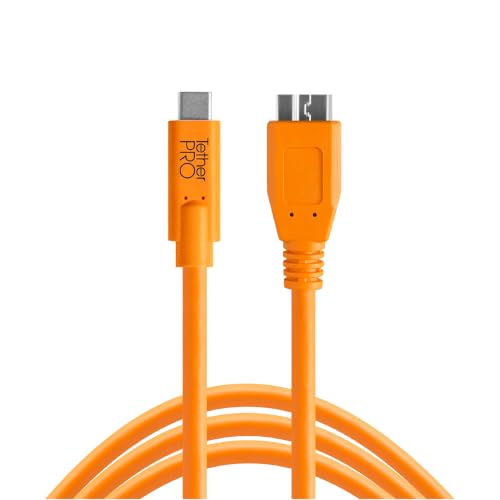
A large share of tethered work is still shot on cameras with USB 3.0 Micro-B ports, including widely used DSLR and medium-format bodies. This cable connects those cameras directly to a USB-C computer, skipping the fragile adapters that Micro-B setups tend to accumulate. It supports USB 3.0 transfer at up to 5 Gbps over 15 feet (4.6 m), and the manufacturer describes the construction as fully shielded and bi-directional, carrying both image transfer and two-way camera control.
The orange version, model CUC3315-ORG, earns its place on bright, busy sets: the jacket is easy to spot before someone steps on it, and easy to trace when a connection drops. Micro-B is the most physically delicate connector in this guide, with its wide, thin plug, so the honest advice that comes with this pick is to treat strain relief as part of the purchase: route the cable so nothing pulls sideways on the camera port, and consider a locking support for tripod work. If your camera predates USB-C but your computer does not, this is the straightforward bridge, with no dongle in the chain to lose or blame.
Tether Tools TetherPro USB-C to USB 3.0 Micro-B Cable, Black, 15 ft
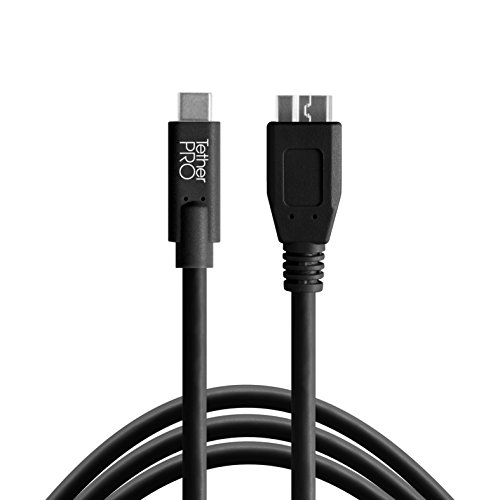
This is the same connection as the orange Micro-B cable above, finished in non-reflective black: USB-C at the computer end, USB 3.0 Micro-B at the camera end, 15 feet (4.6 m) of fully shielded cable rated at up to 5 Gbps. The listing specifies a 12-pin Micro-B connector and an item weight of 8 ounces. The black model in the TetherPro range is CUC3315-BLK.
The reason to choose black over orange is the set, not the spec sheet. On video stages, dark studios and event work where an orange line reads as visual clutter or catches light, a non-reflective jacket disappears into the background and stays out of the frame’s edge. The compromise is the mirror image of the orange cable’s strength: a black cable on a dark floor is harder for crew to see, so trip awareness falls on your routing instead of the color. Everything else carries over, including the handling advice: support the camera end, avoid sideways pull, and confirm your camera really uses USB 3.0 Micro-B rather than the similar-looking Mini-B or Micro-B 5-pin connectors, which need different cables entirely.
GeoHN.G USB C Tethering Cable, Right Angle, 16.5 ft

The GeoHN.G takes the opposite design philosophy from the TetherPro flagship. Instead of stripping features down to a data-only path, it stacks them: this is a USB4 cable rated at 20 Gbps data transfer, with 240-watt power delivery and 4K video output at 60 Hz, sold explicitly as a tethering cable for cameras and computers. The listing names compatibility with USB-C cameras from Sony, Canon and Nikon lines and with MacBook and other USB-C computers, and the right-angle plug keeps the camera end low-profile. At 16.5 feet, it is also the longest single cable in this guide, and the jacket is orange.
That suits a specific shooter: one whose tether line doubles as the camera’s charging source and possibly a monitor feed, doing three jobs on one cable. The honest caveat is the one the Optima’s existence makes: power delivery negotiation is a variable that dedicated data-only cables are designed to eliminate, so if your camera body is known to be fussy about USB-C power roles, a data-only line is the safer primary and this cable is the flexible backup. As a second cable in the bag, or a primary for hybrid photo-video sets, it covers ground none of the TetherPro picks attempt.
How to choose
Start with the two ports, because they decide everything else. Identify the camera’s connector exactly: current mirrorless bodies use USB-C, many DSLRs and medium-format cameras use USB 3.0 Micro-B, and older bodies use Mini-B 5-pin or Mini-B 8-pin, which look similar but are different shapes. Then check the computer end: every cable here covers USB-C computers, so USB-A-only workstations need the USB-A variant of these families instead.
Next, weigh speed against design. A USB 3.2 Gen 2 rating of 10 Gbps only matters if the camera and software can use it, and data-only designs trade charging for connection stability. Finally, plan the physical run: 15 feet covers most studio layouts, right-angle plugs reduce port strain and snagging, bright jackets prevent trips on lit sets while black jackets disappear on dark ones, and runs beyond a single cable need active extension systems rather than passive couplers.
Who should skip
Skip this guide if you shoot wirelessly by preference, since many current bodies tether over Wi-Fi well enough for preview-driven work and no cable can beat zero cable for freedom of movement. Skip it if your workflow is card-based, with a reader at the workstation and no live preview, because a tether cable solves a problem you do not have. Owners of USB 2.0 Mini-B cameras should also skip these five picks: none of them fits your port, and your cable belongs to a different, slower branch of the same product families. Finally, if your camera does not support tethered control at all, a cable from this guide will only move files, so check the manual before spending on a long run.
FAQ
What length tether cable should I buy?
Fifteen feet is the standard studio length because it lets the computer sit on a cart away from the set while the camera moves through normal shooting positions. Go shorter only for a fixed tabletop setup, and treat anything beyond a single cable’s length as an extension-system purchase, since passive couplers and bargain extenders are a common source of dropped connections at longer distances.
Can I use a regular USB-C charging cable for tethering?
Sometimes, briefly, and often badly. Charging cables may be wired for USB 2.0 speeds, may carry thin or lightly shielded conductors, and always involve power delivery negotiation that dedicated tether cables are designed to avoid. A charging cord is fine for an emergency transfer, but its failure mode is a dropped connection at the worst moment, which is why purpose-built cables exist.
Why does my camera keep disconnecting during tethered shooting?
The usual causes are physical and electrical rather than software: a loose or strained camera port, a cable run at the edge of its length, power delivery renegotiation between camera and computer, or interference on a lightly shielded line. Work through them in order: support the cable at the camera, shorten the run or add a proper active extension, try a data-only cable if your current line carries power, and keep the run away from power cables on the floor.
Does a faster cable make tethered transfers faster?
Only up to the slowest link in the chain. A 10 Gbps or 20 Gbps cable cannot make a camera write faster, and tethering software, card speed and the computer’s port all cap real throughput. Buy the rating that matches your camera’s USB generation, and treat headroom above it as future-proofing, not a promise of faster previews today.
Final verdict
Tether cables are a connector-matching exercise before they are a shopping exercise. For a current USB-C studio, the TetherPro Optima 10G is the guide’s top pick, because its data-only 10 Gbps design removes the most variables from the connection. The dual right-angle TetherPro is the routing specialist, the two Micro-B TetherPro cables keep older DSLR and medium-format bodies working with modern computers in orange or black, and the GeoHN.G is the flexible all-in-one for shooters who want data, power and video on one line. Match the plug, support the port, and the cable disappears into the workflow, which is exactly what a good tether should do.
Product and ASIN Reference
| Product | ASIN |
|---|---|
| Tether Tools TetherPro Optima 10G USB-C Straight to Right Angle Cable, 15 ft, Orange | B0DPLJT6RG |
| Tether Tools TetherPro USB-C to USB-C Dual Right Angle Cable, 15 ft, Orange | B0CSMQ7BQ9 |
| Tether Tools TetherPro USB-C to USB 3.0 Micro-B Cable, Orange, 15 ft | B0794CS7JB |
| Tether Tools TetherPro USB-C to USB 3.0 Micro-B Cable, Black, 15 ft | B0794H18LS |
| GeoHN.G USB C Tethering Cable, Right Angle, 16.5 ft | B0F917NY7F |
More from Amazon
Programs that pair well with the guide above. Offers and eligibility are set by Amazon and may change.
A free business account with business pricing and bulk-buying tools for work, shop or home office.
Create a business accountFree shipping on eligible items, Prime Video and more. Eligible new members can start with a free trial.
Start a Prime free trialAudiobooks and podcasts to listen to on the go. Eligible new members can start with a free trial.
Try Audible freeAd-free music streaming. Eligible new subscribers can start with a free trial.
Try Music Unlimited freeAs an Amazon Associate we earn from qualifying purchases.
Write Your Review
No reviews yet. Be the first to share your experience!