
Our Short List of 3

All 5 Picks at a Glance
| Product | Specs | Action |
|---|---|---|
| Razer Turret Wireless Mechanical Gaming Keyboard and Mouse Combo for Xbox | Check price on Amazon | |
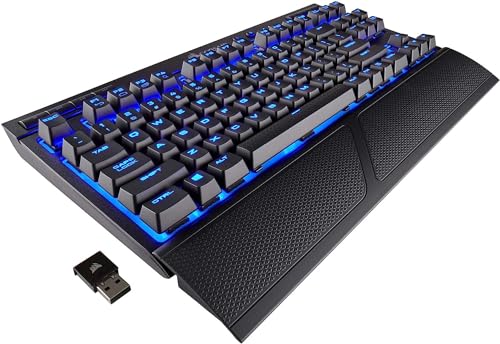 Corsair K63 Wireless Mechanical Keyboard and Gaming Lapboard Combo | Check price on Amazon | |
 Logitech G613 Lightspeed Wireless Mechanical Gaming Keyboard | Check price on Amazon | |
 Razer Cynosa Lite Gaming Keyboard | Check price on Amazon | |
 Corsair K55 RGB Pro and Harpoon RGB Pro Gaming Bundle | Check price on Amazon |
Key takeaways
- Compare the best gaming keyboards for Xbox Series X|S and Xbox One, from the Xbox-licensed Razer Turret to wired and wireless boards that plug straight in.
A keyboard can change how an Xbox feels in the games that support one. Text chat becomes faster, menus become easier to navigate, and strategy, simulation, and shooter titles that accept keyboard input can feel closer to how they play on a computer. The catch is that support is not universal. Some Xbox games accept a keyboard and mouse, some accept a keyboard only for chat, and some do not accept either at all. That is why the match between the board, the game, and where you sit matters more than any single feature.
As an Amazon Associate, we earn from qualifying purchases.
Quick answer
For the most Xbox-focused setup, start with the Razer Turret Wireless Mechanical Gaming Keyboard and Mouse Combo for Xbox, because it is made as a keyboard-and-mouse pair for Xbox. For couch play, the Corsair K63 Wireless Mechanical Keyboard and Gaming Lapboard Combo is the more practical alternative. For a simple desk setup, the Razer Cynosa Lite Gaming Keyboard is the easiest of the five to live with.
Razer Turret Wireless Mechanical Gaming Keyboard and Mouse Combo for Xbox
The Razer Turret Wireless Mechanical Gaming Keyboard and Mouse Combo for Xbox is the only pick in this guide that arrives as a matched keyboard-and-mouse pair made for Xbox. That matters because the two parts are meant to work together from the start, with no separate mouse to choose and no guesswork about whether the pair was designed for the same kind of play. It is a wireless mechanical keyboard, so the keys use mechanical switches rather than the membrane design found on the cheaper boards in this guide, and the wireless connection keeps the living room or desk free of a cable running back to the console.
The combo form also changes where this pick works best. A keyboard and mouse are most comfortable at a desk, but a living room player can use them on a lap or a tray. Before buying, check that the games you play most often support keyboard and mouse input on Xbox, because a board cannot add support to a game that does not offer it. Battery life, charging method, switch type, and exact dimensions are not stated in the product name, so treat those details as not stated and confirm them on the product page before ordering.
Corsair K63 Wireless Mechanical Keyboard and Gaming Lapboard Combo
The Corsair K63 Wireless Mechanical Keyboard and Gaming Lapboard Combo is the pick for a player who wants to use a keyboard away from a desk. The lapboard is the part that makes that possible. It gives the keyboard a firm base on a lap and a flat surface for a mouse, which is the part of couch play that usually fails first.
The keyboard itself is wireless and mechanical, so it shares the cable-free layout and the mechanical key feel of the Razer Turret, while the lapboard is what sets it apart. That combination suits a living room best, especially for a player who sits on a sofa and plays strategy, simulation, or shooter titles that support keyboard input. It is less suited to a small desk, where the lapboard adds size without adding much. A mouse is not stated as included with this combo, so treat mouse inclusion as not stated and confirm it on the product page. Battery life, charging method, switch type, and exact dimensions are also not stated. Check game support first, then check that the lapboard fits the space where you sit.
Logitech G613 Lightspeed Wireless Mechanical Gaming Keyboard
The Logitech G613 Lightspeed Wireless Mechanical Gaming Keyboard is the wireless mechanical pick for a player who wants a full keyboard without a combo or a lapboard. It is a single board, so there is no mouse to place, no lapboard to store, and no second part to keep charged or connected. That simplicity suits a desk well, and it also suits a player who already owns a mouse they like and only needs the keyboard half of the setup. The wireless connection keeps the desk tidy, and the mechanical design gives the keys a firmer and more distinct feel than a membrane board.
On a sofa, the board can work on a lap or a tray, but a mouse still needs a flat surface, so a couch player who wants mouse control will need to solve that part separately. Battery life, charging method, switch type, key layout, and exact dimensions are not stated, so confirm them on the product page before ordering. For a desk player who wants a straightforward wireless mechanical board, this is the cleanest option of the five.
Razer Cynosa Lite Gaming Keyboard
The Razer Cynosa Lite Gaming Keyboard is the simplest pick in this guide, and that is its main strength. It is a single wired keyboard with no mouse, no lapboard, and no wireless connection to manage. Plug it into the console, place it on a desk, and it is ready to use in the games that support it. There is nothing to charge, nothing to pair, and nothing extra to store when the session ends.
The wired connection also suits a desk better than a sofa. A cable is easy to manage when the console and the board sit close together, and it removes the question of battery life entirely. The trade-off is reach. A player who sits far from the console will need to think about cable length and placement, and a couch player may find a wireless board more practical. The keyboard uses a membrane design rather than mechanical switches, so the keys feel softer and quieter than the mechanical boards in this guide. Cable length, key layout, and exact dimensions are not stated in the product name, so treat them as not stated and confirm them on the product page. If the games you play accept a keyboard, this is the lowest-effort way to add one.
Corsair K55 RGB Pro and Harpoon RGB Pro Gaming Bundle
The Corsair K55 RGB Pro and Harpoon RGB Pro Gaming Bundle is the wired bundle pick for a player who wants a keyboard and a mouse in one box without a wireless or mechanical design. The bundle includes the K55 RGB Pro keyboard and the Harpoon RGB Pro mouse, so both parts arrive together and both use the same wired connection to the console. That pairing suits a desk player who is starting from nothing and wants a complete setup in a single order, with no separate mouse to choose and no wireless parts to manage.
The keyboard is a membrane board with RGB lighting, so the keys feel softer than the mechanical boards in this guide. The mouse is the part that makes this bundle different from the single-board picks, because a desk player who buys a keyboard alone still needs a mouse for the games that support one. Cable length, key layout, mouse sensor details, and exact dimensions are not stated in the product name, so treat them as not stated and confirm them on the product page. If your games accept keyboard and mouse input, this bundle is the most complete wired option in the guide.
How to choose
Start with the game, not the keyboard. A board only helps in a title that accepts keyboard input on Xbox, so list the games you play most often and check each one before you spend anything. If most of them do not, a controller remains the better tool. Once the games check out, choose by where you sit. A desk player can use any of the five, wired or wireless, while a sofa player should favour a wireless board or a lapboard combo, because a cable and a mouse with nowhere to go are the two things that make couch play fail.
Next, decide whether you need a mouse. If you play games that use mouse aim or mouse menus, a combo or a bundle saves a second purchase. If you only need a keyboard for chat, menus, or strategy commands, a single board is enough. Then decide between mechanical and membrane keys. Mechanical boards feel firmer and more distinct, membrane boards feel softer and quieter. Finally, confirm the connection type, the cable length on a wired board, and the size of the board against the space where you will use it.
Who should skip
A player whose favourite games do not support keyboard input on Xbox should skip all five picks. A keyboard cannot add support that a game does not offer, and buying one for a title that ignores it is a waste of money and desk space. A player who is happy with a controller and has no trouble with chat, menus, or aiming should also skip this guide, because a keyboard is a different way to play, not a better way to play in every game. A player with a small desk may find a full keyboard and a mouse crowded, and a player who sits far from the console may find a wired board impractical. If any of those warnings apply, wait until your games or your setup change, and keep the controller for now.
FAQ
Do all Xbox games work with a keyboard?
No. Only games that support keyboard input on Xbox will respond to one. Some games support a keyboard and mouse together, some support a keyboard only for chat, and some do not support either at all. Check each game you play most often before buying.
Do I need a mouse as well as a keyboard?
It depends on the game. Some titles use mouse aim or mouse menus, and those play best with both parts. Others use the keyboard for chat, shortcuts, or strategy commands, and a mouse adds little. The Razer Turret combo and the Corsair K55 bundle include a mouse, while the Corsair K63 combo includes a lapboard for a mouse.
Is a wireless keyboard better than a wired keyboard for Xbox?
Neither is better in every setup. A wireless board suits a sofa and a tidy desk, because there is no cable running back to the console. A wired board suits a desk close to the console, because there is nothing to charge, but a cable limits where you can sit.
Which pick is best for playing from a sofa?
The Corsair K63 Wireless Mechanical Keyboard and Gaming Lapboard Combo is the best of the five for sofa play, because the lapboard gives the keyboard a firm base and the mouse a flat surface. The Razer Turret combo is the next best option for a living room, while the wired boards suit a desk better. Check that the lapboard fits your chair before buying.
Final verdict
The best gaming keyboard for Xbox depends on where you sit and whether you need a mouse. For most players, the Razer Turret Wireless Mechanical Gaming Keyboard and Mouse Combo for Xbox is the strongest starting point, because it arrives as a matched keyboard-and-mouse pair made for Xbox. A sofa player should choose the Corsair K63 Wireless Mechanical Keyboard and Gaming Lapboard Combo instead, because the lapboard solves the hardest part of couch play. A desk player who wants a simple wired setup should choose the Razer Cynosa Lite Gaming Keyboard, while a desk player who wants a keyboard and a mouse together should choose the Corsair K55 RGB Pro and Harpoon RGB Pro Gaming Bundle.
Product and ASIN Reference
| Product | ASIN |
|---|---|
| Razer Turret Wireless Mechanical Gaming Keyboard and Mouse Combo for Xbox | B07QXLC24V |
| Corsair K63 Wireless Mechanical Keyboard and Gaming Lapboard Combo | B078233TKB |
| Logitech G613 Lightspeed Wireless Mechanical Gaming Keyboard | B07796MBJ7 |
| Razer Cynosa Lite Gaming Keyboard | B087C98QJJ |
| Corsair K55 RGB Pro and Harpoon RGB Pro Gaming Bundle | B096GSQKL7 |
More from Amazon
Programs that pair well with the guide above. Offers and eligibility are set by Amazon and may change.
A free business account with business pricing and bulk-buying tools for work, shop or home office.
Create a business accountFree shipping on eligible items, Prime Video and more. Eligible new members can start with a free trial.
Start a Prime free trialAudiobooks and podcasts to listen to on the go. Eligible new members can start with a free trial.
Try Audible freeAd-free music streaming. Eligible new subscribers can start with a free trial.
Try Music Unlimited freeAs an Amazon Associate we earn from qualifying purchases.




Write Your Review
No reviews yet. Be the first to share your experience!