

Key takeaways
- A Chromebook is built around cloud storage and a small internal drive, so an external hard drive is usually bought for one of three jobs: parking a.
A Chromebook is built around cloud storage and a small internal drive, so an external hard drive is usually bought for one of three jobs: parking a photo library, keeping offline copies of school or work files, or holding media that would otherwise swamp the built-in storage. The decision is less about raw speed and more about whether a drive plugs in cleanly, runs from the laptop’s own port power, and works with the file system your Chromebook can read.
This guide is for students, remote workers, and parents buying a simple plug-in drive for a lightweight laptop. It compares eight portable hard drives using their published listings, with a focus on capacity, connector type, and warranty or recovery-service details. In 2026 most of these drives are sold for several platforms at once, so a listing that names ChromeOS directly deserves extra attention while the rest need a quick compatibility check.
Quick Picks
Our top picks




As an Amazon Associate we earn from qualifying purchases at no extra cost to you.
| Product | Best for | Key feature |
|---|---|---|
| YOTUO 500GB Portable | Everyday file copies | USB 3.0 and USB-C connections |
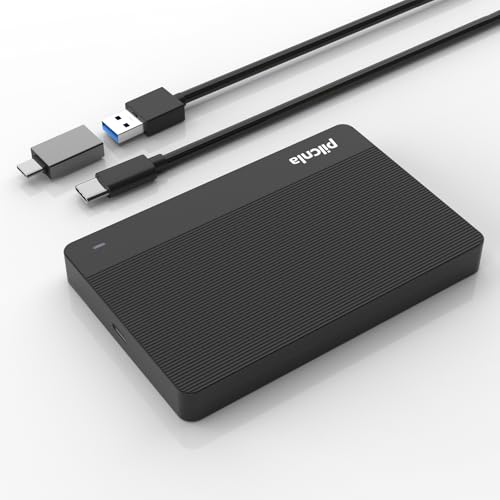
| PILCNLA 250GB Ultra Slim | Light backups on a Chromebook | Listing names Chromebook directly |
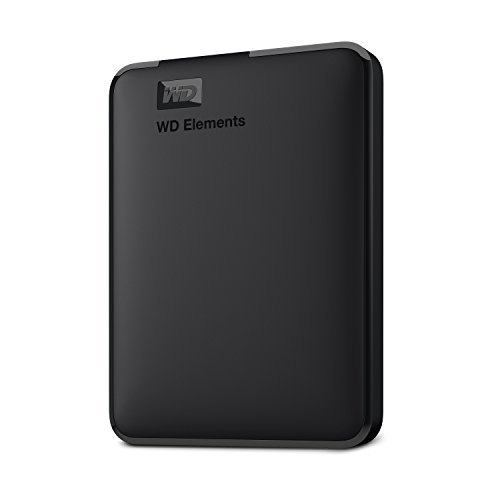
| WD Elements 5TB | Large media libraries | USB 3.2 Gen 1 and plug and play |
| UnionSine 500GB Black | Slim, low-cost storage | Ultra slim body, USB 3.0 |
| Seagate Portable 1TB | Balanced capacity and support | 1-year Rescue Service |
| UnionSine 500GB Pink | Color-coded personal drive | Ultra slim, USB 3.0 |
| Seagate Portable 2TB | Photo and school archives | 1-year warranty, plug-and-play backup |
| UnionSine 1TB Black | Mid-size slim storage | 1TB in an ultra slim body |
How to Choose
Confirm ChromeOS Compatibility Before Anything Else
Most portable drives arrive formatted for Windows or macOS. Chromebooks can read common formats, but you should confirm what the manufacturer says about ChromeOS and know that reformatting erases everything on the drive. A listing that mentions Chromebook explicitly is a safer starting point than one that lists only Windows and Mac, though the others may still work.
Match the Port and Power
Many Chromebooks have only USB-C ports, sometimes just two. A USB 3.0 drive with a standard cable may need an adapter, while a drive that offers USB-C needs none. Bus-powered portable drives draw power from the laptop, so avoid anything that needs a separate power brick if you travel with the machine.
Size the Capacity to Your Habits
A Chromebook user who stores most files in the cloud rarely needs more than 500GB or 1TB. Larger drives make sense for video, family photo archives, or multi-year backups. Paying for terabytes you will never fill is the most common overspend.
Look at Warranty and Recovery Extras
Drives from established makers often add a limited warranty or a bundled rescue service for lost data. Budget no-name models may lack both. Ignore bundled trial software; a Chromebook will not run most of it. Where budget drives cut corners is support: paperwork, firmware updates, and replacement terms are thinner.
The 8 Best Options
YOTUO 500GB Portable HDD
A straightforward 500GB drive that offers both USB 3.0 and USB-C connections, which matters on a Chromebook with only a couple of USB-C ports. The listing targets PC, Mac, laptops, phones, and game consoles broadly, so it works as a general-purpose drive for school files, downloaded media, and a modest photo library without needing a dongle.
- Dual USB 3.0 and USB-C connectivity
- Roomy enough for school folders and everyday photos
- Trade-off: the listing does not mention ChromeOS or any warranty
Skip it if you need an explicit Chromebook statement or a rescue service.
PILCNLA 250GB Ultra Slim
The only drive in this group whose listing names Chromebook next to PC, Mac, and consoles. At 250GB it is a small add-on rather than a full archive, ideal for a student carrying a handful of projects, a document library, and a few offline reference files that need to survive a laptop reset.
- Chromebook named directly in the listing
- Ultra slim USB 3.0 design that slides into a sleeve
- Trade-off: the smallest capacity here, and no warranty in the title
Skip it if you plan to keep video or several years of photos on it.
Western Digital WD Elements 5TB
A high-capacity portable drive from a major brand, described with USB 3.2 Gen 1 and plug-and-play setup. It suits someone consolidating a large photo and media collection, or a household that wants one big drive to park everything the Chromebook cannot hold, then connect it only when needed.
- 5TB of space for large libraries and long-term archives
- Established brand with a USB 3.2 Gen 1 interface
- Trade-off: the listing is written for Windows and Mac, so verify ChromeOS use first
Skip it if you only need a few hundred gigabytes of space.
UnionSine 500GB Ultra Slim (Black)
A slim 500GB portable drive aimed at laptops and consoles alike. It is a modest, no-frills option for documents, downloaded lectures, and some media, and its thin profile makes it easy to carry in the same bag pocket as a Chromebook charger without adding noticeable bulk.
- Ultra slim body that fits a laptop sleeve
- USB 3.0 connection for straightforward plug-in use
- Trade-off: no warranty or recovery service appears in the title
Skip it if you want a recognized brand with a published support program.
Seagate Portable 1TB
A 1TB model with USB 3.0 and a 1-year Rescue Service, which adds a data-recovery safety net that is not common at this size. It is a sensible default for most Chromebook owners who want comfortable capacity without paying for multi-terabyte hardware they will never fill.
- 1TB capacity covers most personal libraries
- 1-year Rescue Service listed in the title
- Trade-off: the listing names PC, Mac, and consoles, not ChromeOS
Skip it if you need an explicit Chromebook statement from the maker.
UnionSine 500GB Ultra Slim (Pink)
The same 500GB slim design as the black version, offered in pink. In a household where several people share Chromebooks and each owns a drive, the color makes it easy to tell whose files are on which device, and it reduces accidental mix-ups during busy school mornings.
- Easy to identify among several similar drives
- Ultra slim USB 3.0 build
- Trade-off: color is the only difference from the black model
Skip it if you want a more discreet look or a larger capacity.
Seagate Portable 2TB
A 2TB portable drive with USB 3.0, plug-and-play backup, and a 1-year warranty listed in the title. It suits families keeping years of photos and school archives together, and the mainstream-brand name makes support easier to find if something goes wrong with the drive.
- 2TB of space from a mainstream brand
- Warranty stated in the listing
- Trade-off: the listing names Windows and macOS, not ChromeOS
Skip it if you want the smallest, lightest option available.
UnionSine 1TB Ultra Slim (Black)
A 1TB step up in the same slim line, for a Chromebook owner who has outgrown 500GB but still wants a pocketable drive. It works well for a growing photo library, a few semesters of coursework, and offline copies of media for a long trip.
- 1TB packed into an ultra slim body
- USB 3.0 interface for plug-in use
- Trade-off: the listing offers no warranty or rescue details
Skip it if recovery support matters more than the lower entry cost.
Which One Fits Your Situation
A Student Who Needs a Safe Chromebook Add-On
The PILCNLA 250GB Ultra Slim is the only listing that names Chromebook, and its small size is enough for coursework. If the semester’s files outgrow it, the Seagate Portable 1TB is the natural upgrade.
A Family Archiving Photos and Videos
The WD Elements 5TB gives the most room, while the Seagate Portable 2TB adds a warranty at a more modest capacity. Choose by how many years of footage you want in one place.
A Traveler With a USB-C-Only Laptop
The YOTUO 500GB offers both USB 3.0 and USB-C connections, so a Chromebook with only USB-C ports can connect without hunting for an adapter.
Common Mistakes
- Assuming a drive that lists Windows and Mac will automatically work on ChromeOS.
- Reformatting without copying files off first; formatting erases the drive.
- Buying a drive that needs an external power adapter for a travel laptop.
- Paying for terabytes when cloud storage already holds most files.
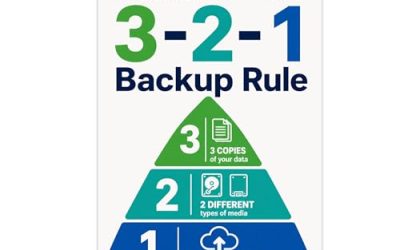
- Treating one external drive as a complete backup instead of keeping a second copy.
Related guides
- How To Connect An Old Ide Hard Drive To A Modern Computer
- Signs Your Hard Drive Is Failing And How To Back Up Fast
- How To Securely Erase An Old Hard Drive Before Selling
Frequently Asked Questions
Do external hard drives work with every Chromebook?
Most USB drives can connect, but file system support and port type matter. Check the maker’s ChromeOS statement and confirm the drive’s format is readable on your device.
Is an SSD better than a hard drive for a Chromebook?
SSDs are faster and more shock-resistant, but hard drives offer far more capacity for the same budget. For backups and media storage, speed is rarely the limiting factor.
Will the drive drain my Chromebook battery?
Bus-powered drives draw power from the laptop, which can shorten battery life during long transfers. Plug in to charge when copying large libraries.
How much capacity should I buy?
For a cloud-first Chromebook, 500GB to 1TB is plenty. Choose 2TB or more only if you store video or many years of photos locally.
More from Amazon
Programs that pair well with the guide above. Offers and eligibility are set by Amazon and may change.
A free business account with business pricing and bulk-buying tools for work, shop or home office.
Create a business accountFree shipping on eligible items, Prime Video and more. Eligible new members can start with a free trial.
Start a Prime free trialAudiobooks and podcasts to listen to on the go. Eligible new members can start with a free trial.
Try Audible freeAd-free music streaming. Eligible new subscribers can start with a free trial.
Try Music Unlimited freeAs an Amazon Associate we earn from qualifying purchases.
Write Your Review
No reviews yet. Be the first to share your experience!