

Our Top Picks
If you want a 2TB drive that physically fits a Steam Deck, the realistic shortlist is a handful of M.2 2230 NVMe models, and the best fit for most owners is a name-brand 2TB unit with a clear model number and warranty, such as the Crucial P310 listing below. Speed claims on the box are largely irrelevant to the handheld, so this guide leans on capacity, form factor, heat and how verifiable each listing is. The eight listings were compared from their titles, manufacturer documentation and buyer reviews, and two of them turn out to be 1TB drives, which we flag plainly.
Top picks at a glance

Crucial P310 2TB M.2 2230 SSD, PCIe Gen4 NVMe, Up to 7,100MB/s, Ideal for Steam Deck, ASUS ROG Ally, MSI Claw, Mini PCs & Ultrabooks, Solid State Drive - CT2000P310SSD2


As an Amazon Associate we earn from qualifying purchases. Product prices and availability are accurate as of the date/time indicated.

Bestoss 2TB M.2 2230 SSD NVMe PCIe4.0 Internal Hard Drive, Up to 7300 MB/s | PCIe Gen4 2230 SSD,3D NAND SLC Cache, Compatible with Steam Deck/ROG Ally/Microsoft Surface Pro/MSI Claw/Mini PCs&Ultrabooks


As an Amazon Associate we earn from qualifying purchases. Product prices and availability are accurate as of the date/time indicated.

fanxiang 2TB M.2 2230 NVMe SSD, PCIe Gen 4x4 Speed up to 5200 MB/s, 2230 SSD Compatible with Steam Deck/ROG Ally/Microsoft Surface Pro/Mini PCs, S630


As an Amazon Associate we earn from qualifying purchases. Product prices and availability are accurate as of the date/time indicated.

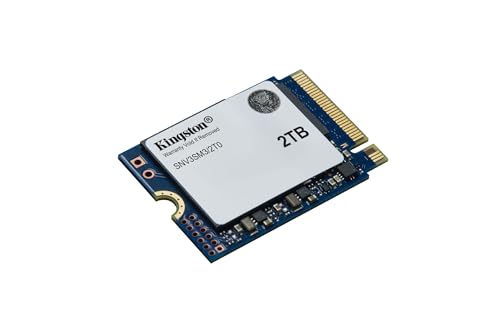
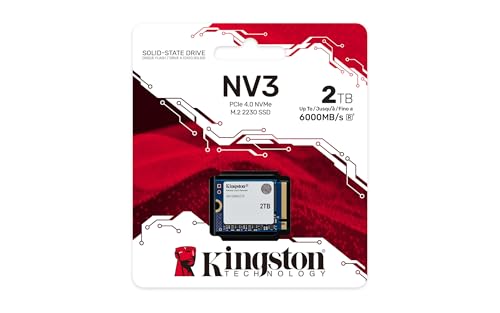
Kingston NV3 2TB M.2 2230 NVMe SSD | Up to 6000MB/s | SNV3SM3/2T0

As an Amazon Associate we earn from qualifying purchases. Product prices and availability are accurate as of the date/time indicated.

Fikwot FX953 M.2 2230 SSD 1TB NVMe SSD for Steam Deck PCIe Gen 4x4, Read Up to 5000MB/s, M2 2230 Internal Soild State Drive, Compatible with ASUS ROG Ally, Microsoft Surface Pro


As an Amazon Associate we earn from qualifying purchases. Product prices and availability are accurate as of the date/time indicated.

OSCOO 1TB M.2 2230 NVMe Gen4x4 PCIe SSD, Up to 5200MB/s Graphene Heatsink | Graphene Thermal Solution, Compatible with Steam Deck, ASUS ROG Ally, Microsoft Surface, Laptops, Mini PCs, Ultrabook






As an Amazon Associate we earn from qualifying purchases. Product prices and availability are accurate as of the date/time indicated.
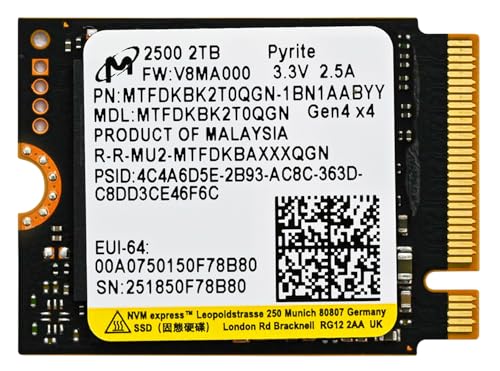
Micron 2TB 2500 M.2 2230 PCIe Gen 4.0x4 NVMe SSD Up to 7100 MB/s Compatible with Steam Deck Surface Ally Mini PCs Laptops
As an Amazon Associate we earn from qualifying purchases. Product prices and availability are accurate as of the date/time indicated.

Kingston 2TB M.2 2230 PCIe Gen 4.0x4 NVMe SSD OM3SGP4 Compatible with Steam Deck Surface Ally Mini PC Up to 7000 MB/s
As an Amazon Associate we earn from qualifying purchases. Product prices and availability are accurate as of the date/time indicated.
| Model | Key point from the title | Price tier | Best for |
|---|---|---|---|
| Crucial P310 2TB | Gen4 NVMe, up to 7,100MB/s, Deck named, model CT2000P310SSD2 | Mid | Name-brand default |
| Bestoss 2TB | PCIe 4.0, up to 7300 MB/s, SLC cache mentioned | Budget to mid | Highest rated speed on paper |
| fanxiang S630 2TB | Gen 4×4, up to 5200 MB/s | Budget | Lowest cost 2TB in the set |
| Kingston NV3 2TB | Up to 6000MB/s, no PCIe generation or Deck mention in title | Upper mid | Buyers who want the Kingston name |
| Fikwot FX953 1TB | 1TB only, Gen 4×4, up to 5000MB/s | Budget | Smaller libraries |
| OSCOO 1TB | 1TB only, graphene heatsink, up to 5200MB/s | Budget | Only if the heatsink clears the shield |
| Micron 2500 2TB | Gen 4.0×4, up to 7100 MB/s, Deck named | Mid to premium | Brand-conscious capacity buyers |
| Kingston OM3SGP4 2TB | Gen 4.0×4, up to 7000 MB/s | Premium | Only if price is no object |
Why the Deck’s slot narrows your choices
A Steam Deck takes a single-sided M.2 2230 module, which is physically shorter than the 2280 drives used in desktops and most laptops. That one fact removes the vast majority of consumer SSDs from consideration, and it explains why 2TB 2230 drives cost noticeably more per terabyte than common 2280 models. The small circuit board has to fit the same flash capacity on a shorter board, and fewer products exist, so prices are less competitive.
The second constraint is the interface. The slot is widely described as PCIe Gen 3 x4, which tops out well below the 5,000 to 7,300 MB/s printed on these listings. A Gen4 drive still works, because PCIe is backward compatible, but the extra speed goes unused. Other 2230 devices, including some Windows handhelds and mini PCs, may wire the slot for Gen4, which is why sellers list the same drive for several devices. Verify your own device’s slot before assuming anything.
The third constraint is physical clearance. The Deck covers the drive with a metal shield, and thick labels, stickers or an added heatsink can interfere. For a broader look at how the two storage standards differ, see our M.2 versus SATA SSD explainer, and for cooling hardware in general the M.2 heatsink fit guide covers height limits.
How these eight were picked
Every listing here was read for its form factor, stated capacity, interface claim and the way the title describes device compatibility. The comparison uses published specifications, manufacturer documentation and buyer reviews, and the seller’s speed numbers are treated as claims rather than facts. Nobody on the team used or measured these units. Where a title says nothing, the entry says “check the listing” instead of guessing, and where a listing is the wrong capacity or has a typo, that is stated directly.
The listings, one by one
Crucial P310 2TB (CT2000P310SSD2)
The title calls this an M.2 2230 PCIe Gen4 NVMe drive with up to 7,100MB/s and explicitly names Steam Deck, ASUS ROG Ally, MSI Claw, mini PCs and ultrabooks. It also includes a full model number, which is useful: you can look the part up on the manufacturer’s own page and confirm warranty length, rated endurance and thickness rather than relying on retailer text. That traceability is the main reason it sits at the top of this list.
It suits someone who wants to buy once, install, and forget about it, particularly a Deck owner with a big library who prefers a recognizable brand over the cheapest 2TB option. The speed headline is a Gen4 figure, so expect no change in a Gen3 slot, but you lose nothing either.
- Pros: Full model number for easy cross-checking; handheld devices named in the title; 2TB capacity actually matches the keyword.
- Cons: Sits in the middle of the price range, so it is not the cheapest 2TB; title does not mention a heatsink or thickness, so shield clearance is assumed rather than stated.
Question to ask before buying: what endurance rating and warranty term does the manufacturer’s page give for this exact model number?
Bestoss 2TB M.2 2230 NVMe
This listing carries the highest speed claim in the group, up to 7300 MB/s on PCIe 4.0, and the title also mentions 3D NAND and an SLC cache. It lists Steam Deck, ROG Ally, Surface Pro, MSI Claw and mini PCs as compatible devices. The wording “Internal Hard Drive” is loose for what is a solid state module, a small sign that the title was written for search matching rather than precision.
It fits a shopper who likes a big number and a price below the major brands. In a Deck that number is academic, since the slot caps throughput, so the real question is how the drive behaves once the SLC cache fills during a large copy. The title does not state cache size or sustained write speed.
- Pros: 2TB capacity; PCIe 4.0 claim at the top of the set; mentions SLC cache so the buyer knows caching exists.
- Cons: Lesser-known brand, so warranty handling is less certain; sustained write speed and endurance are not given in the title; loose “hard drive” wording.
Question to ask: what is the return window if the drive is not recognised, and does the seller publish a warranty term?
fanxiang S630 2TB
The S630 is described as a 2TB M.2 2230 NVMe with PCIe Gen 4×4 and up to 5200 MB/s, compatible with Steam Deck, ROG Ally, Surface Pro and mini PCs. It carries the lowest rated speed among the Gen4 2TB entries, and it sits at the low end of the price range as well. For a handheld where speed is capped anyway, a lower rating costs very little in practice.
This is the pick for a budget-conscious owner who needs capacity above all else and is comfortable with a less prominent brand. The title says nothing about whether the controller uses its own DRAM cache or relies on host memory, which is common on small 2230 drives, so do not assume desktop-class behaviour during long transfers.
- Pros: 2TB at the lowest cost in the group; model number S630 makes lookups possible; compatible-device list includes the Deck by name.
- Cons: Lowest speed claim of the Gen4 2TB group; cache design and endurance are not stated in the title; fewer buyer reviews to lean on than major brands usually have.
Question to ask: does the listing or the maker’s page state a terabytes-written rating and a warranty length?
Kingston NV3 2TB (SNV3SM3/2T0)
The title is terse: a 2TB M.2 2230 NVMe, up to 6000MB/s, with a part number. It does not name a PCIe generation and does not mention the Steam Deck or any other device. That does not make it unsuitable, because 2230 is the form factor that matters, but it means the compatibility reassurance other listings give is missing and you must rely on the 2230 designation and the maker’s documentation.
It appeals to someone who trusts the Kingston name and wants a straightforward drive without marketing language. It lands in the upper-middle of the price range for 2TB 2230, so you pay for the brand rather than a speed advantage, and the 6000MB/s ceiling is irrelevant in a Gen3 slot. Entry-tier lines like this one are usually built to a price, so read buyer reviews for any pattern of warm running or slowdowns on long copies before committing.
- Pros: Established brand with a clear part number; plain, uncluttered title; 2TB capacity.
- Cons: Costs more than several equivalent 2TB options; no PCIe generation or handheld compatibility in the title.
Question to ask: is the single-sided 2230 module confirmed on the maker’s data sheet for this exact part number?
Fikwot FX953 1TB
This is a 1TB drive, not 2TB, so it is off-spec for the keyword and appears here only because it shows up in the same searches. The title says Gen 4×4, up to 5000MB/s, for Steam Deck, ROG Ally and Surface Pro, and it contains the typo “Soild”, a mild warning about listing care. Treat it as an option for a smaller library, not as a 2TB alternative.
It makes sense for an owner who mostly plays lighter games, keeps a microSD card for overflow, and wants the cheapest route to a faster internal drive. Because it is half the capacity, its cost per terabyte is not necessarily better than the 2TB entries, so compare on that basis rather than on sticker price. A second practical point: the title mentions Surface Pro compatibility, and some thin devices use shorter retention screws or different standoffs, so confirm the mounting method your device expects when you plan to reuse the drive elsewhere later.
- Pros: Lowest entry cost in the set; handheld devices named in the title; sufficient for a modest library.
- Cons: Only 1TB, so it does not satisfy a 2TB search; typo in the listing title; brand has a thin track record to review.
Question to ask: will a 1TB drive hold your installed games with at least 100 GB of free space remaining?
OSCOO 1TB with graphene heatsink
Another 1TB listing, so again not a true 2TB match. Its distinguishing feature is a graphene heatsink or thermal layer, with a stated Gen4x4 interface and up to 5200MB/s, and it lists the Deck, ROG Ally, Surface and mini PCs as compatible. A thermal layer sounds like an advantage, but in a handheld that already has a metal shield over the bay, added thickness is a risk rather than a benefit.
It suits a buyer using the drive in a mini PC or laptop with free space around the slot, more than a Deck owner. If it is meant for a Deck, confirm the product’s total thickness against the clearance under the shield before you remove any packaging you may need to return. The title also says nothing about what the graphene layer is made of or how thick it is, and a graphene sticker can behave quite differently from a thick aluminium block, so the listing images and buyer photos deserve a close look.
- Pros: Thermal solution included; 1TB at a low price; flexible across several devices.
- Cons: 1TB only; added thickness may stop the Deck shield seating; title gives no thickness figure.
Question to ask: does the listing state the combined height with the heatsink, and is it within the slot’s clearance?
Micron 2500 2TB
The title names this as a Micron 2500 2TB M.2 2230 PCIe Gen 4.0×4 NVMe with up to 7100 MB/s, listed for Steam Deck, Surface, Ally, mini PCs and laptops, while the catalog brand field shows Crucial. That mismatch is worth a second look at the seller and warranty channel, though Micron and Crucial are related companies. The part reads like a mainstream client drive rather than a gaming-branded one.
It is a sensible match for someone who wants a 2TB drive with a recognisable manufacturer behind it and does not care for gaming-style marketing. It sits in the mid-to-premium range, so the premium over cheaper 2TB drives buys manufacturer traceability, not Deck performance. Because the title is a plain list of devices without a warranty line, the manufacturer’s data sheet for the 2500 series is the document to open before ordering, and it should confirm the single-sided 2230 module and the rated endurance.
- Pros: 2TB; established manufacturer; Deck and Ally named in the title.
- Cons: Higher price than lesser-known 2TB entries; brand naming differs between title and catalog data; Gen4 speed unused in a Gen3 slot.
Question to ask: which company handles warranty claims for this listing, and who is the seller?
Kingston OM3SGP4 2TB
The most expensive listing in the group is a Kingston 2TB 2230 PCIe Gen 4.0×4 NVMe, up to 7000 MB/s, listed for Steam Deck, Surface, Ally and mini PCs. The model code OM3SGP4 is less familiar than the NV3 line, so confirm the part on the maker’s site. The title uses the same compatibility phrasing as the Micron listing, with no punctuation between devices.
It serves a buyer who prioritises a single established brand and does not mind paying the top of the range for it. Nothing in the title promises a Deck-specific benefit over cheaper Gen4 drives, so the price gap is mostly brand and channel. If you already own a Kingston drive and like its software tools or support experience, that familiarity is a fair reason to pay more, but it is a preference rather than a measurable gain, and the price gap to equally sized Gen4 listings above is substantial.
- Pros: Gen 4.0×4 claim; 2TB capacity; recognised maker.
- Cons: Highest price in the set; unfamiliar model code; speed headroom is wasted in a Gen3 slot.
Question to ask: does the cheaper Crucial P310 listing offer the same capacity and warranty for less?
Buying guide for 2230 handheld SSDs
Capacity first, then speed
A 2TB nominal drive shows up as roughly 1.8 TiB in the operating system, because manufacturers count in powers of ten while software counts in powers of two. On top of that, SteamOS needs working space, and a drive that is nearly full slows down and wears faster. Plan for about 100 GB of reserve and treat the rest as game space.
| Spec concept | What to look for | Why it matters |
|---|---|---|
| Form factor | M.2 2230, single sided | Only this length fits the Deck bay |
| Interface | NVMe over PCIe, any generation | Gen4 works in a Gen3 slot, speed is capped |
| Capacity | Selected variant on the order page | Search results often show the wrong size |
| Thickness | No bulky label or heatsink | Shield must seat flat |
| Warranty and endurance | Terabytes-written rating, term in years | Titles rarely state either |
| Sustained writes | Cache size and behaviour after it fills | Large game installs push past the cache |
Heat is a thickness problem as much as a temperature problem
Fast Gen4 drives can run warm under sustained load, yet a handheld rarely sustains a full-speed workload, so thermal throttling is uncommon in everyday play. The more realistic risk is adding material that stops the metal shield from sitting properly. If a listing mentions a heatsink, treat the added height as the first thing to verify, and consult the heatsink fit guide linked earlier before buying anything extra.
Be skeptical of the speed number
Every figure in these titles is a seller claim, usually a best-case sequential read. They tell you almost nothing about random performance, which is what governs game loading, or about writes after the cache fills. In a slot that caps throughput, the spread from 5,000 to 7,300 MB/s is essentially marketing. A drive with a clear model number and warranty is a safer purchase than one with a bigger number and a vague brand.
Worked example: does 2TB or 1TB fit this library?
The assumptions below are estimates, not measurements, so substitute your own installed sizes from the Steam storage screen.
| Library slice | Count | Assumed size each | Subtotal |
|---|---|---|---|
| Indie and older titles | 20 | 8 GB | 160 GB |
| Mid-size games | 15 | 30 GB | 450 GB |
| Large modern releases | 6 | 70 GB | 420 GB |
| Total installed | 1,030 GB | ||
| Usable on 1TB (about 930 GB less 100 GB reserve) | about 830 GB: does not fit | ||
| Usable on 2TB (about 1,860 GB less 100 GB reserve) | about 1,760 GB: fits with room to grow |
With these assumptions the 1TB drives fall about 200 GB short, which is why a 2TB listing is the safer choice for anyone who keeps a large library installed at once. A smaller library, or one managed by uninstalling finished games, could live comfortably on 1TB.
Backup-first install checklist
- List games with local-only saves and copy those folders somewhere safe.
- Power the Deck fully off, not sleep, and disconnect the charger.
- Check the new drive is single sided and shows the expected capacity on the label.
- Seat the drive, refit the shield and confirm it sits flat.
- Reinstall SteamOS using the official recovery image, then format the drive.
- Confirm the capacity in the storage screen before re-downloading games.
If the drive is not detected, work through the steps in the SSD not showing up guide before returning it. Buyers upgrading other devices may prefer the laptop SSD upgrade picks instead.
Which one for which user
| User | Suggested listing | Reason |
|---|---|---|
| Large library, wants fewer surprises | Crucial P310 2TB | Full model number, handhelds named |
| Lowest 2TB cost | fanxiang S630 2TB | Cheapest 2TB, speed irrelevant in the Deck |
| Brand-first buyer | Micron 2500 or Kingston NV3 | Recognised maker; accept the price premium |
| Small library, tight budget | Fikwot FX953 1TB | Cheapest entry, but only half the space |
| Mini PC or open-chassis laptop | OSCOO 1TB | Heatsink helps where clearance exists |
Mistakes buyers make
| Mistake | Fix |
|---|---|
| Buying a 2280 drive by accident | Look for 2230 in the title and check the length |
| Paying extra for Gen4 speed | Remember the Deck’s slot caps throughput |
| Ignoring the variant selector | Confirm 2TB, not 1TB, before checkout |
| Fitting a thick heatsink | Check the clearance under the metal shield |
| Skipping the backup | Copy local saves first, keep the old drive until verified |
| Trusting an unknown model with no warranty page | Prefer listings with a part number you can look up |
Verdict by use case
For most Deck owners with a big library, the Crucial P310 is the straightforward answer, with a traceable model number and handheld compatibility stated up front. If cost is the priority, the fanxiang S630 gives the same 2TB capacity for less, accepting a less established brand. Micron and Kingston entries are for buyers who value the manufacturer name more than the price gap. The two 1TB listings only make sense for smaller libraries or devices with spare thermal room, and neither answers a 2TB search.
Frequently asked questions
Will a Gen4 2230 SSD run faster than a Gen3 one in a Steam Deck?
Probably not by much. The Deck’s M.2 slot is widely described as PCIe Gen 3 x4, so a Gen4 drive negotiates down and the headline 5,000 to 7,300 MB/s figures on these listings cannot be reached there. Where Gen4 helps is on other 2230 devices that wire the slot for Gen4, and in some cases lower-load efficiency. For a Deck alone, capacity, heat and warranty matter more than the number printed in the title.
Is 2TB enough, or should I look at larger 2230 drives?
For most handheld libraries 2TB is plenty. A mixed library of indie titles, mid-size games and a few 70 GB releases fits in roughly 1,000 to 1,200 GB. Larger 2230 capacities are scarcer, usually cost far more per terabyte, and the microSD slot can handle overflow. Count what you actually keep installed, not what you own, before paying for headroom you may never fill.
Do I need a heatsink for a 2230 SSD in a Steam Deck?
Most buyers do not add one. The Deck has its own metal shield over the drive bay, and extra thickness on a drive can stop that shield seating properly. If a listing advertises a heatsink or graphene layer, check its thickness against the space under the shield before buying. Sustained heat is more of a concern for long file copies than for normal game loading.
Can I move my games over without losing them?
Cloud saves cover many titles, but not all, so check each game first. The drive swap itself wipes the old SSD contents only if you reformat or reimage; the safest route is to copy local save folders you care about, install the new drive, set up SteamOS using the official recovery image, then re-download games from Steam. Keep the old drive until you have confirmed everything launches.
Why do some listings say 1TB when I searched for 2TB?
Sellers often bundle several capacities under one product page, and search results can surface the wrong variant. Two of the eight listings reviewed here are 1TB models according to their titles. Always read the capacity inside the title and in the selected variant box on the order page, because a 1TB drive costs less but halves your game storage.





Write Your Review
No reviews yet. Be the first to share your experience!