

Our Top Picks


A 2-bay NAS is the smallest box that still counts as a real NAS. Two drive bays give you a RAID 1 mirror, so one drive can fail without taking your photos and documents with it, and the box sits on your home network where every computer and phone can reach it. The decision is not which brand is best in the abstract — it is how much computing power you need inside the box, how fast your network is, and whether you will outgrow two bays within a year.
This guide is for first-time NAS buyers setting up home backup, families centralising photos, and media lovers who want a private streaming box without a monthly fee. The five boxes below come from the names and specs on their Amazon listings: the Synology DS220+ for DSM on a budget, the QNAP TS-262A for media and expansion, the TerraMaster F2-425 Plus for 5GbE networking, the Asustor Drivestor 2 Gen2 for a low entry cost, and the UGREEN DH2300 for the simplest setup.
Quick Picks
As an Amazon Associate we earn from qualifying purchases.
| Product | Best for | Key spec |
|---|---|---|
| Synology DS220+ | The cheapest Intel-powered DSM box | Intel J4025 with hardware transcoding |
| QNAP TS-262A-4G | Media streaming with HDMI and expansion | Intel CPU bursting to 2.9 GHz |
| TerraMaster F2-425 Plus | The fastest home network link | Dual 5GbE ports and 8GB DDR5 |
| Asustor Drivestor 2 Gen2 AS1202T | The lowest entry cost | Quad-core 1.7 GHz CPU and 2.5GbE |
| UGREEN NASync DH2300 | The simplest setup for phone backup | ARM 8-core CPU and AI photo album |
How to Choose
RAID 1 Is the Whole Point — and Its Limit
Two bays give you exactly one RAID choice that matters: RAID 1, a mirror where each drive holds a copy of the other. One drive can fail and your data survives, which is why a NAS beats a single external drive. What two bays cannot do is RAID 5 or RAID 6, so there is no parity protection across three or more drives, with no room for a third drive later. A growing photo library eventually fills two bays, and the only way forward is larger drives or a bigger box. Buy two bays when your library is modest and your backup plan is simple; buy four bays when you already know the collection keeps growing.
Intel or ARM Decides What the Box Can Do
The processor inside the box decides whether it can transcode video, run containers, or simply serve files. Intel chips with Quick Sync hardware can convert a 4K video on the fly for a phone or a TV, while ARM chips handle file serving and backups well but struggle with live transcoding and heavier apps. Docker containers and virtual machines also favour Intel boxes with more memory. If your plan is backups and photo storage, an ARM box saves money and power. If your plan includes a media server, a download station, or a few always-on apps, pay for Intel and at least 4GB of memory.
Network Speed: 1GbE, 2.5GbE or 5GbE
A NAS is only as fast as the slowest link between the box and your computer. A 1GbE port caps transfers near 110 MB/s, which is fine for documents and photos but slow for moving a video library. A 2.5GbE port more than doubles that ceiling, and a 5GbE port doubles it again, provided your router or switch and your computer’s adapter match. Buying a 5GbE NAS for a 1GbE network wastes the port, and buying a 1GbE NAS when your switch already runs 2.5GbE wastes the switch. Check your router’s ports before choosing, and remember that Wi-Fi rarely delivers the full wired speed anyway.
Diskless Means Drives Are a Separate Purchase
Every box in this guide ships diskless, which means the enclosure arrives empty and you buy two hard drives separately. That is normal for NAS hardware, and it lets you choose the capacity and the drive model, but it also means the real cost is the box plus two drives, plus a spare drive if you want one on the shelf. Some listings show bundle versions with drives already installed, and those bundles can cost more than buying the same drives separately. Confirm the listing says diskless before ordering, and budget for NAS-rated drives rather than desktop drives, since NAS drives are built for always-on use.
The 5 Best Options
Synology DS220+
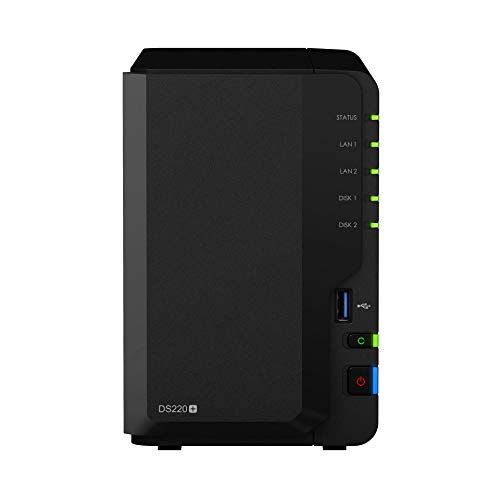
The DS220+ is the previous-generation Plus model, and that is exactly why it earns a place here: it is the cheapest way into DSM with an Intel chip and hardware transcoding, and it still sells new on Amazon. A Celeron J4025 dual-core processor and 2GB of memory cover backups, photo libraries, and a media server for a household, and two M.2 slots take NVMe SSDs for caching. Two 1GbE ports cap wired transfers near 110 MB/s per link, so this box suits backups and streaming rather than multi-gig editing.
Specs
- 2-bay diskless NAS enclosure
- Intel Celeron J4025 dual-core processor, burst to 2.9 GHz
- 2GB DDR4 memory, expandable to 6GB
- Dual 1GbE network ports
- Two M.2 2280 NVMe slots for SSD caching
- 2 USB 3.0 ports
- Synology DSM operating system
Best for: The cheapest Intel-powered DSM box, for backups, photos and a media server on a 1GbE network.
Watch out for: The DS220+ is a 2020 model, so confirm a live new offer before ordering — third-party sellers list it above the old street price; confirm the listing is the diskless box, not a bundle with drives.
QNAP TS-262A-4G

The TS-262A-4G is the media-first pick in this group, built around an Intel processor that bursts to 2.9 GHz and an HDMI output that plays video directly on a TV. Two M.2 PCIe slots accept NVMe SSDs for caching, and a PCIe slot takes an expansion card such as a faster network adapter, which gives this box a longer useful life than a sealed budget enclosure. QTS, QNAP’s operating system, covers backups, snapshots, and media apps, and the 4GB of memory is enough for a media server plus a few small apps.
Specs
- 2-bay diskless NAS enclosure
- Intel Celeron processor bursting to 2.9 GHz
- 4GB DDR4 memory
- 2.5GbE network port
- Two M.2 PCIe slots for NVMe SSD caching
- PCIe Gen 3 x2 expansion slot
- HDMI 2.1 output for direct TV playback
- QTS operating system
Best for: A living-room media box that also backs up the household, with room to add caching or faster networking later.
Watch out for: The 4GB of memory is fixed on the board, so heavy Docker use will hit a ceiling; confirm the listing is the 4GB diskless box, not a preconfigured bundle with drives.
TerraMaster F2-425 Plus

The F2-425 Plus is the networking pick, and the only box here with dual 5GbE ports. Two 5GbE links can be bonded for a combined ceiling far above a 2.5GbE box, which matters when two computers back up at once or a video editor pulls large files from the NAS. The Intel N150 quad-core processor and 8GB of DDR5 memory give it more headroom for apps than any other box in this guide, and an M.2 slot accepts an NVMe SSD for caching. TerraMaster’s TOS operating system covers the basics — backup, file sharing, media, and snapshots — without the depth of DSM or QTS.
Specs
- 2-bay diskless NAS enclosure
- Intel N150 quad-core processor
- 8GB DDR5 memory
- Dual 5GbE network ports
- M.2 slot for NVMe SSD caching
- TerraMaster TOS operating system
Best for: A household with a multi-gig switch, where two machines back up at once or large video files move across the network every day.
Watch out for: Do not confuse this N150 model with the base F2-425 or the N95 Plus variant, which are separate listings with different processors and memory; confirm the listing names the N150 and 8GB DDR5.
Asustor Drivestor 2 Gen2 AS1202T
The Drivestor 2 Gen2 is the lowest-cost way into a proper 2-bay NAS, and it does not feel cut down for the money. A quad-core 1.7 GHz processor and a 2.5GbE port cover backups, file sharing, and light media serving, and three USB 3.0 ports take an external drive for a local copy of the NAS itself. Asustor’s ADM operating system includes backup, photo, and media apps, and the 1GB of memory keeps the box honest about its limits — this is a backup and file box, not a virtualisation host.
Specs
- 2-bay diskless NAS enclosure
- Quad-core 1.7 GHz processor
- 1GB DDR4 memory
- 2.5GbE network port
- 3 USB 3.0 ports
- Asustor ADM operating system
Best for: A tight budget where the job is backups and shared files, and transcoding or containers are not on the list.
Watch out for: The 1GB of memory cannot be expanded, so do not plan on running several apps at once; confirm the listing is the Gen2 AS1202T, not the older Drivestor 2 with a slower chip.
UGREEN NASync DH2300
The DH2300 is the simplest box here, and the best fit for a buyer who has never owned a NAS. An 8-core ARM processor and 4GB of memory run UGREEN’s UGOS system, which leans on a phone app for setup, photo backup, and remote access, and an AI photo album groups pictures by person and scene without a computer. A 4K HDMI output lets the box play media on a TV, and the enclosure supports up to 60TB across its two bays. The trade is the 1GbE network port, which caps transfers near 110 MB/s.
Specs
- 2-bay diskless NAS enclosure
- Rockchip RK3576 8-core ARM processor
- 4GB LPDDR4X memory
- 1GbE network port
- 4K HDMI output
- Up to 60TB total capacity across two bays
- UGREEN UGOS operating system with AI photo album
Best for: A first NAS bought mainly for phone backup and photos, where an easy phone app matters more than network speed.
Watch out for: The ARM chip cannot transcode 4K video the way an Intel box can, and the single 1GbE port is the slowest link in this guide; confirm the listing is the diskless box, not a bundle with a cable or a drive.
Which One Fits Your Situation
Your first NAS, and you want setup to be painless
Pick the UGREEN DH2300 if the phone app and guided setup matter most, or the Synology DS220+ if you want DSM’s backup and photo apps and an Intel chip for transcoding. Both are friendly to a buyer who has never owned a NAS, but the Synology software goes further once the box is running, while the UGREEN box is cheaper and simpler on day one.
You stream 4K video to the TV
Pick the QNAP TS-262A-4G, whose HDMI output plays video directly on the TV and whose Intel chip transcodes for phones and tablets. The Synology DS220+ is the backup choice here, since its Intel chip also handles hardware transcoding, though it has no HDMI output for a direct TV connection, so you would stream over the network instead.
You back up several computers and phones
Pick the Synology DS220+ for its backup apps, or the TerraMaster F2-425 Plus if two machines back up at the same time and your switch runs multi-gig. The Asustor Drivestor 2 Gen2 covers the same job on a smaller budget, provided you keep the app list short and the memory limit in mind.
You want the fastest network the box can offer
Pick the TerraMaster F2-425 Plus, the only box here with dual 5GbE ports and 8GB of DDR5 memory. Make sure your switch and your computer’s adapter actually run at 5GbE first, or the extra speed stays unused and a 2.5GbE box would have done the same job for less.
Common Mistakes
- Buying a 2-bay box for a library that already fills two drives — two bays leave no room to grow, and the only fix is larger drives or a bigger box.
- Treating RAID 1 as a backup — a mirror protects against one failed drive, not against deletion, ransomware, or a flooded room, so keep a second copy elsewhere.
- Ordering a bundle with drives when the diskless box plus drives bought separately costs less — always compare the bundle against the two parts.
- Picking an ARM box for 4K transcoding — ARM chips serve files well but cannot convert video on the fly the way an Intel chip with hardware transcoding can.
- Forgetting the network — a 5GbE NAS on a 1GbE router runs at 1GbE speed, so match the box to the switch you already own.
Frequently Asked Questions
Can a 2-bay NAS hold more than two drives?
No. A 2-bay enclosure has two drive slots and no internal room for a third drive. Some boxes accept an external USB drive as extra storage or as a backup target, but that drive is not part of the RAID mirror. If your library already fills two drives, buy a 4-bay box instead of hoping a 2-bay enclosure will stretch.
Is RAID 1 a backup?
No. RAID 1 mirrors your data across two drives, so one drive can fail without data loss, but it does not protect against accidental deletion, ransomware, or a damaged enclosure. A real backup is a second copy on a different device or in the cloud, kept separate from the NAS. Use RAID 1 for uptime and a backup for safety.
Can a 2-bay NAS transcode 4K video?
It depends on the processor. Intel boxes with hardware transcoding, such as the Synology DS220+ and the QNAP TS-262A-4G, can convert 4K video on the fly for a phone or a tablet. ARM boxes such as the UGREEN DH2300 and the Asustor Drivestor 2 Gen2 serve files well but struggle with live transcoding, so direct playback is the safer plan there.
Should I buy a bundle with drives included?
Only after comparing the bundle against the diskless box plus two drives bought separately. Bundles are convenient and arrive ready to run, but they can cost more than the same parts bought on their own, and the drives in a bundle may not be the model you would choose. If the bundle costs more, buy the empty box and two NAS-rated drives instead.
More from Amazon
Programs that pair well with the guide above. Offers and eligibility are set by Amazon and may change.
A free business account with business pricing and bulk-buying tools for work, shop or home office.
Create a business accountFree shipping on eligible items, Prime Video and more. Eligible new members can start with a free trial.
Start a Prime free trialAudiobooks and podcasts to listen to on the go. Eligible new members can start with a free trial.
Try Audible freeAd-free music streaming. Eligible new subscribers can start with a free trial.
Try Music Unlimited freeAs an Amazon Associate we earn from qualifying purchases.
Write Your Review
No reviews yet. Be the first to share your experience!