

Key takeaways
- Five 512GB flash drives compared on real speed, connector, and size. Find the right USB-A, USB-C, or dual drive for laptops, phones, and backups.
A 512GB flash drive sits in the middle of the range, and that middle is where the buying decision gets tricky. Go smaller and you end up shuffling files between drives. Go bigger and you pay for room you may never fill. The real choice is not the number on the box. It is the connector on the end, the speed the listing actually prints, and the shape of the drive once it lives in your laptop. Get those three right and 512GB covers a working photo library, a semester of coursework, or a full set of installers.
This guide is for laptop owners who need breathing room, phone owners moving photos off a full handset, and photographers carrying a working set between shoots. Every drive below was chosen from its name and its printed specs on an Amazon listing, and every one is a 512GB model. Nothing here repeats an ASIN from the 1TB or 2TB guides on this site.
Quick Picks
As an Amazon Associate we earn from qualifying purchases.
| Product | Best for | Key spec from title |
|---|---|---|
| SanDisk Ultra Fit 512GB | Leaving in a laptop full time | Plug-and-stay nano body, up to 400MB/s read |
| Samsung BAR Plus 512GB | A tough everyday stick | Metal body, up to 400MB/s read |
| SanDisk Ultra Dual Drive Go 512GB | Moving files between phone and computer | USB-C and USB-A in one drive |
| PNY PRO Elite V3 Type-C 512GB | Moving big video files fast | Up to 1000MB/s read, USB 3.2 Gen 2 |
| Samsung FIT Plus 512GB | A second laptop that needs more room | Tiny plug-and-stay body, up to 400MB/s read |
How to Choose
Capacity Is Not the Whole Story
512GB on the box does not mean 512GB of room for your files. Drive makers count in decimal gigabytes while your computer counts in binary, so a 512GB drive shows about 476GB once it is formatted. What matters is whether the formatted room fits your working set. A photo library of 200GB fits with space left over. A 4K video project does not. Check the file system too. A drive formatted FAT32 cannot hold a single file larger than 4GB, so a long video clip will fail to copy even when the drive looks half empty. exFAT has no such limit, and most 512GB drives ship that way, but confirm it before you load a big file.
Connector First, Speed Second
Look at the port on your machine before you look at the speed on the box. A USB-C drive will not plug into an old USB-A laptop without an adapter, and a USB-A drive will not plug into a phone at all. One model name can come in several connector versions, so the name alone does not settle it. PNY sells the PRO Elite V3 in Type-C and Type-A forms, and the two are different listings. Read the connector line on the exact listing you are buying. A dual drive with both connectors is the safest pick when your phone, tablet, and laptop do not share one port.
Read Speed Is Not Write Speed
Writing files onto the drive is usually slower than reading them, and a few listings print no write speed at all. The SanDisk Ultra Fit and the Ultra Dual Drive Go print a read speed of up to 400MB/s and no write speed, so how fast they fill is a guess. Samsung prints both numbers for the BAR Plus and the FIT Plus: up to 400MB/s read and up to 110MB/s write. The PNY PRO Elite V3 prints up to 1000MB/s read and up to 800MB/s write, but those numbers need a USB 3.2 Gen 2 port. On a 5Gbps port it runs at Gen 1 speed.
Size, Heat, and the Port It Lives In
A flash drive has to fit the life around the port. A plug-and-stay nano drive like the Ultra Fit or the FIT Plus sits almost flush with the side of a laptop, so it can stay in while the laptop goes in and out of a bag. A full-size stick like the BAR Plus sticks out, which is fine on a desk and awkward in a crowded bag. A wide body can also block the port next to it, so check the spacing first. Long writes heat a small metal body, and a hot drive slows down, so a drive that runs cool on short copies may still crawl on a full transfer.
The 5 Best Options
SanDisk Ultra Fit 512GB

The Ultra Fit is the drive you plug in and forget. Its body sits almost flush with the side of a laptop, so it can live in a USB-A port full time as extra room for photos and documents. SanDisk prints a read speed of up to 400MB/s, but the listing prints no write speed at all. That gap matters when you copy large folders onto it, because the fill speed is a guess. For a laptop that is always short on room, the shape is the point: nothing sticks out, nothing snags in a bag, and the drive is always there.
Specs
- 512GB capacity
- USB 3.2 Gen 1 interface, USB-A connector
- Up to 400MB/s read speed
- Plug-and-stay low-profile design
- Model SDCZ430-512G-GAM46
- Black
Best for: laptop owners who want extra room that stays in the machine.
Watch out for: the listing prints no write speed, so fill speed is a guess; the body sits so flush that it takes a fingernail to pull out, and it is easy to leave behind in a shared machine.
Samsung BAR Plus 512GB

The BAR Plus is a plain metal bar with no cap to lose and no moving parts to wear out. Samsung prints both speeds for it, up to 400MB/s read and up to 110MB/s write, so you know what you are getting before you buy. The metal casing shrugs off knocks in a bag, and Samsung backs the drive with five-proof protection against water, shock, temperature, magnets, and X-rays, plus a 5-year limited warranty. It sticks out of a laptop like any full-size stick, so it is not a leave-it-in drive, but as an everyday carry stick it is hard to fault.
Specs
- 512GB capacity
- USB 3.2 Gen 1 interface, USB-A connector
- Up to 400MB/s read speed, up to 110MB/s write speed
- Metal casing
- Model MUF-512BE4/AM
- Titan Gray
- 5-year limited warranty
Best for: anyone who wants a tough everyday stick with both speeds printed.
Watch out for: the 110MB/s write speed means filling the whole drive takes a while; the full-size body sticks out of a laptop in a bag, so do not leave it in while travelling.
SanDisk Ultra Dual Drive Go 512GB
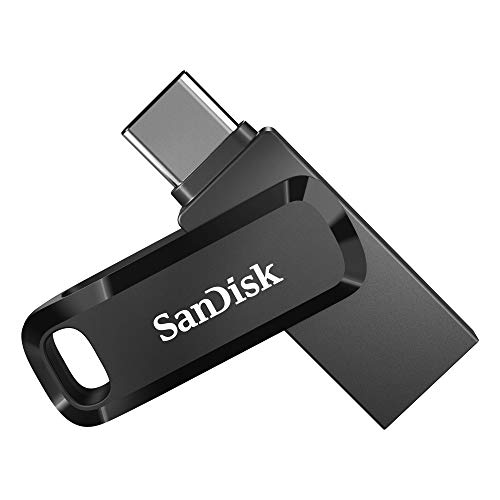
The Dual Drive Go solves the connector problem by carrying both of them. One end is USB-C and the other is USB-A, joined by a swivel, so the same drive moves photos off a phone and onto a laptop with no adapter in between. SanDisk prints a read speed of up to 400MB/s and no write speed, so the fill speed is a guess, just like the Ultra Fit. The swivel is the weak point in a pocket, since it can rotate open, but for anyone who moves files between a phone and a computer every week, two connectors on one drive beats carrying two drives.
Specs
- 512GB capacity
- USB Type-C and USB Type-A connectors in one drive
- Up to 400MB/s read speed
- Swivel design
- Model SDDDC3-512G-GAM46
- 5-year warranty
Best for: phone owners moving photos and video onto a laptop without an adapter.
Watch out for: the listing prints no write speed, so fill speed is a guess; color variants sell under different ASINs, such as Navagio Bay, so confirm the black listing in the selector; the swivel can rotate open in a pocket.
PNY PRO Elite V3 Type-C 512GB

The PRO Elite V3 is the fastest drive in this guide, and it is built for people who move big files often. PNY prints up to 1000MB/s read and up to 800MB/s write, numbers that belong to a portable SSD more than a thumb drive. The catch is the port: those speeds need a USB 3.2 Gen 2 port, and on a 5Gbps port the drive runs at Gen 1 speed. It is also USB-C only, so an old USB-A machine needs an adapter. If your machine has the port, nothing else here keeps up.
Specs
- 512GB capacity
- USB 3.2 Gen 2 interface, USB Type-C connector
- Up to 1000MB/s read speed, up to 800MB/s write speed
- Premium metal design
- Sliding cap
- Key loop
Best for: photographers and video editors moving large files on a machine with a Gen 2 port.
Watch out for: full speed needs a USB 3.2 Gen 2 port, so check your machine first; USB-C only, so a USB-A-only machine needs an adapter; confirm the Type-C listing, since the Type-A version is a different ASIN.
Samsung FIT Plus 512GB

The FIT Plus is the smallest drive in this guide, a grey nub barely bigger than the USB-A plug itself. Once it is in, it almost becomes part of the laptop, which makes it the other leave-it-in pick next to the Ultra Fit. Samsung prints up to 400MB/s read and up to 110MB/s write, the same pair as the BAR Plus, and the same five-proof protection covers it. The size is also the risk: a drive this small is easy to lose, and it has no cap or loop to tie it down. Confirm the 512GB listing in the selector, since smaller capacities sell under near-identical names.
Specs
- 512GB capacity
- USB 3.2 Gen 1 interface, USB-A connector
- Up to 400MB/s read speed, up to 110MB/s write speed
- Compact plug-and-stay design
- Model MUF-512AB/AM
- Five-proof protection against water, shock, temperature, magnets, and X-rays
Best for: a second laptop or a car stereo that needs more room without anything sticking out.
Watch out for: the tiny body is easy to lose and has no cap or loop; the 110MB/s write speed means a full load takes a while; confirm the 512GB listing, since smaller capacities sell under near-identical names.
Which One Fits Your Situation
You Need More Room on One Laptop
Pick the SanDisk Ultra Fit or the Samsung FIT Plus. Both sit almost flush with the side of a laptop, so they can stay in the port while the machine goes in and out of a bag. The Ultra Fit prints the faster read speed on paper, while the FIT Plus prints both speeds and carries five-proof protection. Either one turns a cramped laptop into a machine with room for a photo library and a semester of coursework.
You Move Files Between a Phone and a Computer
Pick the SanDisk Ultra Dual Drive Go. It carries USB-C and USB-A on one body, so the same drive plugs into a phone and then into a laptop with no adapter to remember. The swivel is the only fiddly part, and it can rotate open in a pocket, but for a weekly phone-to-laptop shuffle it is the simplest tool in this guide.
You Move Big Video Files Often
Pick the PNY PRO Elite V3 Type-C, but only if your machine has a USB 3.2 Gen 2 port. Its printed speeds of up to 1000MB/s read and up to 800MB/s write are in a different league from the rest of this guide. On a 5Gbps port it still works, just at Gen 1 speed, so check the port before you buy. If your machine has the port, nothing else here keeps up.
You Want the Toughest Stick in a Bag
Pick the Samsung BAR Plus. The metal body has no cap to lose and no swivel to wear out, and Samsung prints both speeds plus five-proof protection and a 5-year limited warranty. It sticks out of a laptop, so it is not a leave-it-in drive, but as a stick that lives in a bag, a pocket, or a camera case, it takes knocks that would crack a plastic body.
Common Mistakes
- Treating a flash drive as your only backup. A flash drive is not a backup. Keep a second copy somewhere else, on another drive or in the cloud, and follow the 3-2-1 rule.
- Buying the wrong connector. Check the port on your machine first. A USB-C drive will not plug into a USB-A-only laptop without an adapter, and a USB-A drive will not plug into a phone at all.
- Trusting the read speed alone. A drive that prints no write speed is a guess on fill speed. Samsung prints both numbers on the BAR Plus and the FIT Plus, while SanDisk prints read speed only on the Ultra Fit and the Dual Drive Go.
- Formatting FAT32 and then wondering why a file over 4GB will not copy. FAT32 cannot hold a single file larger than 4GB. Use exFAT for large files, and confirm the format before a big transfer.
- Chasing a model with no Amazon listing you can pin down. The Kingston DataTraveler Max 512GB prints up to 1000MB/s read and 900MB/s write on paper, but no Amazon US ASIN could be pinned to its listing after repeated searches, so it is not in this guide. Do not buy a lookalike listing in its place.
Frequently Asked Questions
How much usable space does a 512GB flash drive really hold?
About 476GB once it is formatted. Drive makers count in decimal gigabytes while your computer counts in binary, so the number on the box is always bigger than the room your computer reports. The gap is the same on every brand, and it is not a fault. Plan your working set around 476GB, not 512GB, and you will not run short mid-transfer.
Is 512GB enough for photos and video?
Yes, for a working set. A photo library of 200GB fits with room left over, and so does a semester of coursework or a full set of installers. A 4K video project is a different story: a single shoot can fill the drive, and long clips copy slowly at 110MB/s write. Keep the working set on the flash drive and the archive on a bigger drive.
Can I use a USB-C flash drive on a USB-A laptop?
Not directly. A USB-C plug will not fit a USB-A port, so you need an adapter, and an adapter is one more thing to lose. A dual drive like the SanDisk Ultra Dual Drive Go avoids the problem entirely, since it carries both connectors on one body. If you only own USB-A machines, buy a USB-A drive and skip the adapter.
How is this guide different from the 1TB and 2TB guides?
It covers the same capacity axis at a smaller size, and no ASIN here repeats an ASIN from the 1TB guide or the 2TB guide on this site. A 512GB drive suits a working set: a photo library, a semester of coursework, or a phone backup. The 1TB and 2TB guides suit archives and full libraries that need far more room.
More from Amazon
Programs that pair well with the guide above. Offers and eligibility are set by Amazon and may change.
A free business account with business pricing and bulk-buying tools for work, shop or home office.
Create a business accountFree shipping on eligible items, Prime Video and more. Eligible new members can start with a free trial.
Start a Prime free trialAudiobooks and podcasts to listen to on the go. Eligible new members can start with a free trial.
Try Audible freeAd-free music streaming. Eligible new subscribers can start with a free trial.
Try Music Unlimited freeAs an Amazon Associate we earn from qualifying purchases.
Write Your Review
No reviews yet. Be the first to share your experience!