

Key takeaways
- The best fiber media converters for longer Ethernet runs, with single-mode pairs, multimode, 10G, PoE and compact picks compared by listed spec.
Copper Ethernet runs into a hard wall at 100 meters, and plenty of real links need to go further: a detached workshop, a barn, a gate camera, or a second building across a yard. A fiber media converter solves that problem by turning a copper Ethernet signal into light, sending it down a fiber strand, and turning it back into copper at the far end. Each converter is a small powered box with its own RJ45 port, so a pair of them can bridge two ordinary switches or devices that have no fiber ports of their own.
That is also what separates the products below from the SFP transceivers covered elsewhere on this site. A transceiver module by itself does nothing until it sits inside a switch, router, or network card that has a matching slot. A media converter is the host device: it takes the module, adds power and a copper port, and works with whatever gear you already own. The five picks here cover the main buying situations, from a ready-made single-mode pair to a 10G converter and a PoE model that powers a remote camera.
As an Amazon Associate, we earn from qualifying purchases.
Quick answer
For most people, the gigabit single-mode converter pair with BiDi SFP modules included is the one to buy: both ends arrive in one box, the optics are matched at the factory, and the single-mode link is specified for distances up to 20 kilometers. Pick the TP-Link MC200CM instead for short multimode runs inside one building, and the TP-Link MC420L when the link needs 10G speed.
Gigabit Single-Mode Media Converter Pair with BiDi SFP Modules

This two-pack is the simplest way to build a long fiber link, because everything that has to match already matches. The box holds two media converters, each with a 10/100/1000Base-Tx RJ45 port and an SFP slot, plus two BiDi SFP LC transceiver modules. The modules work as a matched pair over a single strand of single-mode 9/125 fiber: one side transmits at 1310nm and receives at 1550nm, and the other side does the reverse, so one fiber carries traffic in both directions.
The listing specifies the optical port at 1.25Gbps and compatible with 1000Base-LX, and the included transceivers are specified for links up to 20 kilometers. Two DC power adapters come in the box, one for each end, each rated at 5V DC and 1A from a 100 to 240V AC input. Because both converters and both optics ship together, there is no separate module order to get wrong, which is the most common failure point in a first fiber build.
The honest limits: the pair is fixed at gigabit speed, so it will not grow into a 10G link later, and BiDi optics must stay with their matched partner, so a spare module from another brand may not pair correctly. The brand is a generic one rather than a networking name, so long-term support runs through the seller listing rather than a maker support site. For a point-to-point run between two buildings at gigabit speed, though, nothing else in this roundup asks less of the buyer.
TP-Link MC200CM Gigabit Multimode Media Converter

The MC200CM is the established name-brand answer for short fiber runs inside a single building. It converts 1000Base-T copper to 1000Base-SX fiber and back, using multimode fiber with an SC connector at 850nm. TP-Link specifies multimode reach up to 550 meters, which comfortably covers warehouse aisles, school corridors, and runs between floors where copper would exceed its limit or pick up interference.
Multimode is the right fiber for this job because the cable and optics suit short distances, and many older buildings already have multimode pulled between wiring closets. If your building already runs OM1 or OM2 multimode with SC connectors, this converter drops into that plant without new cable. The unit is a single converter, so a complete link needs one at each end, or one paired with a switch that has a matching 1000Base-SX port.
The trade-offs are plain: gigabit only, one speed class, and no SFP slot, so the optics are fixed at the factory and cannot be swapped if your fiber plant changes. Buyers with single-mode cable in the ground should look at the pair above or the MC220L below instead. As a fixed-purpose box for a known multimode run, it remains the low-risk choice, and its long sales history means the listing details are well documented.
TP-Link MC420L 10G Multi-Gigabit SFP Media Converter

The MC420L is the step up for links that carry a NAS, a server, or a busy switch uplink. Its copper port negotiates at 1G, 2.5G, 5G, and 10G, and its fiber side is a single SFP+ port. TP-Link describes it as converting between 10GBASE-SR, 10GBASE-LR, and 10GBASE-LRM fiber and 10GBASE-T copper, so the same box handles a short multimode hop inside a rack room or a long single-mode run, depending entirely on the SFP+ module you fit.
That module is sold separately, and the listing is clear that maximum transmission distance depends on the inserted SFP module, so budget for a matched pair of 10G modules along with the converters. The datasheet lists maximum power consumption of 4.12W, dimensions of 94.5 by 73 by 27 millimeters, and the option to run the unit on a desk or slide it into the Omada MC1400 chassis for a rack of converters. The package holds the converter, a power adapter, and an installation guide.
One caution from the listing details: the copper side reaches its full 10G distance only on suitable cable, with Cat 6 limited to shorter runs and shielded Cat 6 or better needed for the full span. This is also the only converter here that serves multi-gigabit copper devices at 2.5G and 5G, which suits newer NAS units and access points whose ports sit between gigabit and 10G.
StarTech.com IMC1GSFP30W PoE+ Fiber Media Converter

Security cameras and outdoor access points often sit where there is fiber but no power outlet. The IMC1GSFP30W answers that layout: it converts fiber to copper Ethernet and delivers up to 30W of PoE+ power on the copper port, enough for a typical fixed camera or access point as the listing describes. The fiber side is an open SFP slot that accepts MSA-compliant gigabit SFP modules, so the same converter works with single-mode or multimode fiber depending on the module fitted.
The housing suits rough locations. The listing specifies an IP-30 rated mini industrial enclosure, an operating range from minus 40 to plus 75 degrees Celsius, and DIN rail mounting, which fits it for cabinets, poles, and plant rooms rather than desks. It is TAA compliant and carries a 2-year warranty from the maker. The module is not included, so the fiber reach is whatever the SFP you choose provides, and that module needs its own line in the budget.
This is a specialist pick. A home user linking two buildings gains nothing from the hardened case or the wide temperature range, and a PoE injector at the far end is a simpler answer when a power outlet exists there. Where the far end truly has no mains power and the weather reaches it, this converter earns its place.
TP-Link MC220L Gigabit SFP Media Converter
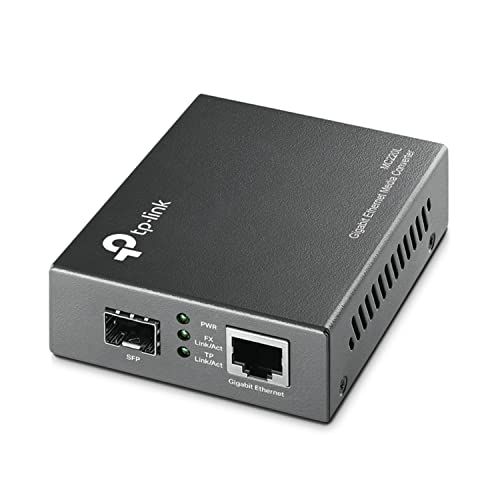
The MC220L is the compact flexible option, built around an open SFP slot in a small 94.5 by 73 by 27 millimeter case. It pairs one gigabit SFP port with one 10/100/1000M RJ45 port that supports Auto MDI/MDIX, and it complies with IEEE 802.3ab and 802.3z. Because the optics live in the module, the listing describes wavelength by the module fitted: 850nm with multimode fiber or 1310nm with single-mode fiber, which lets one converter model serve either fiber plant.
That flexibility makes it a good spare and a good fit for mixed sites, where one closet runs multimode and another runs single-mode. It works on its own with the included external power adapter, specified at 9V and 0.6A, or inside the TP-Link TL-MC1400 19-inch chassis when several converters share a rack. The SFP module is sold separately, so the reach of any link is set by the module you buy for it.
Against the MC200CM above, the MC220L trades fixed optics for freedom: no SC-only lock-in, but one more part to choose correctly. Against the pair at the top, it asks more of the buyer and rewards anyone who already owns spare gigabit SFP modules. For a small network corner where space is tight and the fiber type may change, it is the tidy answer.
How to choose
Begin with the fiber, not the converter. Single-mode fiber suits runs between buildings and any distance past a few hundred meters, and it is what new outdoor pulls usually install. Multimode fiber suits short indoor runs and is what many older buildings already have in place. A converter bought for the wrong fiber type will not link, so confirm what is in the ground or on the quote before ordering anything.
Next, match speed to the devices at both ends. Gigabit converters cover most building links, camera backhauls, and switch uplinks. Choose the 10G class only when both ends can use it, since a 10G converter feeding a gigabit switch still runs at gigabit. Then decide between fixed optics and an open SFP slot. Fixed-optics models like the MC200CM remove guesswork for one known run. Open-slot models like the MC220L, MC420L, and the IMC1GSFP30W let you change reach or fiber type by changing a module, at the cost of buying that module separately.
Finally, plan power at both ends. Every converter needs its own supply, and the far end of a long link is often a cabinet or outbuilding where outlets are scarce. If the far device also needs power, a PoE converter can carry it over the same copper tail. Check connector types too: SC and LC dominate this class, and a mismatch means an adapter cable or a different module.
Who should skip
Skip media converters entirely if both devices already have SFP or SFP+ slots; a pair of modules and a patch lead do the same job with fewer boxes and fewer power supplies. Skip them if your run is under 100 meters and stays indoors, where ordinary copper Ethernet is cheaper and simpler. Skip the 10G and PoE models if your link is a basic building-to-building gigabit bridge, since the added capability goes unused. And skip fiber altogether for a single camera or access point inside one building when a PoE switch in the same rack covers it.
Frequently Asked Questions
Do I need two media converters for one link?
Usually, yes. A link needs conversion at both ends unless the far device has a fiber port of its own, such as a switch with an SFP slot that matches the converter’s optics. The single-mode pair at the top of this guide includes both ends, while the other picks are sold as single units.
Can I mix converters and modules from different brands?
Often, with care. Converters with open SFP slots accept MSA-compliant modules from many makers, and fixed-optics converters link fine with a matching port on a switch. The exceptions are BiDi pairs, which must match wavelength partners, and any setup where speed class or fiber type differs between ends.
What fiber cable do these converters need?
Each listing names its fiber type and connector. The single-mode pair uses single-mode 9/125 fiber with LC connectors, the MC200CM uses multimode fiber with SC connectors, and the open-slot models take whatever fiber matches the module fitted. Match the cable to the optics, not to the converter shell.
Does a media converter slow the network down?
A converter passes traffic at its rated line speed, so a gigabit converter carries gigabit traffic and the MC420L carries up to 10G. The link runs at the slowest element, though, so cable grade on the copper side and module choice on the fiber side both matter.
Final verdict
For a first fiber link, buy the matched single-mode pair and spend your effort on the cable run instead of on matching parts. Choose the MC200CM for a documented multimode run inside one building, the MC220L when you want one compact converter that adapts to either fiber type, the MC420L when the link must carry multi-gigabit or 10G traffic, and the IMC1GSFP30W when the far end needs power delivered over the same drop. Match fiber type first, speed second, and every pick here will do its job.
Product and ASIN Reference
| Product | ASIN |
|---|---|
| Gigabit Single-Mode Media Converter Pair with BiDi SFP Modules | B0BHWK1T2T |
| TP-Link MC200CM Gigabit Multimode Media Converter | B003AVRLZI |
| TP-Link MC420L 10G Multi-Gigabit SFP Media Converter | B0DKSP24SN |
| StarTech.com IMC1GSFP30W PoE+ Fiber Media Converter | B08KYH4PL4 |
| TP-Link MC220L Gigabit SFP Media Converter | B003CFATL0 |
More from Amazon
Programs that pair well with the guide above. Offers and eligibility are set by Amazon and may change.
A free business account with business pricing and bulk-buying tools for work, shop or home office.
Create a business accountFree shipping on eligible items, Prime Video and more. Eligible new members can start with a free trial.
Start a Prime free trialAudiobooks and podcasts to listen to on the go. Eligible new members can start with a free trial.
Try Audible freeAd-free music streaming. Eligible new subscribers can start with a free trial.
Try Music Unlimited freeAs an Amazon Associate we earn from qualifying purchases.

Write Your Review
No reviews yet. Be the first to share your experience!