

Key takeaways
- Budget: SanDisk Ultra or an older U1 card for cold storage. Accept slower loads.
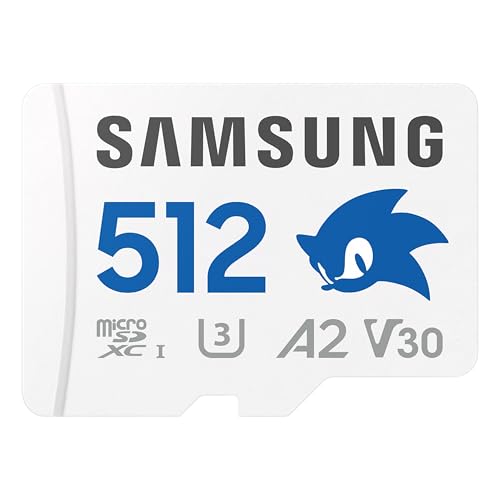
- Mid-range: Samsung EVO Select or EVO Plus in 256GB or 512GB. The sweet spot for most players.
- Premium: Samsung PRO Plus, SanDisk Extreme or Extreme PRO, or a 1TB card. Better warranties and consistent sustained writes.
For a Steam Deck, the best microSD card for most owners is a 256GB to 512GB UHS-I card rated U3, V30 and A2, such as the Samsung PRO Plus or the SanDisk Extreme; buyers who want a lower price can step down to a Samsung EVO Select or EVO Plus, and people with big libraries can move up to a 1TB card from Lexar, PNY or SanDisk. Paying for a faster-looking card than that is mostly wasted, because the slot itself sets the speed ceiling.
Valve’s tech specs page describes the Deck’s card slot as UHS-I and lists SD, SDXC and SDHC support. PCGamesN and other outlets note that the UHS-I interface caps transfers at roughly 104 MB/s, so a UHS-II card that advertises 250 MB/s or more will still run at UHS-I speed in the Deck. That makes capacity, random-access performance and a decent warranty the things worth comparing.
Our top picks



As an Amazon Associate we earn from qualifying purchases at no extra cost to you.
At a glance: cards that suit the Steam Deck
| Card | Best for | Key stated specs | Limits |
|---|---|---|---|
| Samsung PRO Plus (256GB and up) | Best all-round pick | UHS-I, U3, V30, A2; the newer version is rated up to 180 MB/s read and 130 MB/s write; 10-year limited warranty | Older listings show 160/120 MB/s; costs more than basic cards |
| SanDisk Extreme | Strong value with long warranty | UHS-I, U3, V30, A2; the 256GB model is listed at up to 190 MB/s read and 130 MB/s write; limited lifetime warranty | Speeds differ by capacity and generation |
| SanDisk Extreme PRO | Buyers who want the faster-rated SanDisk | A2, V30, U3; listings cite 200 MB/s read and 90 MB/s write for some capacities | Rated speeds exceed what the slot can use |
| Samsung EVO Select / EVO Plus | Budget to mid-range | Current EVO Select: U3, V30, A2, up to 160 MB/s read; 10-year warranty | Maker does not publish write speed; older versions lack A2 |
| Lexar Play and Professional 1066x | Large capacities up to 1TB | U3, V30, A2; the Professional 1066x is rated up to 160 MB/s read and up to 130 MB/s write | One commenter reports slow writes on the Play 1TB; real-world results vary |
| PNY Pro Elite | 1TB buyers who want good write speed | A2, UHS-I | Thinner independent review coverage |
| SanDisk Ultra | Lowest cost, cold storage | Lower U1/A1 rating | Weaker random performance, so slower installs and loading |
What the ratings mean for a handheld
Four labels matter. UHS-I is the interface and the only one the Deck uses. U3 and V30 describe sustained write speeds (at least 30 MB/s), which keep big downloads from stalling. The A rating describes how the card handles the small, scattered reads and writes that games and launchers produce. An A2 card is guaranteed 4,000 random read operations and 2,000 random write operations per second, against 1,500 and 500 for A1. Reviewers at How-To Geek and Switchblade Gaming both argue that this is worth more than a headline sequential number, which is why they favour A2 cards over the cheaper A1 models even when the sticker speeds look close.
There is a caveat. An older Steam community thread notes that Valve supplied reviewers with A1 cards and that early Linux kernels lacked full A2 support. Current guides treat A2 as the standard recommendation, and nothing in an A2 card stops it working in the Deck, but the benefit is a modest one and not a promise of dramatic load-time gains.
Capacity: how much do you need?
Modern games are large, and the Deck’s internal storage fills fast. A 256GB card holds a handful of big titles, a 512GB card is the comfortable middle, and 1TB suits people with large libraries or emulation collections. Eneba, Switchblade Gaming and others point to 256GB as a practical starting point. A card also costs more per gigabyte at the extremes, so the mid-capacities tend to be the best value. If you play mostly small indie games, a smaller card works, but you will probably outgrow it.
Card-by-card notes
Samsung PRO Plus
Eneba calls it the best overall microSD card for the Steam Deck, and Switchblade Gaming lists it among its top three. Samsung lists the newer 256GB version at up to 180 MB/s read and 130 MB/s write with U3, V30 and A2, plus water-, X-ray- and magnet-proofing and a ten-year warranty. An older version is rated 160/120 MB/s, so check the model number on the packaging.
SanDisk Extreme and Extreme PRO
How-To Geek names the Extreme PRO its best overall pick, and SpazioGames named the 512GB Extreme PRO its best Steam Deck card in an August 2026 roundup. Retailer listings for the 256GB Extreme quote 190 MB/s read and 130 MB/s write, with a limited lifetime warranty. Higher-capacity and newer versions quote faster peaks, and a 2TB model on the maker’s site lists reads up to 240 MB/s, though the Deck cannot use that.
Samsung EVO Select and EVO Plus
These are the value picks. The current 256GB EVO Select is listed as UHS-I, U3, V30 and A2 with reads up to 160 MB/s, and Samsung says only that writes are lower than reads. Switchblade Gaming reports that the U3/A2 Samsung EVO Plus consistently beats the U1/A1 SanDisk Ultra. Be careful with older stock: an earlier EVO Select (the MB-ME256HA) lacks the A2 rating, and a 2021 version is rated 130 MB/s.
Lexar Play and Lexar Professional 1066x
MakeUseOf chose the Lexar Play 1TB as its premium pick, noting it is A2, UHS-I and V30. A commenter in a deal forum says its write speed tops out near 20 MB/s, which would slow installs. Independent testing of the Professional 1066x in the 256GB size by CameraJabber measured about 93 MB/s read and 80 MB/s write, below the rated figures, which shows why rated numbers deserve caution.
PNY Pro Elite
A forum commenter recommends the 1TB PNY Pro Elite for write speeds around 90 MB/s. It is an A2, UHS-I card. The coverage is thin, so treat it as a candidate worth reading user reports on, not a proven leader.
SanDisk Ultra
How-To Geek picks it as its budget choice. It is lower-rated than the other cards here, with weaker random performance, so expect slower game loading. It is fine for a shelf of games you rarely launch.
Budget tiers
- Budget: SanDisk Ultra or an older U1 card for cold storage. Accept slower loads.
- Mid-range: Samsung EVO Select or EVO Plus in 256GB or 512GB. The sweet spot for most players.
- Premium: Samsung PRO Plus, SanDisk Extreme or Extreme PRO, or a 1TB card. Better warranties and consistent sustained writes.
Fit, care and compatibility
- The Deck takes microSD, not full-size SD, so use the card directly and keep any adapter in a drawer.
- Format the card in the Deck’s own settings, which erases it, so copy off anything you need first.
- Sources disagree on microSDUC cards above 2TB, and Valve’s page names only SD, SDHC and SDXC. Stay with SDXC capacities.
- SD Express cards fall back to the slot’s UHS-I speed. Dexerto notes the Deck is not built for Express, so the extra cost buys nothing.
- Heat and shock matter in handhelds, so choose cards whose makers list shock- and temperature-proofing, and keep a backup of saves with Steam Cloud.
- Buy from a seller with a clear returns policy, because counterfeit cards with inflated capacities exist; run a free capacity check tool when it arrives.
Pick X if…
| You are | Pick | Reason |
|---|---|---|
| Buying one card and not thinking again | Samsung PRO Plus 256GB or 512GB | Consistent specs, long warranty |
| Price-sensitive but want A2 | Samsung EVO Select (check the A2 rating) | Rated A2 in current versions |
| Loading a large library | 1TB SanDisk Extreme, Lexar or PNY card | Capacity matters more than rated speed |
| Only storing rarely played games | SanDisk Ultra | Cheapest route |
| Weighing UHS-II cards | Skip them | Extra speed unusable in the Deck |
Alternatives
- Bigger internal drive: some owners replace the internal SSD, which is a more involved job and may affect the warranty. Follow Valve’s instructions.
- External dock storage: a USB drive in a dock works for some libraries but loses portability.
- Uninstall and redownload: Steam keeps your library, so uninstalling games you are not playing costs nothing.
Frequently Asked Questions
Does a faster microSD card make Steam Deck games load faster?
Only up to the slot’s limit. The Deck uses UHS-I, which tops out near 104 MB/s, so a card advertising far higher speeds will not load games faster. Random-access performance, shown by an A2 rating, tends to matter more than the sequential figure.
Is A2 required on a Steam Deck?
No, an A1 card works. Reviewers still favour A2 for its higher random operations rating, and recent guides treat it as the standard choice. Older community threads questioned A2 support, but that concern appears out of date.
What capacity should I buy?
256GB is a practical starting point, 512GB is comfortable and 1TB suits large libraries. Games keep getting bigger, so many owners regret buying too little.
Can I use the same card in a Nintendo Switch or a phone?
Yes. A standard microSDXC card works across devices, but the Deck formats it for its own use, so you would reformat and lose the data when changing devices.
Will a SD Express or UHS-II card work?
They are generally reported to work but run at UHS-I speed, so they cost more without helping. Setupgamers says UHS-II cards are backward compatible, while Dexerto warns the Deck was not built for SD Express.
How do I know if my card is fake?
Buy from a trusted seller and test the capacity and speed with a free checking tool when it arrives. A card that reports the right size but fails to write the last gigabytes is a warning sign. Return it at once.










Write Your Review
No reviews yet. Be the first to share your experience!