

Our Short List of 3
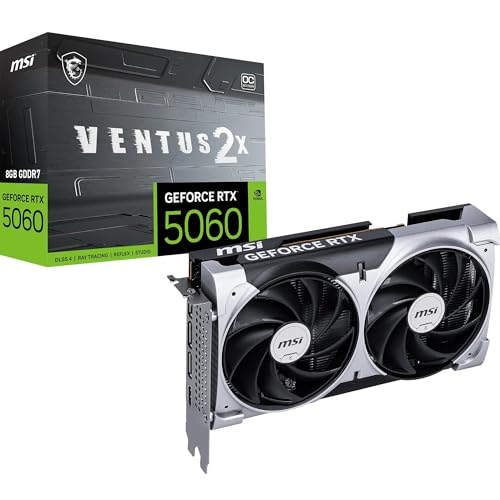
- Best for: Gamers who want a short, quiet RTX 5060 that slots into most cases.
- Graphics coprocessor: NVIDIA GeForce RTX 5060
- Memory: 8 GB GDDR7, 128-bit
- Boost clock: up to 2535 MHz
- Interface: PCI Express 5.0

- Best for: Builders who want a compact, quiet RTX 5060 with a small footprint.
- Graphics coprocessor: NVIDIA GeForce RTX 5060
- Memory: 8 GB GDDR7, 128-bit
- Boost clock: 2512 MHz
- Interface: PCI Express 5.0

- Best for: Open-world games and players who want the largest memory buffer here.
- Graphics coprocessor: AMD Radeon RX 9060 XT
- Memory: 16 GB GDDR6
- Boost clock: 3290 MHz
- Memory clock: 20 Gbps
All 3 Picks at a Glance
| Product | Specs | Action |
|---|---|---|
| MSI GeForce RTX 5060 8G Ventus 2X OC |
| Check price on Amazon |
| GIGABYTE GeForce RTX 5060 WINDFORCE OC 8G |
| Check price on Amazon |
| Sapphire Pulse AMD Radeon RX 9060 XT 16GB |
| Check price on Amazon |
Key takeaways
- Compare the best graphics cards for 1080p gaming, with smooth frame rates, cool running and enough memory for modern titles at high settings.
A 1080p monitor forgives a lot, yet it still rewards a card that holds smooth frame rates in modern titles at high settings. The cards below were chosen for that job alone: enough memory for detailed textures, cooling that stays quiet during long sessions, and outputs that suit a single high-refresh display. Each one fits a standard desktop case and a mid-range power supply, so upgrading rarely means rebuilding the whole machine around it.
Before choosing, match the card to the games you actually play and the monitor in front of you. Competitive shooters care about frame consistency, open-world adventures lean on memory, and older esports titles run well on almost anything current. The guide below walks through memory, cooling, power, and size, then lays out five cards that cover the common budgets and case shapes for 1080p play.
Quick Picks
As an Amazon Associate we earn from qualifying purchases
| Product | Best for | Key spec |
|---|---|---|
| MSI GeForce RTX 5060 8G Ventus 2X OC | Smooth 1080p play in a compact case | 8 GB GDDR7, boost clock up to 2535 MHz |
| GIGABYTE GeForce RTX 5060 WINDFORCE OC 8G | Quiet dual-fan cooling at high settings | 8 GB GDDR7, boost clock 2512 MHz |
| ASUS Dual RTX 5060 OC Edition | A simple two-fan upgrade for mid-range builds | 8 GB GDDR7, boost clock up to 2535 MHz |
| Sapphire Pulse AMD Radeon RX 9060 XT 16GB | Heavy textures and long-term headroom | 16 GB GDDR6, boost clock 3290 MHz |
| SPARKLE Intel Arc B580 Titan OC | Large memory on a modest budget | 12 GB GDDR6, boost clock 2760 MHz |
How to Choose
Memory and Texture Headroom
Memory decides how much texture detail a card can hold without dipping into system memory, and that matters more with every new release. Eight gigabytes of GDDR7 handles most current titles at 1080p with high settings, though the heaviest open-world games already push against that ceiling when texture packs are turned up. Twelve or sixteen gigabytes gives far more breathing room and keeps frame times steadier in dense scenes. If you play sprawling adventures or plan to keep the card for several years, lean toward the larger memory options. For competitive games and lighter titles, eight gigabytes remains a sensible fit.
Cooling and Noise
A card that runs hot will spin its fans harder, and that noise becomes hard to ignore during quiet exploration or late-night sessions. Dual-fan designs suit most 1080p cards well, since these chips draw modest power and spread heat across a wide heatsink. Look for a card with a solid backplate and fans that stop at idle, which keeps the desktop silent when you are browsing or watching video. Case airflow matters just as much: one intake and one exhaust fan can drop temperatures noticeably. Avoid cramming a long triple-fan card into a case with no room for air to move.
Power Supply and Connectors
Most 1080p cards draw between 145 and 200 watts, so a good 550 to 600 watt power supply covers them comfortably. Check the connector before ordering, since nearly every card in this class uses a single eight-pin plug, while some compact models may differ. A supply with a single twelve-volt rail and a reputable brand name is a safer bet than an oversized unit from an unknown maker. Leave headroom for the processor and storage drives, and confirm the supply has the right cable free. If your current unit is very old, replacing it alongside the card is often the wiser move.
Size, Outputs, and Fit
Measure the inside of your case before you buy, because length and slot width vary more than buyers expect. Dual-fan cards in this guide run from about 228 to 315 millimetres long and occupy two slots, which suits most mid-tower cases but can crowd smaller ones. Count your display outputs too: three DisplayPort sockets plus one HDMI is common, and that covers a main gaming monitor with a second screen beside it. Check clearance above the power supply shroud and beside the front fans. A card that fits with room to spare runs cooler and is far easier to install.
The 5 Best Options
MSI GeForce RTX 5060 8G Ventus 2X OC
- Best for: Gamers who want a short, quiet RTX 5060 that slots into most cases.
- Graphics coprocessor: NVIDIA GeForce RTX 5060
- Memory: 8 GB GDDR7, 128-bit
- Boost clock: up to 2535 MHz
- Interface: PCI Express 5.0
Gamers who want a short, quiet RTX 5060 that slots into most cases.
Eight gigabytes of memory can feel tight in the heaviest texture-heavy titles.
The Ventus 2X OC pairs the current-generation RTX 5060 chip with a short dual-fan cooler, making it one of the easiest cards to fit into a mid-tower or a smaller case. Its eight gigabytes of GDDR7 memory and DLSS 4 support carry modern titles at high settings on a 1080p display, while the two TORX fans keep temperatures in check without much noise. It draws modest power and needs only a single eight-pin connector, so most existing mid-range builds can take it without a supply change.
GIGABYTE GeForce RTX 5060 WINDFORCE OC 8G
- Best for: Builders who want a compact, quiet RTX 5060 with a small footprint.
- Graphics coprocessor: NVIDIA GeForce RTX 5060
- Memory: 8 GB GDDR7, 128-bit
- Boost clock: 2512 MHz
- Interface: PCI Express 5.0
Builders who want a compact, quiet RTX 5060 with a small footprint.
The eight-gigabyte memory buffer limits future headroom in the most demanding games.
GIGABYTE’s WINDFORCE OC version of the RTX 5060 uses a two-fan cooler with a compact footprint, measuring just under eight inches long, so it suits cases where a longer card would crowd the front fans. The factory overclock lifts the boost clock slightly above the reference design, and the eight gigabytes of GDDR7 memory keeps high-setting 1080p play smooth in the vast majority of current releases. It is a straightforward card with no elaborate lighting, which suits builds where the focus stays on the games rather than the hardware on show.
ASUS Dual RTX 5060 OC Edition
The ASUS Dual RTX 5060 OC Edition keeps the formula simple: two fans, a two-slot body, and a factory overclock that nudges the boost clock above the reference figure. At 228 millimetres long it fits comfortably in most mid-tower cases, and its 145-watt draw means a 550-watt power supply with a single eight-pin cable is enough. The card suits anyone replacing an older mid-range card, since the installation is a direct swap in most builds and the dual-fan cooler stays calm during long sessions at 1080p.
Specs
- Graphics coprocessor: NVIDIA GeForce RTX 5060
- Memory: 8 GB GDDR7, 128-bit
- Boost clock: up to 2535 MHz
- Power draw: 145 W, 550 W power supply recommended
- Power connector: 1 x 8-pin
- Length: 228 mm
- Slot width: 2 slots
- Warranty: 3 years
Best for: A clean, simple upgrade from an older mid-range card.
Watch out for: Memory is eight gigabytes, so the heaviest future titles may need settings lowered.
ASIN: B0F8PR9L3X
Sapphire Pulse AMD Radeon RX 9060 XT 16GB
- Best for: Open-world games and players who want the largest memory buffer here.
- Graphics coprocessor: AMD Radeon RX 9060 XT
- Memory: 16 GB GDDR6
- Boost clock: 3290 MHz
- Memory clock: 20 Gbps
Open-world games and players who want the largest memory buffer here.
It is longer than the dual-fan RTX 5060 cards, so check case clearance first.
The Sapphire Pulse RX 9060 XT is the memory champion of this group, pairing sixteen gigabytes of GDDR6 with a dual-fan cooler and a boost clock of 3290 MHz. That large buffer shines in open-world games with dense textures, where smaller cards dip into system memory and frame times grow uneven. The card uses a PCIe x16 interface and offers DisplayPort and HDMI outputs, and its two fans keep noise modest for a card of this capability. It is the pick for players who want the most headroom for the years ahead.
SPARKLE Intel Arc B580 Titan OC
The SPARKLE Arc B580 Titan OC brings twelve gigabytes of GDDR6 to the budget end of 1080p gaming, giving it more memory than the eight-gigabyte cards in this guide while staying within reach of modest builds. Its 2760 MHz boost clock and 192-bit memory bus handle modern titles at high settings, and the TORN Cooling 2.0 design with a metal backplate keeps the card steady during long sessions. Three DisplayPort outputs plus one HDMI make multi-monitor setups easy, and a single eight-pin connector keeps the power requirements simple.
Specs
- Graphics coprocessor: Intel Arc B580
- Memory: 12 GB GDDR6, 192-bit
- Boost clock: 2760 MHz
- Interface: PCI Express
- Cooling: TORN Cooling 2.0, axial fan
- Outputs: 1 x HDMI 2.1, 3 x DisplayPort 2.1
- Power connector: 1 x 8-pin
- Length: 315 mm
Best for: Gamers who want twelve gigabytes of memory without moving to a larger budget.
Watch out for: At 315 millimetres it is the longest card here, so measure your case before ordering.
ASIN: B0DNMH4KQM
Which One Fits Your Situation
Competitive Shooters on a High-Refresh Monitor
Fast-paced shooters reward consistent frame delivery above all else, and any of the RTX 5060 cards in this guide will hold high frame rates at 1080p with competitive settings. The MSI Ventus 2X OC and the ASUS Dual both fit smaller cases and stay quiet, which suits a desk setup where the case sits close by. Pair the card with a monitor that matches its output, and keep background programs closed so the frame pacing stays even during long matches.
Open-World and Story-Driven Games
Sprawling adventures with detailed landscapes lean hard on memory, so the sixteen gigabytes of the Sapphire Pulse RX 9060 XT earn their keep here. Textures stay loaded, distant scenery holds detail, and frame times remain steadier when you ride through a dense city or forest. The twelve-gigabyte Arc B580 is a strong second choice when the budget is tighter. Either way, leave the texture setting one notch below maximum if you notice hitches in the busiest areas.
A Compact Case or a Modest Power Supply
Small cases and older power supplies narrow the field quickly, and the shortest cards here are the best fit. The ASUS Dual at 228 millimetres and the GIGABYTE WINDFORCE OC at under eight inches long both slide into cases where longer cards would not fit. All three RTX 5060 cards draw 145 watts and need only one eight-pin cable, so a 550-watt supply covers them. Measure twice, then order once.
A First Upgrade From an Older Card
Moving up from a card that is several generations old brings the largest jump in this guide, and any of these five will feel like a new machine. The ASUS Dual RTX 5060 OC Edition is the simplest swap, with its short body and single power cable, while the Sapphire Pulse suits anyone who also wants a big memory upgrade. Before ordering, confirm your case length, your power supply wattage, and that your monitor cable matches the card outputs.
Common Mistakes
- Buying a card longer than the case can hold, then discovering it blocks the front fans or the drive cage.
- Choosing eight gigabytes of memory for a library of texture-heavy open-world games and then wondering why frame times wobble.
- Ignoring the power supply and learning too late that the right eight-pin cable is already in use.
- Pairing a strong card with a 60 Hz monitor and never seeing the smooth frame rates the hardware can deliver.
- Forgetting to check display outputs and ending up short one DisplayPort socket for a second screen.
Frequently Asked Questions
Is 8 GB of memory enough for 1080p gaming?
Eight gigabytes handles most current titles at 1080p with high settings, including competitive shooters and many story-driven games. The heaviest open-world releases already push against that limit when textures are set to their highest level. If your library leans toward sprawling adventures, or you plan to keep the card for several years, twelve or sixteen gigabytes gives far more headroom and steadier frame times.
Do I need a new power supply for one of these cards?
Most of the cards here draw between 145 and 200 watts, so a good 550 to 600 watt supply with a free eight-pin cable covers them. Check the wattage label on your current unit and confirm the cable is available before ordering. If your supply is very old or from an unknown maker, replacing it alongside the card is a sensible move that protects the rest of the build.
Which card suits a small case best?
The ASUS Dual RTX 5060 OC Edition at 228 millimetres and the GIGABYTE WINDFORCE OC at under eight inches long are the easiest fits in this group. Both occupy two slots and use a single eight-pin connector. Measure the clear space from the rear bracket to the front fans or drive cage, and leave a little room for airflow around the card once it is installed.
Can these cards handle a second monitor?
Yes, every card in this guide offers multiple outputs, typically three DisplayPort sockets and one HDMI port. A second screen for chat, video, or work runs comfortably beside the main gaming display. Gaming on the primary monitor while the second shows a browser or a stream uses only a small amount of extra graphics memory, so the main game stays smooth.
More from Amazon
Programs that pair well with the guide above. Offers and eligibility are set by Amazon and may change.
A free business account with business pricing and bulk-buying tools for work, shop or home office.
Create a business accountFree shipping on eligible items, Prime Video and more. Eligible new members can start with a free trial.
Start a Prime free trialAudiobooks and podcasts to listen to on the go. Eligible new members can start with a free trial.
Try Audible freeAd-free music streaming. Eligible new subscribers can start with a free trial.
Try Music Unlimited freeAs an Amazon Associate we earn from qualifying purchases.

Write Your Review
No reviews yet. Be the first to share your experience!