

Key takeaways
- Heat. Fast CFexpress cards run warm. Long 8K recording in direct sun or inside a cage with no airflow can trigger thermal throttling. Keep cards out of direct sun before use and let them cool before offloading.
- Counterfeits. Fake high-capacity cards are common on marketplace listings. Buy from authorized sellers, and run a full-capacity check on any new card before a critical shoot.
- Formatting. Format in the camera, not on a computer, every time you start a new project. This resets the file system the camera expects and reduces the risk of a corrupted card.
- Write endurance. Flash wears with use. For heavy 8K RAW workflows, plan to retire cards after a couple of years of intensive use rather than waiting for failure.
- Backups. Do not wipe a card until footage exists in two places. If a card does fail, stop using it immediately, because continued writes can overwrite recoverable data.
The best memory cards for 8K video in 2026 are CFexpress Type B cards for any RAW or very high bitrate mode, and UHS-II V90 SD cards only when your camera records compressed 8K to an SD slot. A card’s headline read speed matters far less than its sustained write speed, because 8K recording fails when a card slows down mid-clip, not when it transfers slowly at the end of the day.
This guide explains how to match a card to your camera’s 8K mode, compares seven real card lines by their published specifications, and walks through the capacity math that decides how many cards you need to carry. Specifications below come from manufacturer spec sheets and published reviews; speeds vary by capacity and by host device, so always confirm against your camera manual.
Our top picks



As an Amazon Associate we earn from qualifying purchases at no extra cost to you.
Quick comparison of the best 8K memory cards
| Pick | Format | Best for | Published read / write | Price tier |
|---|---|---|---|---|
| Lexar Professional CFexpress Type B Gold | CFexpress Type B (PCIe 3.0) | Best overall | Up to 1,750 / 1,500 MB/s (128GB-512GB) | Mid to premium |
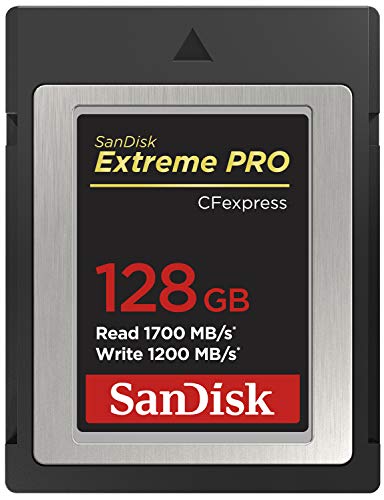
| SanDisk Extreme PRO CFexpress Type B | CFexpress Type B | Mainstream 8K RAW | Up to 1,700 / 1,400 MB/s | Premium |
| Delkin Devices Black CFexpress Type B 4.0 | CFexpress 4.0 Type B | Maximum speed | Roughly 3,500 / 3,200 MB/s | Premium |
| ProGrade Digital CFexpress 4.0 Type B | CFexpress 4.0 Type B | Consistent sustained writes | Up to about 3,400 MB/s read | Premium |
| OWC Atlas Pro CFexpress Type B | CFexpress Type B | Rugged field work | Up to 1,700 / 1,500 MB/s | Premium |
| Sony TOUGH SF-G (V90) | SD UHS-II | Harsh weather, compressed 8K | Up to 300 / 299 MB/s | Mid |
| ProGrade Digital Iridium (V90) | SD UHS-II | Compressed 8K on SD cameras | Around 300 / 275 MB/s | Mid to premium |
What 8K video actually asks of a memory card
8K frames contain four times the pixels of 4K, and the bitrate scales accordingly. Compressed 8K modes such as the long-GOP or all-intra H.265 options on many mirrorless bodies typically land between roughly 200 and 600 megabits per second, which is 25 to 75 megabytes per second. That is within reach of a good V60 or V90 SD card. RAW and ProRes RAW modes are a different class entirely: depending on the camera, frame rate and codec, they can run from several hundred to well over 700 megabytes per second. One published review of a high-end CFexpress card recorded a continuous 8K 60p N-RAW stream at about 722 MB/s, which no SD card can sustain.
That gap is why the card format matters more than brand. SD UHS-II tops out around 312 MB/s on the bus, and real sustained writes sit well below that. CFexpress Type B on PCIe 3.0 offers roughly 1,000 to 1,500 MB/s of sustained headroom, and the newer CFexpress 4.0 cards on PCIe 4.0 push published write speeds above 3,000 MB/s. The newer generation is designed to work in older Type B slots, but the camera will run it at its own interface speed.
Video Performance Guarantee and why it beats peak speed
The SD Association’s video classes, V30, V60 and V90, guarantee a minimum sustained write speed of 30, 60 and 90 MB/s respectively. CFexpress uses a similar idea called VPG, the Video Performance Guarantee, with VPG 200 and VPG 400 certifications guaranteeing 200 and 400 MB/s minimum sustained writes, and the newer 4.0 generation extending the idea to even higher tiers. A card without a certification can still be excellent, but you are relying on the vendor’s claim and independent measurements rather than a certified floor.
The practical consequence is simple. If your 8K mode needs 150 MB/s sustained, a V90 SD card with a guaranteed 90 MB/s floor is not safe, even though its advertised 300 MB/s write speed looks generous. Advertised maximums describe a short burst into an empty card; the guaranteed minimum describes what happens after the card’s internal cache fills and the controller has to garbage-collect.
Best overall: Lexar Professional CFexpress Type B Gold
Digital Camera World’s 2026 CFexpress roundup ranks the Lexar Professional CFexpress Type B Gold as its best overall pick, and the reasoning holds up. The PCIe 3.0 version is rated by Lexar at up to 1,750 MB/s read and 1,500 MB/s write in the 128GB to 512GB capacities, with 1TB and 2TB cards reaching 1,900 MB/s read. Minimum sustained write is listed at 1,000 MB/s for 512GB and smaller cards and 1,300 MB/s for the larger ones. Lexar also sells a newer PCIe 4.0 Gold card advertised at up to 3,600 MB/s read and 3,300 MB/s write, with sustained figures that vary sharply by capacity, so check the exact SKU.
Who it suits: shooters of 8K RAW on Canon, Nikon and Panasonic bodies who want a strong balance of price, speed and capacity options up to 2TB. A limited lifetime warranty backs the line.
Trade-off: the PCIe 3.0 version does not carry a VPG 400 certification, so its sustained rate rests on the manufacturer’s rating and third-party measurements. A reviewer who evaluated an earlier unit still reported stable 8K 60p N-RAW recording, but if your workflow demands a certified floor, look at the certified alternatives below.
Best mainstream CFexpress: SanDisk Extreme PRO CFexpress Type B
The SanDisk Extreme PRO CFexpress Type B is the card most camera retailers recommend by default. The original line is specified at up to 1,700 MB/s read and 1,400 MB/s write, in capacities from 64GB to 512GB, and a newer CFexpress 4.0 version is listed with up to 3,700 MB/s read and 3,500 MB/s write plus a VPG 800 rating. Digital Camera World’s review advises avoiding the 64GB size, which is slower than the larger capacities because it has fewer flash chips working in parallel.
Who it suits: buyers who want a widely stocked, widely compatible card, with firmware support and good availability in most countries. It is a safe pick for 8K on Nikon Z8 and Z9 bodies, the Canon EOS R5 family and similar cameras.
Trade-off: the older generation is priced like a premium product but is outpaced on paper by CFexpress 4.0 cards. Unless your camera supports faster interfaces, the extra speed of the 4.0 card is unused, so choose by what your body can actually take.
Best for speed: Delkin Devices Black CFexpress Type B 4.0
Digital Camera World names the Delkin Devices Black CFexpress Type B 4.0 as best for speed. The card is rated at a minimum of about 3,530 MB/s read and 3,200 MB/s write, with minimum sustained write above 2,000 MB/s according to that guide. Delkin’s design also targets heat management, an under-appreciated issue with fast CFexpress cards: when a card overheats, its controller throttles, and an 8K recording can stop with an error even though the card is nominally fast enough.
Who it suits: cinema and hybrid shooters on newer bodies that expose PCIe 4.0 speeds, and anyone who records 8K RAW to a card and then offloads terabytes at a time, where faster reads cut real hours from the post-production schedule.
Trade-off: premium pricing and limited benefit on older cameras. Delkin’s own Power 4.0 line is the same guide’s budget pick if you want 4.0 compatibility for less.
Best for consistency: ProGrade Digital CFexpress 4.0 Type B
ProGrade Digital builds cards for working video and photo professionals, and its CFexpress 4.0 Type B line is listed by roundups at up to roughly 3,400 MB/s read in a 512GB capacity. The company’s selling point is binned, screened components and predictable behavior under long recordings rather than a headline number. ProGrade also publishes software for card health and firmware, which matters when you are managing a pool of cards on a multi-day shoot.
Who it suits: productions where a dropped take is expensive and the team manages many cards across several camera bodies.
Trade-off: cost per terabyte is high, and capacity choices are narrower than the mass-market brands. Verify the exact sustained write rating of the capacity you plan to buy, because fast cards generally have lower sustained speeds in small sizes.
Best for rugged field work: OWC Atlas Pro CFexpress Type B
The OWC Atlas Pro is listed at up to 1,700 MB/s read and 1,500 MB/s write, in the same performance bracket as the Lexar Gold and SanDisk Extreme PRO. Where it differentiates itself is construction and support: OWC positions the card for field and location work, with an emphasis on durable housing and a long warranty period.
Who it suits: documentary, wildlife and expedition shooters who record 8K in dust, rain and temperature swings.
Trade-off: a smaller retail footprint than SanDisk or Lexar can mean fewer local return options, so buy from a seller with a straightforward warranty process.
Best SD V90 for harsh weather: Sony TOUGH SF-G
Not every 8K camera has a CFexpress slot. Several models record compressed 8K to UHS-II SD, and for those, the Sony TOUGH SF-G series is the sturdy option. Its published specifications are Class 10, U3, V90, with up to 300 MB/s read, 299 MB/s write and a 90 MB/s minimum write, in 32GB (SDHC) to 256GB sizes. Sony rates it IP68 against dust and water, quotes drop survival from 5 meters, and offers a limited five-year warranty. The card has no write-protect switch.
Who it suits: shooters who need the toughest SD card they can buy and who record compressed 8K at modest bitrates.
Trade-off: a 90 MB/s guaranteed floor is the V90 ceiling, which means RAW or very high bitrate modes belong on CFexpress instead. The maximum capacity is also smaller than the 512GB and 1TB options from some rivals.
Best value V90: ProGrade Digital Iridium
ProGrade’s Iridium V90 SD card, listed in recommended-card roundups at roughly 275 MB/s write, is regularly named among the most consistent SD cards for video. In a camera with a single UHS-II SD slot, consistent sustained writes mean fewer dropped frames when the camera records dense 8K footage for 20 to 30 minutes in a row.
Who it suits: mirrorless owners who need V90 reliability without paying CFexpress prices, and who rely on SD as their backup or dual-slot partner card.
Trade-off: published figures vary slightly by capacity and source, and SD cards still cannot keep pace with CFexpress in RAW recording.
How to choose: a decision matrix
| Your situation | Recommended card | Why |
|---|---|---|
| Camera records 8K RAW to CFexpress Type B | Lexar Gold, SanDisk Extreme PRO or OWC Atlas Pro | Sustained writes above 1,000 MB/s cover most RAW modes |
| Newer body with PCIe 4.0 slot, heavy RAW use | Delkin Black 4.0 or ProGrade CFexpress 4.0 | Higher sustained floors and faster offload |
| Camera records compressed 8K to SD | Sony SF-G or ProGrade Iridium V90 | Guaranteed 90 MB/s with headroom |
| Wet, dusty or cold locations | Sony SF-G or OWC Atlas Pro | Higher ingress ratings and drop resistance |
| Tight budget but 8K at moderate bitrates | V60 or V90 SD at 128GB | Low bitrate modes fit SD limits |
Worked example: how many cards do you need?
Suppose your 8K RAW mode writes 700 MB/s. A 512GB card holds about 512,000 MB, which at 700 MB/s lasts about 731 seconds, a little over 12 minutes. A 1TB card lasts roughly 24 minutes. A four-hour shoot with 50 percent of the day spent rolling is two hours of footage, or about 5 TB. That is five 1TB cards, or ten 512GB cards, before accounting for backups. Compressed 8K at 60 MB/s changes the picture: a 256GB card holds roughly 71 minutes, so two or three cards cover the same day.
Run this calculation with your own bitrate before buying. The camera menu or manual usually gives a recording time table per card size, and it is the best predictor of whether a capacity is sensible.
Offload speed and the reader bottleneck
A 3,000 MB/s card is only as quick as the reader, cable and host port that sits behind it. Over USB 3.2 Gen 2 at 10 Gbps, practical transfers top out around 1,000 MB/s, so a CFexpress 4.0 card will not show its full read speed unless you use a USB4 or Thunderbolt reader. Offloading 1TB at 1,000 MB/s takes about 17 minutes, while the same card on a 400 MB/s reader needs roughly 42 minutes. If your workflow is time-limited, budget for a proper reader.
Ownership realities: what wears out and what goes wrong
- Heat. Fast CFexpress cards run warm. Long 8K recording in direct sun or inside a cage with no airflow can trigger thermal throttling. Keep cards out of direct sun before use and let them cool before offloading.
- Counterfeits. Fake high-capacity cards are common on marketplace listings. Buy from authorized sellers, and run a full-capacity check on any new card before a critical shoot.
- Formatting. Format in the camera, not on a computer, every time you start a new project. This resets the file system the camera expects and reduces the risk of a corrupted card.
- Write endurance. Flash wears with use. For heavy 8K RAW workflows, plan to retire cards after a couple of years of intensive use rather than waiting for failure.
- Backups. Do not wipe a card until footage exists in two places. If a card does fail, stop using it immediately, because continued writes can overwrite recoverable data.
Frequently Asked Questions
Can I record 8K video on a V60 SD card?
Sometimes. A V60 card guarantees 60 MB/s sustained writes, which covers lower bitrate compressed 8K modes. Many cameras, however, specify V90 or CFexpress for their highest quality 8K modes, so check your manual. A V60 card that is within the camera’s requirement works fine; one below the requirement will trigger card speed warnings.
Do I need CFexpress Type B or is SD enough for 8K?
If your camera records 8K RAW, you need CFexpress Type B. If it records only compressed 8K to SD, a UHS-II V90 card is the correct and often the only compatible choice. The camera dictates the format, so the decision is usually made for you by the card slots on the body.
Is CFexpress 4.0 worth it if my camera only supports older Type B speeds?
Usually not for recording, because the camera will limit the card to its own interface speed. The benefit is on the computer side, where a fast card and a USB4 reader can offload footage much sooner. Buy the newer generation if you plan to upgrade your camera soon or offload large volumes daily.
How much capacity should I buy for 8K?
Divide the card capacity by your camera’s recording bitrate in megabytes per second to estimate recording time. For RAW, 512GB cards cover roughly 10 to 15 minutes at high bitrates, so 1TB or larger sizes are more practical. For compressed 8K, 256GB to 512GB cards give comfortable run times.
Why does my card stop recording even though it is fast enough?
The usual causes are heat throttling, a nearly full card whose controller is busy reorganizing data, and a card that was formatted outside the camera. Reformatting in the camera and letting the card cool normally solves the problem. If it persists, try a card with a certified sustained write rating.
Are microSD or SD Express cards suitable for 8K?
Standard microSD cards are generally too slow for 8K. SD Express cards offer faster interfaces on paper, but support in cameras is still limited, so confirm that your body lists SD Express before you buy.








Write Your Review
No reviews yet. Be the first to share your experience!