

Key takeaways
- Works in every modern camera with an SD slot
- Generous 140 MB/s rated write for a UHS-I card
- Lowest cost per gigabyte among the cards here
A 512GB SD card makes sense when you shoot long events, record high-bitrate video or travel without a chance to back up, and the best all-round choice in 2026 is the SanDisk Extreme PRO UHS-II or the Lexar Professional 2000x, depending on whether you need V60 or V90 speed. Budget shooters with UHS-I cameras get the same capacity from the SanDisk Extreme PRO UHS-I V30. Because a single failed card now holds a lot of work, this guide also covers the risk side of big cards: how to split data, when two 256GB cards beat one 512GB card, and what to check before you trust one with a paid job.
Our top picks



As an Amazon Associate we earn from qualifying purchases at no extra cost to you.
512GB SD Card Picks Compared
Ratings are the manufacturers’ published maximums. The V rating is the guaranteed minimum sustained write speed, and it is the number that decides whether a card can keep up with your camera’s video mode.
| Card | Type | Class | Rated read | Rated write | Best for |
|---|---|---|---|---|---|
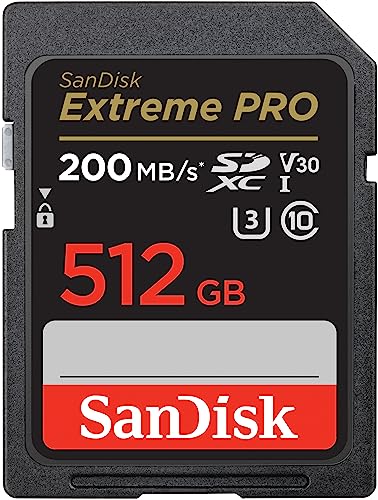
| SanDisk Extreme PRO UHS-I 512GB | SDXC, UHS-I | V30 | Up to 200 MB/s | Up to 140 MB/s | Everyday value |
| SanDisk Extreme PRO UHS-II 512GB | SDXC, UHS-II | V60 | Up to 280 MB/s | Up to about 150 MB/s | Bursts and 4K |
| Lexar Silver PRO 512GB | SDXC, UHS-II | V60 | Up to 280 MB/s | Up to 160 MB/s | Lower-cost UHS-II |
| Lexar Professional 2000x 512GB | SDXC, UHS-II | V90 | Up to 300 MB/s | Up to 260 MB/s | 8K and fast offloading |
| SanDisk Extreme PRO UHS-II V90 512GB | SDXC, UHS-II | V90 | Up to 300 MB/s | Up to 260 MB/s | Professional video |
| ProGrade Digital Gold 512GB | SDXC, UHS-II | V60 | Up to 250 MB/s | Up to 130 MB/s | Consistent quality control |
| Kingston Canvas Go! Plus 512GB | microSDXC, UHS-I | V30, A2 | Up to 200 MB/s | Up to 160 MB/s | Drones, action cameras, handhelds |
SanDisk Extreme PRO UHS-I V30: Best Value 512GB Card
This is the card for people whose cameras only have a UHS-I slot. SanDisk lists the 512GB model at up to 200 MB/s read and up to 140 MB/s write, with C10, U3 and V30 markings. SanDisk’s published speeds depend on capacity, with the 256GB to 1TB cards getting the faster write figure and the 64GB to 128GB cards rated lower.
Who it is for: travelers, hybrid shooters and anyone who wants a big card for all-day 4K recording at normal bitrates without paying for speed their camera ignores.
Pros:
- Works in every modern camera with an SD slot
- Generous 140 MB/s rated write for a UHS-I card
- Lowest cost per gigabyte among the cards here
Cons:
- Not suitable for the highest-bitrate video modes
- Slower card-to-computer transfers than UHS-II models, since a 512GB card at the 200 MB/s read rating needs over 40 minutes to empty
SanDisk Extreme PRO UHS-II V60: Best Mainstream Upgrade
SanDisk’s UHS-II Extreme PRO in 512GB is listed with up to 280 MB/s read and a V60 rating, which guarantees at least 60 MB/s of sustained writing. Listings of related part numbers show slightly different read and write figures, with some newer versions quoting up to 300 MB/s read, so confirm the exact SKU if you compare prices. SanDisk’s product page notes that you need a UHS-II reader to get the full performance.
Who it is for: shooters who want faster card reading and the headroom for 10-bit video, but whose cameras top out at V60 requirements.
Pros:
- Clear guaranteed minimum write for video work
- Large capacity from a reliable, widely stocked brand
- Drops back to UHS-I speeds in older cameras without trouble
Cons:
- Write speed is modest compared with V90 cards
- Price climbs steeply at 512GB compared with 256GB
Lexar Silver PRO: Best Lower-Cost UHS-II
Lexar lists the Silver PRO 512GB as UHS-II, V60 and U3, with up to 280 MB/s read and up to 160 MB/s write. It typically undercuts SanDisk’s equivalent, and Lexar’s own range lists a 1TB Silver capacity too, which makes it a natural choice if you may scale up later.
Who it is for: shooters on a budget who still want UHS-II offload speeds and V60 video headroom.
Pros:
- Rated write speed is slightly higher than the SanDisk V60
- Lower cost than most UHS-II cards at this capacity
Cons:
- Not intended for 8K or the heaviest codecs
- Fewer ruggedness claims than premium lines
Lexar Professional 2000x: Best V90 at 512GB
According to Lexar’s product page, the Professional 2000x Gold series ships in 64GB, 128GB, 256GB and 512GB, rated V90 with up to 300 MB/s read and up to 260 MB/s write. It targets 8K and cinema-quality recording. At the rated read speed, filling and emptying a 512GB card takes about 29 minutes (512,000 MB divided by 300 MB/s is roughly 1,707 seconds), so offloading goes a lot faster than with a UHS-I card.
Who it is for: video crews and event photographers who want the biggest card with a V90 guarantee in one piece.
Pros:
- One of few V90 lines that reaches 512GB
- High read speed shortens offload time
Cons:
- Premium pricing at this capacity
- Rated write speed is rarely reached in practice
SanDisk Extreme PRO UHS-II V90: Best for Professional Video
SanDisk also sells a V90 Extreme PRO in 512GB, listed at up to 300 MB/s read and up to 260 MB/s write. It has the brand’s support network and long track record in cinema and broadcast kits. Some reviews quote other write figures for the 256GB model, so rely on the guaranteed minimum of 90 MB/s rather than the headline when planning a codec.
Who it is for: professionals who already standardize on SanDisk and want the highest guaranteed sustained write in 512GB.
Pros:
- V90 sustained write guarantee
- Easy to find replacement cards anywhere in the world
Cons:
- One of the most expensive cards in this roundup
- Counterfeits circulate widely for popular SanDisk models
ProGrade Digital Gold: Best for Consistent Quality Control
ProGrade Digital builds its cards with a focus on testing every unit. Its Gold UHS-II V60 line is rated up to 250 MB/s read and up to 130 MB/s write, with capacities between 64GB and 512GB. It is slower on paper than competing V60 cards, but its audience is professionals who value predictable behavior and a vendor with a photography focus over peak numbers.
Who it is for: photographers shooting RAW bursts for clients who want a card brand dedicated to the professional market.
Pros:
- Professional-oriented brand with a clear V60 guarantee
- Available in 512GB alongside matching card readers
Cons:
- Lower write rating than comparable V60 competitors
- Less available in physical stores
Kingston Canvas Go! Plus microSD: Best 512GB for Drones and Handhelds
Not every large card is a full-size SD. Kingston’s Canvas Go! Plus 512GB is a microSDXC card rated U3, V30 and A2, with up to 200 MB/s read and up to 160 MB/s write. It is a different product from the full-size SD cards above because it uses the UHS-I bus. The A2 rating helps with app loading on handheld gaming devices, and the V30 rating handles 4K from drones and action cameras.
Who it is for: drone pilots, action camera users and owners of handheld gaming PCs who need big capacity in a small card.
Pros:
- A2 application performance and V30 video class
- Useful across drones, phones and handhelds
Cons:
- Not for UHS-II cameras that need full-size SD cards
- Easier to lose because of its small size
The Real Question: One 512GB Card or Two 256GB Cards?
Capacity is only half the decision. The larger the card, the more you lose if it fails, and flash cards fail without warning more often than most people expect. A simple risk calculation helps. Suppose a card has a small chance, p, of failing during any given shoot. With one 512GB card holding the whole day, a failure costs you 100 percent of the work. With two 256GB cards, a single failure costs you about 50 percent, and with dual-slot mirrored recording it can cost nothing. The failure chance doubles if you use two cards, but the expected loss stays about the same while the worst case is halved, and the worst case is what hurts.
| Approach | Cards used | Worst-case loss from one failure | Best for |
|---|---|---|---|
| Single 512GB card | 1 | Everything on the card | Casual travel, backed up every night |
| Two 256GB cards, sequential | 2 | About half of the work | Event shooters with one slot |
| Two cards, mirrored in dual slots | 2 | Nothing, if the other card survives | Weddings and paid commissions |
| 512GB plus backup SSD offload at lunch | 1 + SSD | Only the work since the last offload | Video crews on location |
How Much Footage and How Many Photos Fit on 512GB
A card labeled 512GB shows roughly 476 GiB in a computer, because labels use decimal units. After allowing for that, estimate recording time with simple math: divide the usable megabytes by the data rate in megabytes per second. Here are common examples, rounded.
| Content | Data rate | Approx. capacity on 512GB |
|---|---|---|
| 1080p at 50 Mbps | 6.25 MB/s | about 22 hours |
| 4K at 100 Mbps | 12.5 MB/s | about 11 hours |
| 4K 10-bit at 150 Mbps | 18.75 MB/s | about 7.5 hours |
| 4K all-intra at 400 Mbps | 50 MB/s | about 2.8 hours |
| Compressed 8K at 1,000 Mbps | 125 MB/s | about 68 minutes |
| RAW stills at 50 MB per file | per file | about 10,000 images |
Actual figures vary by camera. File systems also matter: cards of 64GB and above use exFAT, and many cameras split long clips into several files at around 4 GB or on a time limit, which does not change total capacity.
How to Choose a 512GB SD Card
Confirm the camera supports SDXC with exFAT
Cards above 32GB use the SDXC standard with exFAT, and cards above 2TB use SDUC. Nearly every camera made in the last decade handles 512GB, but a few older bodies cap supported capacity. Check the manual or the manufacturer’s compatibility list before buying a card for an older camera or a video recorder.
Match the class to the codec
Choose V30 for routine 4K, V60 for high-bitrate 4K and 10-bit modes, and V90 for 8K, RAW video and long continuous recording. If the manual lists a required class for a mode, buy the next tier up to leave room for slowdowns as the card fills and heats up.
Check the reader and the offload plan
A 512GB card takes real time to copy. At 90 MB/s through a basic reader, copying a full card takes about 95 minutes, while a UHS-II reader at around 250 MB/s cuts that to roughly 34 minutes. Verify the copy with checksums when the footage matters, and keep a second copy before reformatting.
Think about longevity and temperature
Cards heat up during sustained writes, and heat can lower performance. Rotating cards between shoots, keeping them out of direct sun and avoiding repeated reformatting at nearly full capacity all help. Replace cards on a schedule, such as every few years for professional use, rather than waiting for a failure.
Decision Matrix
| Your situation | Best match | Why |
|---|---|---|
| UHS-I camera, long travel days | SanDisk Extreme PRO UHS-I V30 | Big capacity at the best price |
| Mirrorless with UHS-II, mixed photo and video | SanDisk Extreme PRO V60 or Lexar Silver PRO | Fast offload and V60 guarantee |
| 8K or RAW video | Lexar 2000x or SanDisk V90 | V90 sustained writes |
| Client work with strict quality standards | ProGrade Digital Gold | Professional focus and consistent QC |
| Drone, action camera or handheld | Kingston Canvas Go! Plus microSD | A2 and V30 in a small format |
Verifying a New Large Card
Large cards are a favorite target for counterfeiters, who sell cards that report 512GB but contain far less memory. A fake card accepts files until its real capacity is used and then silently overwrites older data. Check a new card before relying on it.
- Buy from the manufacturer or an authorized reseller and compare packaging and part numbers with the brand’s website.
- Format the card in your camera, then fill it completely with test files using a capacity verification tool.
- Read every file back and confirm that the checksums match.
- Record a few minutes of your highest-bitrate video mode and confirm the camera never drops frames or shows a speed warning.
- Keep the receipt and register the card where the maker offers warranty or recovery services.
Workflow Habits That Protect Large Cards
Big cards reward discipline. A few habits cost nothing and prevent most of the heartbreak stories photographers tell. Start each day with a freshly formatted card, formatted in the camera that will use it, because the camera writes the folder structure and file allocation it expects. Never delete single files in the camera on a nearly full card, since repeated partial deletions fragment the file system; offload everything, then format.
Use a labelled case with separate pockets for blank and used cards. A common studio rule is that a card flips upside down in its slot once it holds shot images, so nobody formats it by accident. Log the shoot date on a strip of tape or in a spreadsheet, and do not reformat a card until the footage has been copied to two independent drives and the copies have been verified.
Heat, cold and battery interactions
Continuous 8K or high-bitrate recording heats both the camera and the card. If the camera shows an overheating warning, a fast card is not the cause, but a card that is already hot can throttle writes and introduce dropped frames. In cold weather, keep spare cards in an inside pocket, because very cold flash can behave unpredictably and condensation forms when a cold card is brought into a warm room. Let it warm up in a sealed bag before removing it.
Plan for the card at the end of its life
Flash memory has a limited number of write cycles, although modern cards handle many thousands. Heavy video users who fill and erase a card most days can reach meaningful wear within a few years. Retire cards that show slowdowns, unexplained errors or file corruption, and use retired cards for non-critical tasks such as test shots. Keep your newest and most trusted cards for jobs that cannot be repeated.
Frequently Asked Questions
Is a 512GB SD card worth it?
It is worth it if you record long video, shoot RAW for many hours or cannot back up during a trip. For casual photography, a 128GB or 256GB card is enough, and using two smaller cards spreads the risk.
Will my camera accept a 512GB card?
Most cameras from the last decade do, as the SDXC standard supports up to 2TB. Older cameras and some video recorders may limit capacity, so check the manual.
What speed class do I need for 4K?
V30 works for typical 4K recording. High-bitrate or 10-bit 4K often needs V60, and 8K or RAW needs V90. Your camera’s manual lists the requirement for each mode.
Why is my 512GB card showing less space?
Manufacturers count a gigabyte as one billion bytes, while computers show gibibytes. That makes a 512GB card appear as roughly 476 GB, and the file system uses a little more.
Can I use a microSD card with an adapter in my camera?
You can for basic use, but adapters do not turn a UHS-I microSD into a UHS-II card, and cameras needing V60 or V90 will warn or limit recording. Buy a full-size card made for the speed class your camera requires.
How do I recover photos from a failed card?
Stop using the card immediately and avoid saving anything to it. Try recovery software on a copy of the card image, and if the files matter, contact a professional recovery service rather than repeatedly trying different tools.
Bottom Line
For most people, the SanDisk Extreme PRO UHS-I V30 delivers the capacity you want at the lowest cost. Step up to the SanDisk or Lexar V60 cards for UHS-II offloading, choose the Lexar Professional 2000x or SanDisk V90 for 8K and heavy video, and pick the Kingston Canvas Go! Plus for drones and handhelds. Whichever card you buy, verify it when new, offload often and think twice before putting a whole shoot on a single card.








Write Your Review
No reviews yet. Be the first to share your experience!