

Key takeaways
- Strong rated write speed for a single-row card
- Widely available and compatible with older cameras
- Good value per gigabyte in this capacity
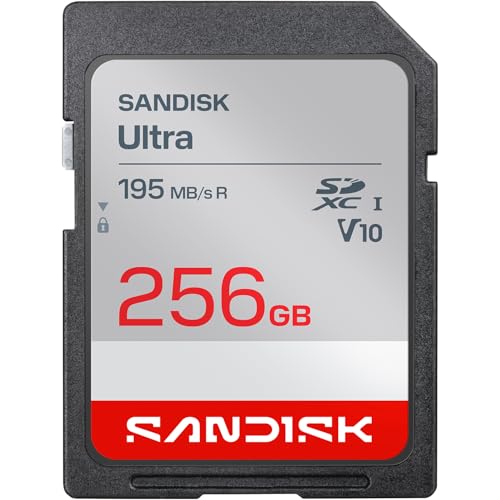
The best 256GB SD card for most photographers in 2026 is the SanDisk Extreme PRO UHS-I V30, which is rated up to 200 MB/s read and 140 MB/s write and handles 4K video and fast RAW bursts on almost every camera. If your camera has UHS-II slots and you shoot long bursts or high-bitrate video, step up to a V60 or V90 card such as the Kingston Canvas React Plus, Lexar Professional 2000x, Sony Tough SF-G or Angelbird AV PRO. The right card depends on your camera’s slot, your bitrate and how much abuse the card will take.
Our top picks



As an Amazon Associate we earn from qualifying purchases at no extra cost to you.
Best 256GB SD Cards Compared
Speeds below are the manufacturers’ rated maximums, which are measured under ideal conditions. Real-world write speeds are usually somewhat lower, so the guaranteed minimum (the V rating) is the number to plan around. Where sources disagree on a rated figure, the table gives the commonly published value and the text flags it.
| Card | Bus / video class | Rated read | Rated write | Best for |
|---|---|---|---|---|
| SanDisk Extreme PRO 256GB | UHS-I, V30 | Up to 200 MB/s | Up to 140 MB/s | All-round value, 4K video |
| SanDisk Extreme PRO 256GB UHS-II | UHS-II, V60 | Up to 280 MB/s | Up to about 150 MB/s | Fast bursts, easy upgrade |
| Lexar Professional Silver PRO 256GB | UHS-II, V60 | Up to 280 MB/s | Up to 160 MB/s | Budget UHS-II speed |
| Kingston Canvas React Plus 256GB | UHS-II, V90 | Up to 300 MB/s | Up to 260 MB/s | High-bitrate video value |
| Lexar Professional 2000x 256GB | UHS-II, V90 | Up to 300 MB/s | Up to 260 MB/s | Fast offloading |
| Sony SF-G Tough 256GB | UHS-II, V90 | Up to 300 MB/s | Up to 299 MB/s | Rugged field work |
| Angelbird AV PRO SD V90 256GB | UHS-II, V90 | Up to 300 MB/s | Up to 280 MB/s | Sustained writes, data recovery service |
SanDisk Extreme PRO UHS-I V30: Best Overall
For general use, this is the card to beat. SanDisk’s published specification lists up to 200 MB/s read, and write speeds of up to 140 MB/s on the 256GB to 1TB capacities (the 64GB and 128GB versions are rated lower at 90 MB/s). It carries the V30 rating, meaning a guaranteed minimum of 30 MB/s sustained writing, which comfortably covers 4K video up to about 240 Mbps.
Who it is for: hobbyists, travel photographers, vloggers and anyone whose camera has only UHS-I slots. Putting a UHS-II card into a UHS-I-only camera wastes the extra speed, so this card avoids paying for performance you cannot use.
Pros:
- Strong rated write speed for a single-row card
- Widely available and compatible with older cameras
- Good value per gigabyte in this capacity
Cons:
- Cannot sustain the very high bitrates of 6K or 8K recording
- Buffer clearing after long bursts is slower than UHS-II cards
- Counterfeit copies are common from unofficial sellers, so buy from authorized retailers
SanDisk Extreme PRO UHS-II V60: Best Step-Up for Burst Shooters
This card adds the second row of pins that UHS-II slots use. It is rated up to 280 MB/s read and, in the listings that publish it, up to about 150 MB/s write, with a V60 rating that guarantees at least 60 MB/s sustained. Newer SanDisk listings show somewhat different figures, so check the exact part number if write speed matters to you.
Who it is for: sports and wildlife shooters who fire long bursts and want the buffer to clear quickly, and videographers recording 4K at higher bitrates or 10-bit formats.
Pros:
- Faster offloading with a UHS-II card reader, often more than twice the UHS-I rate
- V60 guarantees headroom for high-bitrate 4K
- Backward compatible with UHS-I cameras
Cons:
- Write speed is well below V90 cards
- Costs more than the UHS-I version for modest gains in some cameras
- Needs a UHS-II reader to show its full speed
Lexar Professional Silver PRO: Best Budget UHS-II Card
Lexar lists its Silver PRO as a UHS-II, V60, U3 card with up to 280 MB/s read and up to 160 MB/s write. That write figure is slightly higher than the SanDisk V60, and the price usually sits lower. One reviewer reported strong sustained writes from the related Lexar ARMOR Gold V60 line, but treat individual benchmark numbers as dependent on the test camera and reader.
Who it is for: shooters who want UHS-II benefits without the V90 premium, such as event photographers who offload hundreds of images between jobs.
Pros:
- Good write speed for the tier
- Often the lowest cost UHS-II option
- Same V60 sustained write guarantee
Cons:
- Brand has a shorter reputation among professional video users than SanDisk or Sony
- Not suited to the highest-bitrate formats
Kingston Canvas React Plus V90: Best V90 Value
Retailer and manufacturer listings describe the Canvas React Plus as a UHS-II, U3, V90, Class 10 card with up to 300 MB/s read, up to 260 MB/s write and a 90 MB/s minimum write. The 256GB capacity is the largest in the V90 line, which matters if you plan to move to a bigger card later. In one published speed comparison it measured about 274 MB/s write, close to the leaders.
Who it is for: videographers recording high-bitrate 4K, 6K or compressed 8K, and photographers who want the fastest buffer clearing without the highest prices.
Pros:
- V90 sustained write guarantee at a reasonable price
- Consistent real-world speed in published comparisons
- Widely supported by cinema and mirrorless cameras
Cons:
- No 512GB version in the V90 line
- Less ruggedized than the Sony Tough
Lexar Professional 2000x: Best for Fast Offloading
Lexar’s Gold series 2000x card is rated V90 with up to 300 MB/s read and up to 260 MB/s write, in capacities from 64GB to 512GB. It is advertised for 8K and cinema-quality video. With a UHS-II reader, a full 256GB card can theoretically empty in roughly 15 minutes at 300 MB/s (256,000 MB divided by 300 MB/s is about 853 seconds), which is a significant time saver on a busy shoot.
Who it is for: commercial photographers and video crews who offload frequently and want a V90 card that comes in larger sizes if the shoot grows.
Pros:
- High read speed for fast transfers
- Available up to 512GB if you later need more capacity
- V90 rating suitable for demanding codecs
Cons:
- Real-world writes usually land below the 260 MB/s rating
- Higher price than V60 cards
Sony SF-G Tough: Best for Rugged Field Work
Sony’s SF-G Tough series is built differently. The card is a single molded piece rather than a glued shell, and Sony states it is about 18 times more resistant to bending than the SD standard requires, survives drops from up to 5 meters and carries an IP68 rating for dust and water. It is rated for up to 300 MB/s read and up to 299 MB/s write with a 90 MB/s minimum, and it comes with a five-year limited warranty. A published real-world check measured around 234 MB/s write and 269 MB/s read, so expect lower numbers than the headline rating. It has no write-protect switch.
Who it is for: adventure, wildlife and documentary shooters who put cards in wet, dusty or cold environments, and anyone who has cracked a card in a pocket or bag.
Pros:
- Best build quality among SD cards
- Very high rated write speed
- Five-year warranty
Cons:
- One of the more expensive 256GB cards
- No physical write-protect switch
Angelbird AV PRO SD V90: Best for Sustained Writes
Angelbird’s AV PRO is aimed at professional video work. Published specifications list up to 300 MB/s read and 280 MB/s write, a V90 rating and a 90 MB/s minimum, along with a write-protect switch. The company advertises a Stable Stream design for consistent writing around 260 MB/s and offers a free in-house data recovery service for registered cards, with a three-year warranty. In one speed comparison, the card measured about 272 MB/s write and 295 MB/s read, among the best results.
Who it is for: filmmakers recording long takes at high bitrates who value consistent performance and a safety net if a card fails.
Pros:
- Fastest real-world writes in published comparisons
- Write-protect switch and recovery service
- Consistent sustained speed
Cons:
- Priced at the premium end
- Shorter warranty than the Sony
How to Choose a 256GB SD Card
Check your camera’s slot first
Look up whether the camera supports UHS-I or UHS-II. UHS-I tops out near 104 MB/s of actual bus speed, so a UHS-II card in a UHS-I slot runs at UHS-I speed. Some cameras have one UHS-II slot and one UHS-I slot, and the slower slot limits that side. Also confirm whether the camera supports V60 or V90 recording modes; the manual lists recommended card classes for each codec.
Match the video class to your bitrate
The V rating is the minimum sustained write speed in MB/s. A 4K recording at 100 Mbps needs only 12.5 MB/s, so even V30 is more than enough. A 10-bit 4:2:2 all-intra 4K mode at about 400 Mbps needs 50 MB/s, which calls for V60 or V90. Always divide the bitrate in megabits per second by eight to get megabytes per second, then leave a margin of at least 30 percent for overhead.
Capacity math: how much does 256GB record?
Formatted capacity is smaller than the label, roughly 238 GiB as shown by a computer, because the label counts in decimal gigabytes. The table gives practical estimates.
| Content | Typical data rate | Approx. recording on 256GB |
|---|---|---|
| 4K video, 100 Mbps | 12.5 MB/s | about 5.7 hours |
| 4K video, 200 Mbps | 25 MB/s | about 2.8 hours |
| 4K 10-bit all-intra, 400 Mbps | 50 MB/s | about 85 minutes |
| 45-megapixel RAW photos, about 50 MB each | per file | about 5,000 images |
| 24-megapixel RAW photos, about 30 MB each | per file | about 8,500 images |
These are estimates, since file sizes vary with scene detail, compression and camera model.
Consider durability and warranty
Look for waterproof, shock-proof and X-ray-proof ratings if you travel. Lifetime or multi-year warranties are common, but a warranty does not recover lost photos, so cards with recovery services such as Angelbird’s add real value for paid work.
Avoid counterfeits
Fake cards report a large capacity but overwrite old data once the real capacity is full. Buy from authorized dealers, check that the packaging and serial numbers match the manufacturer’s site, and test a new card by filling it with a verification tool before an important shoot.
Decision Matrix
| Your situation | Best match | Why |
|---|---|---|
| Hobbyist with a UHS-I camera | SanDisk Extreme PRO UHS-I V30 | No wasted UHS-II cost |
| Sports or wildlife bursts | SanDisk or Lexar V60 | Faster buffer clearing |
| High-bitrate 4K and 6K video | Kingston Canvas React Plus V90 | V90 guarantee at a fair price |
| Harsh outdoor conditions | Sony SF-G Tough | IP68 and bend-resistant body |
| Paid video work with long takes | Angelbird AV PRO V90 | Consistent writes and recovery service |
| Need to upgrade to 512GB later | Lexar Professional 2000x | Same V90 line available in 512GB |
Care and Handling Tips
- Format the card in the camera, not on a computer, each time you start a new shoot after backing up.
- Do not remove the card while the access light is blinking.
- Offload to two places before erasing, for example a laptop drive and an external SSD.
- Rotate cards so that no single card carries every shoot, and retire cards that show errors.
- Store cards in a case away from heat, magnets and moisture.
- Use a UHS-II reader on a fast USB port for full transfer speed.
Offloading, Readers and Dual-Slot Strategy
A fast card only helps if the rest of the chain keeps up. The reader matters as much as the card: a UHS-II reader connected to a USB 3.2 port can approach the card’s rated read speed, while a cheap UHS-I reader or an old USB 2.0 port will cap transfers at a fraction of that. Many laptop SD slots are UHS-I only, so a separate USB reader is often the best accessory purchase after the card itself. Reading straight from the camera over USB is usually slower and drains the battery, so most professionals remove the card.
Dual-slot cameras let you decide how to use two cards. Recording the same file to both is the safest approach for weddings and commissioned work. Writing RAW to one card and JPEG to the other gives you quick-turnaround files plus full-quality masters. Overflow mode simply continues onto the second card when the first fills. If the two slots differ in speed, put the faster V90 card in the UHS-II slot and use the slower slot for backup or JPEG copies, because the camera’s buffer clears at the speed of the slowest card when recording the same data to both.
Other cards worth knowing about
The cards above are not the only credible options. ProGrade Digital’s Gold UHS-II V60 line is rated for up to 250 MB/s read and 130 MB/s write in capacities from 64GB to 512GB, and the company positions it at professionals who value consistent quality control. It is slower on paper than a V90 card, but it can be a sensible mid-tier choice. Whatever the brand, read the printed speed class symbols on the label rather than relying on marketing names, since the V and U symbols are the guaranteed minimums.
Finally, build a simple routine. Number your cards, log which ones you used for which jobs and keep a record of any that show errors. If a card ever fails to mount, stop using it immediately, because continued writes can overwrite recoverable data. Recovery software works best on a card that has not been written to since the problem began, and professional services are an option for irreplaceable footage.
Frequently Asked Questions
Is 256GB enough for a day of shooting?
For most photographers, yes. At about 30 to 50 MB per RAW file, a 256GB card holds well over five thousand images. For video, it depends on bitrate, and high-bitrate modes may fill it in under two hours.
Do I need V90 for 4K video?
Usually not. Most 4K modes record at 100 to 200 Mbps, which V30 handles easily. V60 or V90 is needed for high-bitrate all-intra, 10-bit and 6K or 8K modes. Check your camera’s manual for the required class.
Will a UHS-II card work in my UHS-I camera?
Yes, UHS-II cards are backward compatible, but they run at UHS-I speeds in that camera. You will still get faster transfers when you move the card to a UHS-II reader.
Is one big card or two smaller cards safer?
Two smaller cards reduce the risk of losing a whole shoot to a single failure. If your camera has dual slots, using two cards for redundant recording is the safest approach for paid work.
What is the difference between SD and microSD for drones and handhelds?
Full-size SD cards fit cameras, while microSD cards fit drones, action cameras and handheld consoles. Do not use an adapter in a camera that needs a UHS-II speed. Buy microSD cards labelled for your device, such as A2 and V30 models for handhelds.
How long do SD cards last?
Quality cards commonly last for years of normal use, but flash memory wears out with writes. Replace cards that throw errors, and never rely on a single copy of important files.
Bottom Line
The SanDisk Extreme PRO UHS-I V30 is the sensible choice for most people with a 256GB card. Move to a V60 card when bursts matter, choose Kingston, Lexar or Angelbird V90 cards for demanding video, and pick the Sony Tough when conditions are rough. Buy from authorized sellers, match the card to your camera’s slot, and always keep a second copy of your files.








Write Your Review
No reviews yet. Be the first to share your experience!