

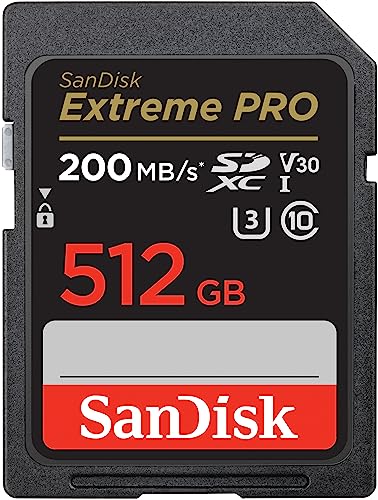
There is no true 500GB SD card: the capacity is sold as 512GB, which is what you should shop for. The best 512GB cards for most cameras are the SanDisk Extreme PRO SDXC UHS-I and the Lexar Professional 1066x, while phones, handhelds and drones usually want a 512GB microSD such as the SanDisk Extreme or the Samsung PRO Plus. Pick by what your device writes, not by the biggest speed number on the label.
Our top picks


As an Amazon Associate we earn from qualifying purchases at no extra cost to you.
Quick comparison of 512GB card picks
| Pick | Best for | Format / class | Rated read / write | Price range |
|---|---|---|---|---|
| SanDisk Extreme PRO SDXC UHS-I 512GB | Best overall SD card | Full-size SD, UHS-I, V30 | Up to about 200 / 140 MB/s | Mid |
| Lexar Professional 1066x SDXC 512GB | Value for 4K video | Full-size SD, UHS-I, V30 | Up to about 160 / 120 MB/s | Mid |
| ProGrade Digital SDXC UHS-II V60 512GB | Burst shooting and high-bitrate video | Full-size SD, UHS-II, V60 | Around 250 / 130 MB/s class | Upper-mid |
| SanDisk Extreme microSDXC 512GB | Drones, action cameras, handhelds | microSD, V30, A2 | Up to about 190 / 130 MB/s | Mid |
| Samsung PRO Plus microSDXC 512GB | Phones and Steam Deck-style handhelds | microSD, V30, A2 | Up to 180 / 130 MB/s | Mid |
These are manufacturer ratings. Real speeds depend on the reader, the host device and the file size, and some listings quote lower write speeds at smaller capacities.
Best overall: SanDisk Extreme PRO SDXC UHS-I 512GB
SanDisk rates the Extreme PRO UHS-I at up to roughly 200 MB/s read and 140 MB/s write, with a V30 video class, which means a sustained minimum of 30 MB/s. That covers 4K video at typical camera bitrates and fast burst photography on most DSLR and mirrorless bodies that use UHS-I slots. SanDisk also supplies recovery software and a lifetime limited warranty in many regions. The trade-off is that it does not use the UHS-II pins, so cameras with UHS-II slots will not reach their full speed.
Best value for 4K: Lexar Professional 1066x SDXC 512GB
Lexar’s 1066x series is rated near 160 MB/s read and 120 MB/s write with a V30 class. For 4K at 100 to 150 Mbps video, the write rate is enough, and the price is usually lower than SanDisk’s. The drawback is lower burst-buffer clearing speed on cameras that can use faster cards, plus a shorter record of independent benchmark data.
Best for fast burst shooting: ProGrade Digital UHS-II V60 512GB
ProGrade makes cards aimed at working photographers. A UHS-II V60 card guarantees a sustained 60 MB/s write minimum, which suits high-bitrate 4K and long RAW bursts. It only runs at full speed in a camera with a UHS-II slot and with a UHS-II reader. The trade-off is cost: you pay more per gigabyte than for UHS-I cards.
Best microSD for action and drones: SanDisk Extreme microSDXC 512GB
The Extreme microSD is rated near 190 MB/s read and 130 MB/s write with V30 and A2 ratings. It is a common pick for drones, action cameras and handheld consoles. Note that SanDisk’s smaller capacities have lower write ratings, so the 512GB model is one of the better sizes. A microSD card in a full-size adapter will not match a real SD card in sustained camera use.
Best for phones and handhelds: Samsung PRO Plus microSDXC 512GB
Samsung’s PRO Plus is rated at up to 180 MB/s read and 130 MB/s write with A2 app performance. Samsung covers it with a limited warranty of up to ten years and states resistance to water, temperature extremes, X-rays and magnets. Reviewers often find it close to the SanDisk Extreme in practice and frequently cheaper. The trade-off is that its sequential read rating is slightly lower.
What 512GB holds
| Content | Typical data rate | Approximate recording time on 512GB |
|---|---|---|
| 1080p video at 50 Mbps | About 6 MB/s | About 23 hours |
| 4K video at 100 Mbps | About 12.5 MB/s | About 11 hours |
| 4K video at 400 Mbps | About 50 MB/s | About 2.8 hours |
| RAW photos at 45 MB each | Not applicable | About 10,000 files |
These are calculated estimates using 512 GB of formatted space and rounded bitrates. Real capacity is a little lower, since a card sold as 512GB formats to about 476 GiB in Windows.
How to choose a 512GB card
- Match the slot: Check whether your camera supports UHS-I or UHS-II. UHS-II cards work in UHS-I slots but only at the lower speed.
- Check the video class: V30 is enough for most 4K. Choose V60 or V90 for high-bitrate codecs such as 4:2:2 10-bit or all-intra recording.
- Check the format: Large cards are SDXC and are formatted exFAT. Older cameras and readers may not support SDXC at all.
- Think about risk: One 512GB card holds all your shots in a single place. Many photographers prefer two 256GB cards so a failure costs less.
- Buy from authorised sellers: Counterfeit high-capacity cards are common. If a card is far cheaper than normal, suspect it.
Care and recovery
Format the card in the camera, not on a computer, so the file structure matches the device. If a card becomes unreadable, stop writing to it immediately and use recovery software or a professional service. Writing new files over a failing card lowers the chance of getting images back. Test any new large card by filling it with data and verifying the files before you rely on it.
Frequently Asked Questions
Is there a 500GB SD card?
No. Standard capacities are 128GB, 256GB, 512GB and 1TB. A card advertised as 500GB is either a mislabelled 512GB card or a suspect product.
Is a 512GB SD card too big for my camera?
Not if the camera supports SDXC, which covers cards up to 2TB. Cameras from before about 2010 may not. Check the manual for supported capacities.
What speed class do I need for 4K video?
Most 4K recording works with a V30 card. High-bitrate formats and slow-motion modes may need V60 or V90. Your camera manual lists the recommended class.
Can I use a microSD card in an SD slot?
Yes, with a proper adapter. It will work for photos and light video, but sustained camera performance is usually lower than that of a native SD card of the same rating.
How do I spot a fake memory card?
Fake cards report a large capacity but overwrite data after the real limit. Free tools that write and verify the full card can expose this. Buying from the manufacturer or an authorised retailer avoids most problems.





Write Your Review
No reviews yet. Be the first to share your experience!