
Our Short List of 3
All 5 Picks at a Glance
| Product | Specs | Action |
|---|---|---|
 Mikirini 13 in 1 PUBG Mobile Triggers Combo | Check price on Amazon | |
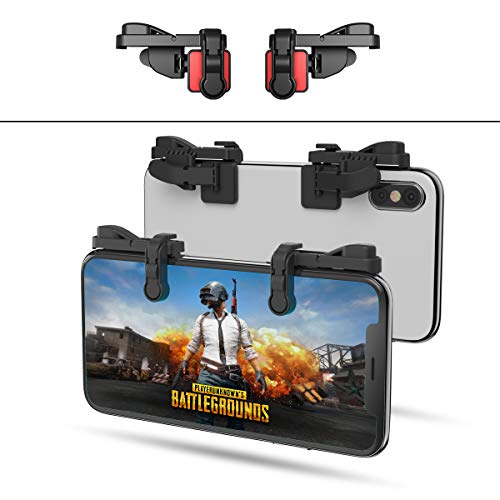 IFYOO Z108 Mobile Gaming Controller, 1 Pair | Check price on Amazon | |
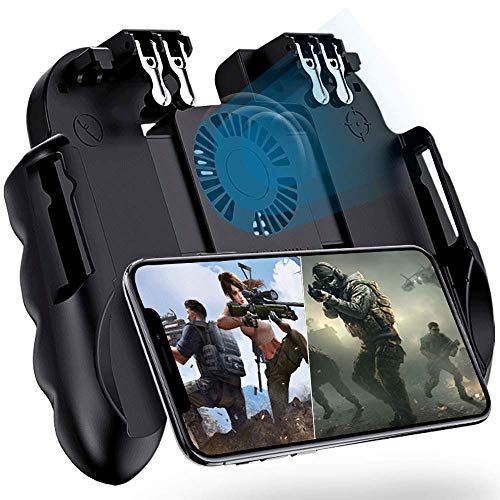 YOBWIN 4 Trigger Mobile Game Controller with Cooling Fan | Check price on Amazon | |
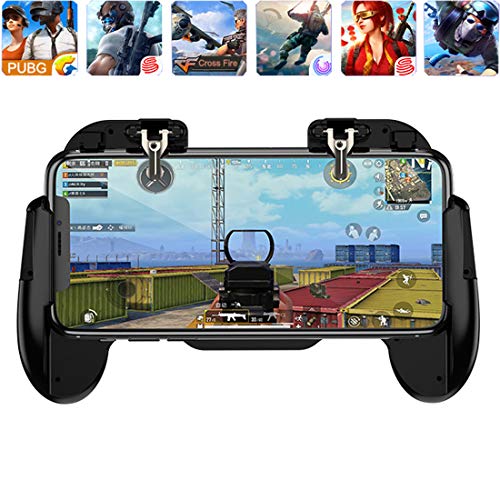 Ytuomzi H6 Mobile Phone PUBG Game Controller | Check price on Amazon | |
 Newseego Mobile Game Controller 3 in 1 Set | Check price on Amazon |
Key takeaways
- Compare the best mobile gaming triggers for faster taps, steadier aim, and longer sessions. Find a trigger set that fits your phone and your play style.
Mobile shooters reward fast reactions, steady aim, and comfortable controls, and a phone screen alone can make all three harder to manage. Clip-on triggers move fire and aim actions from the glass to physical buttons at the top edge of the phone, so fingers rest in a more natural position during long matches. The right set should fit securely, respond with a clear click, and leave the screen visible. This guide compares five trigger sets, from a large multi-piece bundle to compact pairs and a model with a built-in cooling fan.
As an Amazon Associate, we earn from qualifying purchases.
Quick answer
For most competitive players, a simple clip-on pair with a clear click and a secure grip is the best starting point. Players who want extra controls or a backup set should look at larger bundles, while players whose phones run hot during long sessions should consider a trigger set with a cooling fan. Check phone size and case fit before choosing any set.
Mikirini 13 in 1 PUBG Mobile Triggers Combo
The Mikirini 13 in 1 PUBG Mobile Triggers Combo is the broadest bundle in this guide, and it suits players who want several control options in one purchase rather than a single pair of triggers. A multi-piece set can cover different hand positions and different games, and it also provides spares if one piece is misplaced. That flexibility is the main reason to choose a combo over a basic pair, especially where more than one person plays on a phone.
The larger bundle needs more thought at setup. Start with one pair, adjust the on-screen controls to line up with the physical buttons, and only add extra pieces once that pair feels natural. Working through every piece at once can make the layout harder to learn.
Fit is the main thing to confirm before buying. The triggers need to grip the phone edge firmly without pressing the volume or power buttons, and they should sit clear of the front camera and the main play area. A thick case may need to come off, since it can change the grip and the button alignment.
IFYOO Z108 Mobile Gaming Controller, 1 Pair
The IFYOO Z108 Mobile Gaming Controller, 1 Pair, is a straightforward clip-on option for players who want physical fire and aim buttons without a large bundle or extra parts. A single pair keeps setup simple: clip one trigger on each side of the top edge, line up the on-screen controls, and play. That simplicity makes it a sensible first trigger set for someone moving from touchscreen controls to physical buttons for the first time.
A pair of this kind works best when the clips hold the phone firmly and the buttons give a clear, consistent press. It should stay in place during quick movements and release cleanly after each press, so a single tap does not turn into a longer hold. A secure fit matters more than any extra feature.
This set is also easy to carry and store, which suits players who game on the move. It takes up little space in a bag and can be removed quickly when the phone is needed for other apps. Players who prefer a minimal setup and a short learning curve should put this pair near the top of the list.
YOBWIN 4 Trigger Mobile Game Controller with Cooling Fan
The YOBWIN 4 Trigger Mobile Game Controller with Cooling Fan is built for players who want more buttons and help with heat during long sessions. Four triggers give extra control options beyond a basic fire and aim pair, so a player can assign additional actions to the extra buttons and keep thumbs free for movement and looking around. That layout can suit fast shooters where crouching, jumping, scoping, and firing all need quick access.
The cooling fan is the feature that sets this model apart. Phones can warm up during long sessions, and a warm phone can feel uncomfortable to hold. A fan aimed at the back of the phone is intended to move air across the case and help the device stay cooler. Leave space for airflow and avoid covering vents while the fan is running.
This model suits players who play for longer stretches and want a fuller control layout in one device. It is larger than a simple clip-on pair, so players who prefer a light, pocketable setup may find it more than they need. For extended sessions at home, the extra buttons and the fan make it a distinctive option.
Ytuomzi H6 Mobile Phone PUBG Game Controller
The Ytuomzi H6 Mobile Phone PUBG Game Controller is a compact controller-style option for players who want a firmer grip and a more gamepad-like feel than a bare pair of clip-on triggers. A controller frame can make a phone easier to hold for long periods, since it gives the hands a defined shape to grip and keeps the fingers in a steadier position. That can help during matches where the phone would otherwise feel flat and slippery.
The key question with any controller-style grip is fit. The frame needs to suit the phone length and thickness, and it should hold the device firmly without pressing side buttons by accident. Confirm that the charging port and speaker openings remain usable while the phone sits in the grip. A good fit should feel secure without forcing the phone into place.
This model is a good match for players who like a solid hold and a controller feel, and who mostly play in one place. It is less minimal than a small trigger pair, but that trade can be worth it for comfort over a long evening of matches. Check the listed phone size range and case guidance before ordering.
Newseego Mobile Game Controller 3 in 1 Set
The Newseego Mobile Game Controller 3 in 1 Set is a versatile bundle for players who want triggers and joysticks in a single purchase. The three-part approach can suit different games and different hand positions, since a player can use the triggers for shooters and the joystick parts for games that need finer movement control. It is also useful for trying more than one control style without buying separate accessories for each one.
As with other bundles, start with one combination and learn it properly before changing the layout. Moving buttons around too often makes it harder to build the muscle memory that competitive play depends on. Set the on-screen controls to match the physical triggers, then play several casual matches before judging the layout.
This set suits players who play more than one type of mobile game and want a flexible kit that covers triggers and joysticks together. It is also practical for a household with more than one player, since the extra parts can be shared. Confirm phone fit and case clearance first, and keep the spare parts together.
How to choose
Start with phone fit, because a trigger that does not fit securely will slide, block the screen, or press the wrong button. Check the listed phone size range and be ready to remove a thick case if the clips cannot grip properly. Next, think about button layout: a simple pair suits most players, while four triggers suit players who want extra actions within easy reach. Comfort matters as much as speed, so look for a design that lets the index fingers rest naturally without stretching or cramping.
Consider heat and session length as well. Short matches may not need a fan, while hours of play may call for cooling and a grip that stays comfortable. Small clip-on pairs travel well, while larger frames and fan models suit play at home. Finally, check that the on-screen controls can be moved to line up with the physical buttons, since fixed controls can limit the benefit.
Who should skip
Mobile gaming triggers are not for every player. Players who are happy with touchscreen controls, or who mainly play slow puzzle and strategy games, may gain little from physical buttons. Players with very small or unusually shaped phones should also be cautious, since a poor fit can block the screen or press side buttons. Anyone who plays only in short bursts may prefer to keep the phone bare.
Triggers are also a poor match for games that do not allow custom control layouts, or for players who do not want to spend time adjusting buttons and learning a new grip. If a game locks its fire and aim buttons in place, a clip-on trigger may not line up with them. In those cases, adjust the on-screen layout first, and only add hardware once the game and the phone both support it.
FAQ
Do mobile gaming triggers work with any phone?
Most clip-on triggers are made to fit a range of common phone sizes, but they do not fit every phone. Check the listed size range, the phone thickness, and whether a case must be removed. A trigger that is too tight can press side buttons, while one that is too loose can slide during play and block the view.
Do I need to change my game settings to use triggers?
Yes, in most cases the on-screen fire and aim buttons should be moved so they sit directly under the physical triggers. This step is essential, since the triggers press the screen at a fixed point. Adjust button size and position, then play a few casual matches before changing anything else.
Will a cooling fan stop my phone from getting hot?
A cooling fan can help move air across the back of the phone during long sessions, but it will not remove all heat from demanding games. Keep the phone out of direct sunlight, close unused apps, and leave space for airflow. If the phone still feels very hot, take a break and let it cool down.
Are trigger sets good for beginners?
Yes, a simple pair is often the best starting point for a beginner. A basic set has fewer buttons to learn and less setup, and it makes it easier to tell whether physical controls suit your play style. Start with one pair, learn the layout, and only move to a larger bundle later.
Final verdict
The best mobile gaming trigger set is the one that fits your phone, matches your game, and feels comfortable over a full session. A simple pair is the safest starting point for most players, a larger bundle suits players who want options and spares, and a fan model suits long sessions where heat is a concern. Compare fit and button layout first, set the on-screen controls to match the triggers, and give the new layout time before judging it.
Product and ASIN Reference
| Product | ASIN |
|---|---|
| Mikirini 13 in 1 PUBG Mobile Triggers Combo | B0BNY5KW7Q |
| IFYOO Z108 Mobile Gaming Controller, 1 Pair | B07GGSHVCN |
| YOBWIN 4 Trigger Mobile Game Controller with Cooling Fan | B07STYB1P9 |
| Ytuomzi H6 Mobile Phone PUBG Game Controller | B07QWYD69K |
| Newseego Mobile Game Controller 3 in 1 Set | B07JW3ZKLZ |
More from Amazon
Programs that pair well with the guide above. Offers and eligibility are set by Amazon and may change.
A free business account with business pricing and bulk-buying tools for work, shop or home office.
Create a business accountFree shipping on eligible items, Prime Video and more. Eligible new members can start with a free trial.
Start a Prime free trialAudiobooks and podcasts to listen to on the go. Eligible new members can start with a free trial.
Try Audible freeAd-free music streaming. Eligible new subscribers can start with a free trial.
Try Music Unlimited freeAs an Amazon Associate we earn from qualifying purchases.
Write Your Review
No reviews yet. Be the first to share your experience!