

Key takeaways
- SanDisk Extreme Portable SSD V2 1TB review covering its listed speeds, IP65 sealing, drop rating, and the Old Model listing change to know first.
The SanDisk Extreme Portable SSD V2 asks a pointed question: how much speed will you trade for a sealed, drop-rated drive from the previous generation? Amazon has retitled the listing with the words Old Model because a faster successor now sits above it, and stock signals for this drive no longer agree with each other. The hardware has not changed. What has changed is the homework: confirming which listing is live, which model number it carries, and whether the older rating still fits how you move files.
This review serves photographers who empty memory cards away from a desk, laptop owners who want a backup drive that survives a bag pocket, and travelers carrying documents and media on one device. It covers one configuration, the 1 TB model, and everything stated here comes from the name and specifications on its own Amazon product page, including its current wording on firmware and drop protection. Where the page stays silent, this review says so instead of filling the gap.
Quick Picks
As an Amazon Associate we earn from qualifying purchases
There is only one pick here, the 1 TB configuration of the V2, because the capacities in this family are separate listings rather than options on one page. The row below sums up where this drive still earns its place in a kit, and the sections after it explain how to judge the listing, the ratings, and the generation question before you spend anything.
| Product | Best for | Key spec from title |
|---|---|---|
| SanDisk Extreme Portable SSD V2 1TB | Field backups that need sealing and drop cover | Up to 1050 MB/s read speed |
How to Choose
Match the Port Before the Speed Rating
The V2 lists read speeds up to 1050 MB/s and write speeds up to 1000 MB/s over USB 3.2 Gen 2, and those numbers only arrive when the host port speaks the same language. Plug it into an older USB port and the drive slows to whatever that port allows, no matter what the box promises. Before buying, check the port on your laptop or desktop, look for a USB-C connector rated for the faster standard, and plan on using the cable in the box rather than a random spare, since cable quality quietly caps transfer rates on portable drives like this one, especially over longer runs.
Read the Sealing and Drop Figures Separately
SanDisk lists this drive with IP65 water and dust resistance and drop protection up to three meters, and those two ratings guard against different accidents. The IP65 figure covers dust ingress and water jets, the sort of exposure a drive meets in a camera bag or a rainy commute. The drop figure covers falls onto hard ground. Neither rating makes the drive waterproof for submersion, and neither survives being run over or left in a hot car. Current listing copy states the three-meter figure; older copy for this same family said two meters, so judge the drive by the page as it reads today, not by an old screenshot.
Pick a Capacity Inside the Family on Purpose
The 1 TB model reviewed here sits in the middle of a family that also lists 500 GB, 2 TB, and 4 TB versions, each sold under its own listing and its own model number. That separation matters when you order, because clicking a capacity inside a search result can land you on a sibling page with a different drive. Decide the capacity from your library size first: photo archives and video projects grow faster than document folders, and a drive bought too small becomes a second purchase within a year. Then confirm the model number on the page matches the size you chose before paying.
Take the Listing Wording Seriously
Amazon’s current title for this drive carries two phrases worth slowing down for: Updated Firmware and Old Model. The first tells you SanDisk revised the software shipping on these units after the family’s early production run. The second is Amazon plainly marking the V2 as the superseded generation now that a newer Extreme Portable SSD exists above it. Neither phrase is a reason to walk away by itself, but together they mean you should read the exact page in front of you, note its model number, and avoid assuming that coverage written about this drive in earlier years still describes the listing being sold now or the box that will arrive.
The 1 Best Options
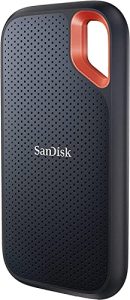
SanDisk Extreme Portable SSD V2 1TB

The 1 TB V2 fits the buyer who puts ruggedness before headline speed. Its listing pairs a USB 3.2 Gen 2 interface with read speeds up to 1050 MB/s and writes up to 1000 MB/s, then wraps that performance in IP65 sealing and three-meter drop protection, a mix the faster new generation does not automatically beat in the field. Hardware encryption is built in for client files and personal archives. It is also the family’s middle capacity: large enough for a working photo library or a full laptop backup, small enough that misplacing it would not mean losing everything you own.
Specs
- Capacity: 1 TB
- Model: SDSSDE61-1T00-G25
- Read speed: up to 1050 MB/s
- Write speed: up to 1000 MB/s
- Interface: USB-C, USB 3.2 Gen 2
- Water and dust resistance: IP65
- Drop protection: up to 3 meters
- Encryption: 256-bit AES hardware encryption
- Dimensions: 3.96 x 2.06 x 0.35 inches
- Color: Black
- Listing title note: Updated Firmware
Best for: Photographers, field workers, and travelers who need a sealed, drop-rated backup drive and are content with Gen 2 speeds rather than the newest interface.
Watch out for: Availability signals for this ASIN conflict, with one tracker showing third-party stock and another showing no current Amazon offer, so confirm a live buy option on the exact listing before ordering, and check that the page shows model SDSSDE61-1T00-G25 rather than the separate, out-of-stock 1 TB listing that also circulates under a different ASIN.
ASIN: B08GTYFC37
Which One Fits Your Situation
You Empty Camera Cards Away From a Desk
Field offloading is where the listed figures line up best. The IP65 sealing shrugs off dust and splashes, the drop rating covers the fumble between bag and laptop, and 1050 MB/s reads move a day of stills without a long wait. If your reader and laptop port support the faster USB standard, the V2 clears a card fast enough that the newer generation’s extra speed rarely changes a trip.
Your Laptop Drive Is Nearly Full
A 1 TB drive doubles the breathing room of a laptop in one step, and this one asks nothing of the machine beyond a USB-C port. Use it as the home for installers, exports, and older folders rather than as a speed upgrade, because its Gen 2 ceiling is a transfer figure, not a responsiveness promise. The shell disappears into a drawer, and the encryption matters once it holds tax records and photos.
You Want One Backup Drive for Trips
Travel punishes fragile storage, and the V2’s listing reads like an answer: sealed against dust and water jets, rated for drops up to three meters, and flat enough to ride in a document sleeve. One drive is never a backup strategy by itself, so treat this as the portable half of a pair, with a copy of everything important living at home. Within that role it suits the knocks travel delivers.
You Keep Eyeing the Newer Generation
The tension is simple: SanDisk now sells a faster Extreme Portable SSD rated up to 2000 MB/s, and Amazon labels this V2 the Old Model in its title. Choose the newer drive if your ports and workload can use the throughput, such as large video moves. Choose the V2 when transfers are measured in tens of gigabytes, because it finishes fast, and its sealing and drop figures remain the same practical protection.
Common Mistakes
- Assuming the Old Model wording means the drive is used or refurbished, when it simply marks the previous generation of a line that is still sold as new old stock through remaining listings.
- Ordering from a sibling capacity listing by mistake, since the 500 GB, 2 TB, and 4 TB versions each live on separate pages with separate model numbers that search results mix together freely.
- Blaming the drive for slow transfers that actually come from an older USB port or a charge-only cable, both of which cap the listed Gen 2 speeds well below the headline figures.
- Treating IP65 as permission to submerge the drive or hose it down, when the rating covers dust and water jets rather than immersion at any depth.
- Quoting the older two-meter drop figure from early coverage instead of the three-meter figure the current listing states, then judging the drive against a spec it no longer carries.
Frequently Asked Questions
Is the V2 still sold on Amazon, or has it vanished?
The listing remains up, but the signals around it conflict: one tracker reports the 1 TB model in stock through a third-party seller while another reports no current Amazon offer for the same page. Treat availability as something to verify on the live listing at the moment you buy, and make sure the model number shown is SDSSDE61-1T00-G25 before you check out.
What does the Old Model wording in the title actually mean?
It is Amazon’s label for a superseded generation, applied because SanDisk now sells a newer Extreme Portable SSD above the V2. The drive itself is the same product the listing always described, with the same stated speeds, sealing, and drop rating. The wording is a prompt to compare generations deliberately, not a warning that the hardware on the page has changed or that the unit being sold is secondhand.
How does its speed compare with the newer generation?
The V2 lists up to 1050 MB/s reading and up to 1000 MB/s writing over USB 3.2 Gen 2. SanDisk rates the newer generation at up to 2000 MB/s, roughly double on paper. Whether that gap reaches your desk depends on ports and file sizes: transfers of documents and photo batches finish quickly on both, while video workloads are where the newer hardware pulls ahead.
Does the drop rating also protect it from water?
They are separate figures covering separate risks. The drop protection, listed at up to three meters, addresses falls. The IP65 rating addresses dust ingress and water jets, such as rain or a splash, and it does not cover immersion. A drive can survive one kind of accident and not the other, so handle it as a rugged device rather than an indestructible one, and keep a copy of anything irreplaceable.
More from Amazon
Programs that pair well with the guide above. Offers and eligibility are set by Amazon and may change.
A free business account with business pricing and bulk-buying tools for work, shop or home office.
Create a business accountFree shipping on eligible items, Prime Video and more. Eligible new members can start with a free trial.
Start a Prime free trialAudiobooks and podcasts to listen to on the go. Eligible new members can start with a free trial.
Try Audible freeAd-free music streaming. Eligible new subscribers can start with a free trial.
Try Music Unlimited freeAs an Amazon Associate we earn from qualifying purchases.


Write Your Review
No reviews yet. Be the first to share your experience!