

Key takeaways
- Samsung Portable SSD T7 review: 1,050 MB/s reads, USB 3.2 Gen 2, AES 256-bit encryption and a credit-card sized metal body, checked against the Amazon listing.
The Samsung Portable SSD T7 is the drive that made portable hard disks feel obsolete for everyday backup and file transfer work. The short verdict: for moving large folders between computers, keeping a working copy of a photo or video library, or holding a backup that travels with you, the T7 in its 1TB size remains an easy recommendation, because it pairs genuinely fast USB transfers with a metal body barely larger than a credit card and hardware encryption built in. It suits students, office workers, photographers and anyone who currently waits on a spinning portable drive. This review is based on the Amazon US listing for the drive and the specifications Samsung states for the model, including its rated speeds, interface, security features and box contents.
Quick Picks
As an Amazon Associate we earn from qualifying purchases.
| Product | Best for | Key spec |
|---|---|---|
| Samsung Portable SSD T7 (1TB, Titan Gray) | Fast everyday portable storage and backups | Read speeds up to 1,050 MB/s over USB 3.2 Gen 2 |
How to Choose
Pick the capacity for the job, not the headline
The T7 line is sold in 500GB, 1TB and 2TB capacities under the same model name, and the listing reviewed here is the 1TB version in Titan Gray, model MU-PC1T0T/AM. For documents, spreadsheets and a modest photo library, 500GB is workable; for video projects, game installs or a full working archive, 1TB is the practical middle ground, and 2TB suits people who carry an entire media library. Because these capacities are separate listings, confirm the capacity in the listing title before ordering rather than assuming the page defaults to the size you want.
Check the ports on your machines
The T7 uses USB 3.2 Gen 2, a 10 gigabit per second connection, and it needs a host port of the same speed to reach its rated transfers. Plugged into an older USB 3.0 or USB 2.0 port it still works, but at that port’s slower ceiling. The drive itself connects by USB-C, and Samsung includes both a USB Type C-to-C cable and a Type C-to-A cable in the box, so it connects to modern laptops and older desktops without an extra adapter. If your workflow involves a phone or tablet, the listing names PC, Mac, Android devices and gaming consoles among its compatible devices.
Decide whether you need the security features
The standard T7 includes AES 256-bit hardware encryption with optional password protection, managed through Samsung’s Portable SSD software. That is enough for most people carrying work files or personal archives. What the standard T7 does not have is a fingerprint reader: that belongs to the T7 Touch, a different variant. If unlocking with a finger matters to you, you are looking at a different model; if a password is fine, the standard T7 covers it without paying for hardware you will not use.
Separate the T7 from its near-namesakes
Samsung’s portable range is easy to confuse. The T7 Shield is a ruggedised relative with a rubberised shell and water and dust resistance for outdoor and site work, and the T9 is a faster drive built for USB 3.2 Gen 2×2 ports. The standard T7 reviewed here is the slim metal original: no rubber armour, no weather sealing rating, and a top speed set by its Gen 2 interface. Knowing which model a listing describes matters, because the names differ by one word while the designs differ substantially.
Look at what is in the box
The listing states the drive ships with both USB cables mentioned above, which sounds minor until a drive arrives with a single short cable that fits none of your machines. The T7 also carries a 3 year limited warranty per the listing’s product information. There is no carrying case in the box, and no separate power supply is needed, because the drive draws power over the USB connection itself.
Full Review
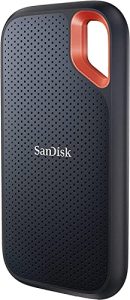
Samsung Portable SSD T7 (1TB, Titan Gray)

Design and build. The T7 is built around an aluminium unibody that doubles as a heat spreader, and its footprint is close to a credit card: the listing gives dimensions of 3.3 by 2.2 by 0.3 inches and a weight of about 58 grams. It slips into a laptop sleeve or a jacket pocket without a noticeable bulge, and there are no moving parts to protect. Samsung rates the drive as shock resistant, withstanding drops of up to 2 metres, which covers the realistic accidents of commuter life: off a desk, out of a bag, onto a hard floor. The Titan Gray finish of this listing is understated and shows scuffs less than a polished surface would. A small LED indicates activity, and the single USB-C port is the only opening on the case.
Stated performance. Samsung rates the T7 at sequential read speeds up to 1,050 MB/s and write speeds up to 1,000 MB/s, figures the listing repeats, and describes the drive as up to 9.5 times faster than traditional external hard drives. Those numbers rest on the PCIe NVMe technology inside the enclosure, and they are only reachable when the host machine and cable support USB 3.2 Gen 2 and UASP mode is enabled, conditions the listing itself spells out. In practical terms, on a modern laptop the drive moves a large video file or a full backup set in a fraction of the time a portable hard disk needs, and it sustains its pace better than basic flash drives because the metal shell sheds heat and the drive’s Dynamic Thermal Guard works to hold speed during long transfers instead of throttling early.
Security and software. The T7 supports AES 256-bit hardware encryption with optional password protection, set up through Samsung’s Portable SSD software for Windows and Mac, with management also available on Android. For a drive that carries client files, tax records or a family photo archive, password protection is the difference between a lost drive being an inconvenience and it being a data breach. Firmware updates come through Samsung’s software as well. Note the boundary of this model: there is no fingerprint sensor on the standard T7, so anyone who needs biometric unlocking should be reading about the T7 Touch instead.
Compatibility and daily use. The listing names gaming consoles, Mac, PC, smartphones and tablets as compatible devices, and Samsung’s description adds Android devices and more. Consoles use the drive happily for storing and playing last-generation titles, subject to each console’s own rules for current-generation games. Because the drive is bus-powered, there is nothing else to carry: one cable, one small metal slab. The included C-to-A cable keeps older desktops and office machines in play, and the C-to-C cable serves current laptops, phones and tablets. For backup duty, the drive works with standard backup software on both major desktop platforms once formatted for the file system you use.
Specs
- Capacity of this listing: 1TB (the T7 line also comes in 500GB and 2TB listings)
- Model number: MU-PC1T0T/AM
- Interface: USB 3.2 Gen 2 (10 Gbps), USB-C connector, backward compatible
- Rated speeds: up to 1,050 MB/s read, up to 1,000 MB/s write
- Internal technology: PCIe NVMe
- Security: AES 256-bit hardware encryption, optional password protection
- Durability: shock resistant, rated for drops up to 2 metres; Dynamic Thermal Guard
- Dimensions: 3.3 x 2.2 x 0.3 inches; weight about 58 grams
- In the box: T7 drive, USB Type C-to-C cable, USB Type C-to-A cable
- Warranty: 3 year limited warranty
Best for: Anyone who wants one fast, pocketable drive for backups, large file transfers and a working media library across PC, Mac, Android and console devices.
Watch out for: Top speeds need a USB 3.2 Gen 2 port on the host; on older ports the drive is limited to that port’s speed. There is no fingerprint reader on this standard model and no water or dust resistance rating, so wet or rough environments point to the T7 Shield instead. Capacity is fixed at purchase, and the 1TB of this listing fills quickly with 4K video projects.
Which One Fits Your Situation
- Backing up a laptop that travels: The T7 fits well. It is small enough to live in the laptop bag, fast enough that backups actually get run, and password protection covers the loss risk that comes with carrying a backup around.
- Moving video projects between machines: The 1TB listing works for active projects, and the rated write speed keeps ingest and hand-offs short. If your projects routinely run past a terabyte, look at the 2TB listing of the same model rather than a different drive.
- Storing console games: The drive suits game storage and last-generation play on the consoles the listing names. Check your console’s rules for current-generation titles, which often must sit on internal storage.
- Rough job sites, boats or field work: Look elsewhere in Samsung’s range. The standard T7 has no water or dust resistance rating; the T7 Shield is the model built for that life.
- You need fingerprint unlocking: This is the wrong variant. The T7 Touch adds the fingerprint reader; the standard T7 uses a password only.
Common Mistakes
- Plugging into a slow port and blaming the drive. A USB 2.0 or early USB 3.0 port caps the transfer far below the rated speed. Use the fastest USB-C or USB-A port your machine has, with the included cables.
- Ordering the wrong capacity listing. The 500GB, 1TB and 2TB versions are separate listings with near-identical pages. Read the capacity in the title of the listing you actually order.
- Confusing the T7 with the T7 Touch or T7 Shield. The Touch adds fingerprint security, the Shield adds rugged water and dust resistance, and neither feature is present on the standard T7 reviewed here.
- Never setting the password. The encryption only protects you once password protection is switched on in Samsung’s software. Set it up before the drive starts carrying real files.
- Treating one portable drive as a complete backup plan. A single small drive can be lost with the laptop it backs up. Keep a second copy of anything irreplaceable in a different place.
Frequently Asked Questions
Is the Samsung T7 fast enough to edit video from directly?
By its stated specifications, yes for most work. With rated reads up to 1,050 MB/s over USB 3.2 Gen 2, the drive handles direct editing of typical camera footage, provided the computer’s port supports Gen 2 speeds. Very large multi-stream projects still belong on faster internal storage.
Does the T7 work with both Windows and Mac?
Yes. The listing names PC and Mac among its compatible devices, and Samsung’s software supports both platforms for password setup and firmware updates. If you move between the two, format the drive in a file system both can write to, such as exFAT.
What is the difference between the T7 and the T7 Shield?
The Shield wraps similar internals in a rubberised, rugged shell with water and dust resistance and a higher drop rating, aimed at outdoor and site use. The standard T7 is slimmer, lighter and metal-bodied, and carries no weather resistance rating.
Does this T7 have a fingerprint reader?
No. Fingerprint unlocking is the defining feature of the separate T7 Touch model. The standard T7 reviewed here uses optional password protection with its AES 256-bit hardware encryption instead.
Which capacity should I buy?
Choose by library size rather than by habit. Documents and light photo use fit in 500GB; the 1TB of this listing is the balanced choice for mixed work and media; people carrying full video archives or large game libraries should take the 2TB listing of the same model.
Closing
The Samsung Portable SSD T7 earns its place as the default portable drive recommendation: NVMe-class speed over a common USB standard, a metal body that genuinely disappears into a bag, hardware encryption with password protection, and both cables you could need included in the box. Its limits are clear and honest ones: it tops out at Gen 2 speeds, it has no fingerprint reader, and it is not the rugged model in the range. If your needs match what it does, the 1TB T7 is a drive you buy once and stop thinking about, which is exactly what portable storage should be.
More from Amazon
Programs that pair well with the guide above. Offers and eligibility are set by Amazon and may change.
A free business account with business pricing and bulk-buying tools for work, shop or home office.
Create a business accountFree shipping on eligible items, Prime Video and more. Eligible new members can start with a free trial.
Start a Prime free trialAudiobooks and podcasts to listen to on the go. Eligible new members can start with a free trial.
Try Audible freeAd-free music streaming. Eligible new subscribers can start with a free trial.
Try Music Unlimited freeAs an Amazon Associate we earn from qualifying purchases.

Write Your Review
No reviews yet. Be the first to share your experience!