

Key takeaways
- Compare the 5 best external GPU enclosures for laptops, from Thunderbolt 5 boxes to OCuLink docks, with power, fit, and host checks before you buy.
A thin laptop is easy to carry and hard to upgrade. When games stutter, renders crawl, or a local model will not load, the usual answer is a new machine. An external GPU enclosure offers a different answer: a box that holds a full desktop graphics card and connects to the laptop over a single cable. The card does the heavy work while the laptop keeps its keyboard, screen, and battery. The hard part is not the idea. It is the match between the box, the card, and the laptop, and a wrong match wastes the purchase.
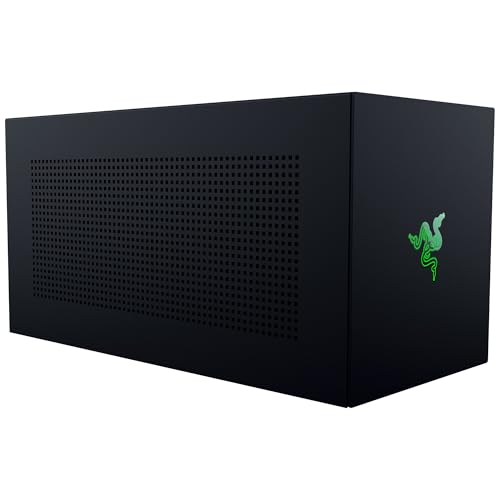

This guide is for Windows laptop owners whose machine has a Thunderbolt or OCuLink port with external graphics support, for creators who need a bigger card for renders, and for gamers who want desktop frames without a desktop tower. Every enclosure below was chosen from its Amazon listing name and specs, and each one answers the same question in a different way: how much box, power, and bandwidth does your card actually need?
Quick Picks
As an Amazon Associate we earn from qualifying purchases.
| Product | Best for | Key spec from title |
|---|---|---|
| Razer Core X V2 | A Thunderbolt 5 laptop with a big card | Thunderbolt 5, 4-slot GPU, 140W PD |
| Sonnet Breakaway Box 850 T5 | A complete Thunderbolt 5 kit | 850W PSU included, triple-wide GPU |
| Sonnet Breakaway Box 750ex | A Thunderbolt 3 laptop with a hub | 750W PSU included, USB and Ethernet |
| Minisforum DEG1 | An OCuLink handheld or mini PC | OCuLink 4i, 64Gbps, open frame |
| GIGABYTE AORUS RTX 5060 Ti AI Box | A ready-to-run GPU in the box | RTX 5060 Ti 16GB, Thunderbolt 5 |
How to Choose
Connection first: Thunderbolt 5, Thunderbolt 3, or OCuLink
The cable decides how much of the card you actually get. Thunderbolt 5 moves up to 80 Gbps and gives a modern card the most room to breathe, while Thunderbolt 3 tops out at 40 Gbps and leaves more performance on the table. OCuLink is a different path entirely: a direct PCIe 4.0 x4 link at up to 64 Gbps with no Thunderbolt chip in the middle, which is why it is the pick for handhelds and mini PCs that carry the port. Check the exact port on your machine first, because a Thunderbolt 5 enclosure plugged into a plain USB-C port does nothing at all.
Power supply: included or bring your own
An enclosure is only half a build until the card has power. The Sonnet boxes ship with a supply already fitted, 850W in the 850 T5 and 750W in the 750ex, so the only extra part is the card itself. The Razer Core X V2 and the Minisforum DEG1 ship with no supply at all, which means you choose and buy an ATX unit that fits the box and covers the card. That freedom is useful when you already own a good supply, but it adds a second purchase and a size check. The AORUS AI Box is different again: its card and cooling are built in, so there is no supply decision to make.
Card fit: width, length, and power plugs
A card that does not fit the bay is a return, not a build. Measure three things before you order: slot width, card length, and height. The Razer Core X V2 takes cards up to four slots wide, the Sonnet 850 T5 takes triple-wide cards up to 345 mm long, and the DEG1 open frame takes almost any length. Power plugs matter just as much. The Sonnet 850 T5 documents three 8-pin leads or one 16-pin 12VHPWR lead, so a card that needs four 8-pin plugs will not work there. Check the card maker page against the enclosure page, not against a roundup table.
Host support: the laptop must say yes
No enclosure works on a laptop that does not support external graphics. The host needs a Thunderbolt 5, Thunderbolt 4, or USB4 port with external graphics support, or an OCuLink port for the DEG1, and the laptop maker has to confirm it. Windows 11 is the safe ground here: the Sonnet 850 T5 documents Windows 11, the Razer Core X V2 lists Windows 11 and Windows 10, and the Plugable and AORUS boxes are Windows-only too. Apple Silicon Macs do not support external GPUs at all, so an M1 or later Mac cannot use any enclosure in this guide.
The 5 Best Options
Razer Core X V2
The Core X V2 is the most rounded enclosed pick for a modern Windows laptop. It takes desktop NVIDIA or AMD cards up to four slots wide over Thunderbolt 5, Thunderbolt 4, or USB4, and it can send up to 140W back to the laptop through the same cable. A 120 mm fan with adjustable profiles keeps the card cool, and the steel chassis is built around big cards rather than small ones. The catch is the parts list: the card and the ATX supply are both sold separately, so the box alone is not a working setup.
Specs
- Thunderbolt 5, Thunderbolt 4, or USB4 host connection
- PCIe 4.0 x4 internal path
- Supports desktop graphics cards up to 4 slots wide
- Up to 140W laptop power delivery via USB-C
- 120 mm cooling fan with adjustable profiles
- Standard ATX power supply required, sold separately
- Graphics card sold separately
- Thunderbolt 5 cable, 1.0 m, included
- Dimensions: 421 x 216 x 197 mm; weight: 3.9 kg
Best for: A Thunderbolt 5 laptop owner who wants the widest card support and is happy to pick a supply.
Watch out for: Razer’s own pages disagree on the maximum card size, with the manual giving 360 x 82 x 170 mm and the support page giving 362.7 x 82 x 185.1 mm, so measure your exact card against the tighter manual figure. No Ethernet, USB hub, or downstream Thunderbolt port is included.
Sonnet Breakaway Box 850 T5
The 850 T5 is the complete kit in this guide. Sonnet fits an 850W supply inside the chassis, so the box arrives ready for the card, and it adds a second Thunderbolt 5 port for daisy-chaining a display or storage, three USB ports, and a 5GbE Ethernet port. The bay takes triple-wide cards up to 345 mm long, and the supply documents three 8-pin leads or one 16-pin 12VHPWR lead. It is the heaviest box here at 6.4 kg, which is the price of a supplied supply and a full dock in one chassis.
Specs
- Thunderbolt 5, Thunderbolt 4, or USB4 host connection, 80 Gbps
- 850W power supply included
- Triple-wide graphics card support, up to 345 x 155 x 70 mm
- Three 8-pin or one 16-pin 12VHPWR GPU power connectors
- Up to 100W laptop charging
- 5GbE Ethernet port
- Three 10Gbps USB 3.2 Gen 2 Type-A ports
- Second Thunderbolt 5 port for daisy-chaining
- Dimensions: 210 x 400 x 250 mm; weight: 6.4 kg
- Part number: GPU-850T5
Best for: A buyer who wants the supply, the dock, and the enclosure in one box.
Watch out for: Sonnet documents Windows 11 25H2 or newer, so confirm your Windows build before ordering. The card is still sold separately, and a card that needs four 8-pin plugs will not fit the documented connector set.
Sonnet Breakaway Box 750ex
The 750ex is the Thunderbolt 3 pick for laptops that do not have a Thunderbolt 5 port. It pairs a 750W supply with a bay for double-width cards, and it adds a small hub: four USB Type-A ports and a Gigabit Ethernet port, run through a second Thunderbolt 3 controller so the hub does not fight the GPU for bandwidth. The Thunderbolt cable is included, and the box is a known quantity with a long sales history. Its ceiling is the Thunderbolt 3 link itself, so a top-end card will be held back more here than on a Thunderbolt 5 box.
Specs
- Thunderbolt 3 host connection, 40 Gbps
- 750W power supply included
- Double-width graphics card support
- Four USB Type-A ports
- One Gigabit Ethernet port
- Second Thunderbolt 3 controller for the hub
- Thunderbolt cable included
- Part number: GPU-750WEX-TB3
Best for: A Thunderbolt 3 laptop owner who also wants USB and wired networking from the same box.
Watch out for: Sonnet’s own store lists this model as refurbished in one listing, so confirm the Amazon listing is a new unit before ordering. The 40 Gbps Thunderbolt 3 link is the bottleneck for the fastest cards.
Minisforum DEG1
The DEG1 is the cheapest path to a desktop card, and the most different one. It is an open frame, not a closed box: a small board with an OCuLink 4i uplink and a PCIe x16 slot, running PCIe 4.0 x4 at up to 64 Gbps. You supply an ATX or SFX power supply through the 24-pin header, and a force power-on mode lets the dock switch the supply on with the host. There is no Thunderbolt here at all, which is the point: an OCuLink port gives a direct PCIe link with no Thunderbolt chip in the middle.
Specs
- OCuLink 4i uplink, PCIe 4.0 x4, up to 64 Gbps
- PCIe x16 slot for desktop graphics cards
- Open frame design, any card length
- ATX or SFX power supply required, sold separately
- Force power-on mode via 24-pin header
- Dimensions: 14 x 6.5 x 2 cm (dock board)
- Graphics card and power supply sold separately
Best for: A handheld or mini PC owner with an OCuLink port who wants the lowest-cost desktop card setup.
Watch out for: The listing records disagree on size, with the Amazon listing giving 14 x 6.5 x 2 cm for the dock board and one news report giving 270 x 175 x 41 mm, so confirm which figure matches the bare board. One November 2026 roundup found the Amazon listing unavailable while the maker store had stock, so confirm a live offer before ordering.
GIGABYTE AORUS RTX 5060 Ti AI Box
The AORUS AI Box is the only pick here with a card already inside. GIGABYTE fits a GeForce RTX 5060 Ti with 16 GB of GDDR7 memory into a compact box and connects it over Thunderbolt 5, with a WINDFORCE cooler, a Hawk fan, and server-grade thermal gel. A Thunderbolt 5 cable, a box stand, and a power adapter come in the box. There is nothing to build and no card to choose, which is exactly the point for a buyer who wants a working eGPU on day one.
Specs
- GeForce RTX 5060 Ti graphics card built in, 16 GB GDDR7
- Thunderbolt 5 host connection
- 128-bit memory interface, PCIe 5.0
- HDMI and DisplayPort 2.1b outputs
- WINDFORCE cooling system with Hawk fan
- Server-grade thermal gel
- Thunderbolt 5 cable, 800 mm, included
- Box stand and power adapter included
- Model number: GV-N506TIXEB-16GD
Best for: A buyer who wants a complete eGPU with no separate card or supply to buy.
Watch out for: The card is built in and cannot be swapped later, so the 5060 Ti is the card you keep. Confirm the listing is the US Amazon listing, since a separate Amazon India listing for the same model uses a different ASIN.
Which One Fits Your Situation
You have a Thunderbolt 5 laptop and want the newest pipe
Pick the Razer Core X V2 if you want to choose your own card and supply, or the Sonnet Breakaway Box 850 T5 if you want the supply and a dock included. Both run at 80 Gbps over Thunderbolt 5, and both need a Windows 11 host with external graphics support. The Razer box takes wider cards, while the Sonnet box saves you the supply purchase.
You want everything in the box except the card
Pick the Sonnet Breakaway Box 850 T5 for a Thunderbolt 5 host, or the Sonnet Breakaway Box 750ex for a Thunderbolt 3 host. Both ship with the supply fitted and the cable in the box, so the only extra part is the card. The 850 T5 also adds 5GbE Ethernet and a second Thunderbolt 5 port, while the 750ex adds USB and Gigabit Ethernet over Thunderbolt 3.
You have an OCuLink handheld or mini PC
Pick the Minisforum DEG1. It is the only pick here that uses OCuLink, and its open frame takes almost any card length for the lowest entry cost. You will need an ATX or SFX supply of your own, and your host must have an OCuLink port, since the DEG1 has no Thunderbolt connection at all.
You want a GPU in the box with no build step
Pick the GIGABYTE AORUS RTX 5060 Ti AI Box. It is the only pick with a card already installed, so it works out of the box over Thunderbolt 5. The trade is flexibility: the card cannot be swapped later, so buy it for the 5060 Ti it carries, not for a future upgrade.
Common Mistakes
- Buying an enclosure before confirming the laptop supports external graphics, which the laptop maker has to state.
- Picking a Thunderbolt 5 box for a laptop that only has a plain USB-C port with no Thunderbolt or eGPU support.
- Forgetting the power supply on the Razer Core X V2 and the Minisforum DEG1, where the supply is a separate purchase.
- Choosing a card that is wider, longer, or hungrier than the bay and the documented power connectors allow.
- Assuming any enclosure works on an Apple Silicon Mac, when M1 and later Macs do not support external GPUs at all.
Frequently Asked Questions
Does an external GPU enclosure include the graphics card?
Most do not. The Razer Core X V2, both Sonnet boxes, and the Minisforum DEG1 are enclosures only, so the card is a separate purchase. The GIGABYTE AORUS AI Box is the exception in this guide, with a GeForce RTX 5060 Ti already fitted inside. Check the listing title before ordering, since a box and a complete system look alike in search results.
Is Thunderbolt 5 worth it over Thunderbolt 3 for an eGPU?
Yes, when the card is fast enough to use it. Thunderbolt 5 moves up to 80 Gbps, double the 40 Gbps of Thunderbolt 3, so a high-end card loses less performance on Thunderbolt 5. A mid-range card may show little difference, and a Thunderbolt 3 laptop cannot use a Thunderbolt 5 box at full speed. Match the box to the port your laptop actually has.
Can I use an eGPU enclosure on a Mac?
It depends on the Mac. Intel Macs with Thunderbolt 3 can use some enclosures with AMD cards, but Apple Silicon Macs with M1 or later chips do not support external GPUs at all. Every enclosure in this guide is aimed at Windows hosts, so Mac owners should confirm support on the maker page before spending anything.
What else do I need besides the enclosure and the card?
It depends on the pick. The Razer Core X V2 and the Minisforum DEG1 also need a power supply, while the Sonnet boxes include one. Every pick needs a host with the right port and external graphics support, plus the card driver installed on the laptop. Keep the Thunderbolt or OCuLink cable that ships with the box, since a random cable may not carry the full link.
More from Amazon
Programs that pair well with the guide above. Offers and eligibility are set by Amazon and may change.
A free business account with business pricing and bulk-buying tools for work, shop or home office.
Create a business accountFree shipping on eligible items, Prime Video and more. Eligible new members can start with a free trial.
Start a Prime free trialAudiobooks and podcasts to listen to on the go. Eligible new members can start with a free trial.
Try Audible freeAd-free music streaming. Eligible new subscribers can start with a free trial.
Try Music Unlimited freeAs an Amazon Associate we earn from qualifying purchases.

Write Your Review
No reviews yet. Be the first to share your experience!