

Key takeaways
- Compare PS5 Pro, PS5, Xbox Series X and S, and Switch 2 on internal storage and how each expands, from the M.2 slot to proprietary cards and microSD Express.
Modern game installs are large enough that the console you buy is partly a storage decision. The real choice is not just how much room you get on day one; it is how you add more later, because each platform expands a different way and the media for one system is useless in another. Buy the wrong expansion card or drive and it will not work at all, so the expansion path deserves as much attention as the processor.

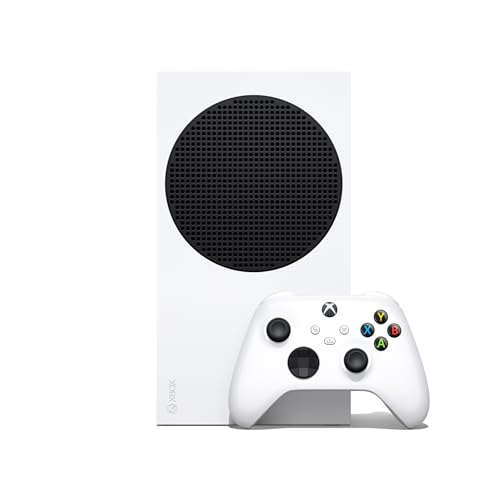
This guide is for players choosing between the current PlayStation, Xbox and Nintendo systems who know their library will outgrow the internal drive. The picks come from the names and specifications on the Amazon pages: the PlayStation 5 Pro and the slimmer PlayStation 5, the Xbox Series X and the 1TB Series S, and the Nintendo Switch 2, compared on internal capacity and the exact way each one expands.
Quick Picks
As an Amazon Associate we earn from qualifying purchases
| Product | Best for | Key spec from title |
|---|---|---|
| PlayStation 5 Pro Console (CFI-7119) | Players who want the most built-in room | 2TB SSD |
| PlayStation 5 Console (Slim, Disc) | Disc collectors on the PS5 platform | 1TB SSD, disc drive |
| Xbox Series X (1TB, Carbon Black) | Xbox players who want discs and speed | 1TB Custom NVMe SSD, 4K gaming |
| Xbox Series S (1TB, Robot White) | All-digital Xbox players | 1TB SSD, all digital |
| Nintendo Switch 2 System | Hybrid handheld and TV play | 256GB, microSD Express expansion |
How to Choose
Start With Internal Storage, Because Expansion Is a Chore
Every console here can grow, but expanding always costs money and a little effort, so the internal drive still sets how soon you feel squeezed. The spread is wide: the Switch 2 starts at 256GB, the standard PS5 and both Xbox models here sit at 1TB, and the PS5 Pro doubles that to 2TB. Think in terms of your real library rather than a headline number. A player who keeps five big titles installed lives happily at 1TB; a player who keeps everything downloaded, all the time, should treat the Pro’s 2TB or an expansion budget as part of the purchase from the start.
Learn How Each Platform Expands Before You Commit
This is the decision the whole purchase turns on, and the three systems share nothing. PlayStation 5 consoles take a user-installed M.2 NVMe SSD inside an expansion slot. Xbox Series X and S take a proprietary Storage Expansion Card that slots into a dedicated port on the back. The Switch 2 takes microSD Express cards and nothing else; ordinary microSD cards are not compatible with it. None of this media crosses over. Choose the console first and the expansion format is chosen for you, so check that you are comfortable with that format’s availability and fitting process before buying.
Decide Whether You Still Need a Disc Drive
Two of these consoles read physical games and three do not. The PS5 Slim in this guide and the Xbox Series X include disc drives, which keeps the used-game market, borrowing and disc collections open to you. The Series S and Switch 2 are download-led systems, and the PS5 Pro’s storage is generous partly because it expects a digital library. There is no wrong answer, but there is a permanent one: an all-digital console cannot be upgraded to read discs later, so if your shelf of game discs matters, filter for a drive first and compare storage second.
Understand What Expansion Media Can and Cannot Play
Expansion is not all equal once fitted. On Xbox, the Storage Expansion Card is built to replicate the internal SSD, so current-generation games run from it directly, while ordinary USB drives are relegated to storing games and playing older titles. On PS5, a compatible M.2 drive becomes full working storage for PS5 games once installed. On Switch 2, the microSD Express card is the working expansion the system is designed around. The practical lesson is to buy the platform’s proper expansion medium rather than the cheapest drive that physically connects, because a bargain USB drive will not do the same job.
The 5 Best Options
PlayStation 5 Pro Console (CFI-7119)
The Pro is the storage-led flagship of the PlayStation line: its 2TB internal SSD is the largest factory capacity in this guide, which delays the expansion decision longer than any other pick here. When you do outgrow it, the route is the PS5 family’s M.2 NVMe expansion slot, taking a user-installed drive rather than a proprietary card. This is the current hardware revision of the Pro, model CFI-7119; an earlier revision exists under a separate listing, so the model number on the page is worth a glance before ordering.
Specs
- Internal storage: 2TB SSD
- Model number: CFI-7119
- Expansion path: M.2 NVMe SSD expansion slot (drive sold separately, heatsink recommended)
- Release date as listed: December 18, 2025
Best for: PlayStation players with large libraries who want the longest runway before expanding.
Watch out for: Two Pro revisions circulate under different listings; confirm the live listing is the CFI-7119 revision and not the earlier CFI-7019 before buying.
ASIN: B0FTMY4YZ2
PlayStation 5 Console (Slim, Disc Version)
The slimmer PS5 is the balanced PlayStation pick: a 1TB ultra-fast SSD, a built-in disc drive for physical games, and the same M.2 NVMe expansion slot as the Pro for the day the internal drive fills. For most households this is the sensible default, because the disc drive keeps every buying option open and the expansion path uses standard M.2 drives rather than a proprietary format. It gives up the Pro’s extra terabyte and flagship performance tier, but on the storage question this guide is asking, it answers it the same way for less commitment.
Specs
- Internal storage: 1TB ultra-fast SSD
- Drive: built-in disc drive (D chassis)
- Picture features as listed: 4K HDR and ray tracing
- Expansion path: M.2 NVMe SSD expansion slot (drive sold separately)
Best for: Players who still buy discs and want standard, widely available expansion media later.
Watch out for: This ASIN tie rests on a single marketplace mirror of the Amazon listing, so check the live listing carefully to confirm it is the new 1TB disc model before ordering.
ASIN: B0CY5HVDS2
Xbox Series X (1TB, Carbon Black)
The Series X is Microsoft’s full-power console: a 1TB custom NVMe SSD, a disc drive, and 4K gaming at up to 120 frames per second as its listing states. Its expansion story is the simplest to execute in this guide. The Storage Expansion Card pushes straight into the dedicated port on the back of the console and replicates the internal drive’s behaviour, so there is no opening the case and no compatibility chart to study. The trade is that the card is a proprietary format made for this port, so you are buying into Microsoft’s medium rather than a general-purpose drive.
Specs
- Internal storage: 1TB Custom NVMe SSD
- Drive: built-in disc drive, Carbon Black finish
- Performance as listed: 4K gaming, up to 120FPS
- Expansion path: dedicated Storage Expansion Port for Storage Expansion Cards (sold separately)
- In the box as listed: console, Xbox Wireless Controller, ultra-high-speed HDMI cable, power cable, 2 AA batteries
Best for: Xbox players who want the flagship console and the easiest expansion process available.
Watch out for: This listing family includes variant options, including a digital edition; confirm the live listing is set to the 1TB disc configuration before ordering.
ASIN: B08H75RTZ8
Xbox Series S (1TB, Robot White)
The 1TB Series S answers the original Series S storage problem directly: the first model shipped with roughly half this capacity, and this version doubles the internal drive to a full 1TB while staying all-digital and compact. Expansion matches its bigger sibling exactly, through the same dedicated port and the same Storage Expansion Cards, so a Series S owner is never locked out of growing the library. What you give up against the Series X is the disc drive and the top performance tier; what you keep is the same storage system and the same card-based simplicity.
Specs
- Internal storage: 1TB SSD
- Drive: none, all-digital console
- Performance as listed: up to 120FPS
- Model number: EP2-00634, Robot White finish
- Expansion path: dedicated Storage Expansion Port for Storage Expansion Cards (sold separately)
Best for: Download-only players who want Xbox’s card expansion without the flagship console.
Watch out for: With no disc drive, every game must be bought digitally; make sure your library habits suit that before choosing it over the Series X.
ASIN: B0D934SHFG
Nintendo Switch 2 System
The Switch 2 is the different-shaped pick: a hybrid that plays handheld and docked, with a 7.9-inch LCD touch screen and a dock that supports 4K output to a compatible TV. Its 256GB of internal storage is the smallest here, and a portion of it is used by the system, so expansion is a near-certainty rather than an option. That expansion is microSD Express, and the listing is explicit that the system is only compatible with microSD Express cards. Standard microSD cards from an original Switch will not serve as this console’s expansion, which is the single easiest buying mistake in this guide.
Specs
- Internal storage: 256GB (a portion used by the system)
- Expansion path: microSD Express cards only (sold separately); standard microSD is not compatible
- Screen: 7.9-inch LCD touch screen with HDR support and up to 120 fps as listed
- Dock: supports 4K with a compatible TV
- Model: BEESKB6AA
Best for: Players who want handheld and TV play in one system and accept a card purchase early.
Watch out for: Budget for a microSD Express card from the start, and check any card listing says Express explicitly; a regular microSD card will not work as expansion in this system.
ASIN: B0F3GWXLTS
Which One Fits Your Situation
You Keep Everything Installed, All the Time
Choose the PlayStation 5 Pro. Its 2TB internal SSD is double every other home console here, so the delete-and-redownload cycle that defines life at 1TB is postponed for years rather than months. When space finally does run out, the M.2 slot accepts standard NVMe drives, which are easy to source. No other pick combines this much factory storage with this flexible an expansion path, and for a permanent-library player that combination is the whole decision.
Your Games Shelf Is Full of Discs
Choose between the PS5 Slim and the Xbox Series X, the two picks with disc drives. Both carry 1TB internally and both expand well, one by M.2 drive and one by plug-in card. Decide by the games you prefer, and by which expansion style suits you: fitting an internal drive once, or sliding a card into the back of the console when you need room. The all-digital Series S and the Pro’s download-led design close the disc option permanently.
You Play Mostly Downloads and Hate Opening Hardware
The Xbox pair was designed for you. The Storage Expansion Card needs no tools, no case opening and no compatibility research: it pushes into the dedicated port and behaves like the internal drive. Pick the Series X for the disc drive and flagship performance, or the 1TB Series S for the same storage system in the smaller, cheaper-to-house box. Either way, expansion becomes a thirty-second job instead of a project, which is exactly what a download-only player wants.
One Console Has to Travel Between Rooms and Hands
Choose the Switch 2. It is the only pick that leaves the TV, and its card-based expansion suits a system that moves: a microSD Express card adds library room without changing how the console is carried or docked. Go in with eyes open about the 256GB starting capacity and the Express-only rule, buy the right card once, and the storage question is settled for a system the whole household can share.
Common Mistakes
- Buying a standard microSD card for a Switch 2; the system only accepts microSD Express cards as expansion.
- Assuming one platform’s expansion media fits another; M.2 drives, Xbox Storage Expansion Cards and microSD Express cards are three separate, incompatible formats.
- Plugging a USB hard drive into an Xbox or PlayStation and expecting current-generation games to run from it; on Xbox, USB drives are for storage and older titles.
- Ordering the earlier PS5 Pro revision by mistake, or a variant configuration of the Series X listing, instead of checking the model and edition on the live page.
- Comparing internal capacities without noting that part of the Switch 2’s 256GB is reserved for the system, making its usable room smaller than the headline figure.
Frequently Asked Questions
Can I use the same expansion drive on PlayStation and Xbox?
No. The platforms use entirely separate systems. PlayStation 5 consoles expand with a user-installed M.2 NVMe SSD in an internal slot, while Xbox Series X and S expand with a proprietary Storage Expansion Card in a dedicated rear port. Neither medium fits or functions in the other system, so expansion purchases should always follow the console decision, never precede it.
Will my old microSD cards work in the Switch 2?
Not as expansion. The Switch 2 listing states the system is only compatible with microSD Express cards, which are a faster, newer format than the standard microSD cards used by the original Switch. A drawer full of older cards does not save you the purchase here; check that any card you buy for this console is labelled microSD Express explicitly.
Does the PS5 Pro really need an expansion drive with 2TB built in?
For most players, not soon. Two terabytes holds a large working library, and the Pro is the one console in this guide where expansion can be treated as a later decision rather than a launch-day one. The M.2 slot is there when a permanent collection eventually outgrows it. By contrast, the Switch 2’s 256GB makes an expansion card a realistic first-month purchase.
Is the Xbox Storage Expansion Card just a normal SSD?
No, it is a proprietary card built for the dedicated expansion port on the back of the Series X and S, and it is designed to replicate the internal custom SSD so current-generation games run from it directly. A standard USB drive is not a substitute: on Xbox, USB drives are used for storage and for playing older titles, not for running Series X and S games.
More from Amazon
Programs that pair well with the guide above. Offers and eligibility are set by Amazon and may change.
A free business account with business pricing and bulk-buying tools for work, shop or home office.
Create a business accountFree shipping on eligible items, Prime Video and more. Eligible new members can start with a free trial.
Start a Prime free trialAudiobooks and podcasts to listen to on the go. Eligible new members can start with a free trial.
Try Audible freeAd-free music streaming. Eligible new subscribers can start with a free trial.
Try Music Unlimited freeAs an Amazon Associate we earn from qualifying purchases.



Write Your Review
No reviews yet. Be the first to share your experience!