

Our Short List of 3

- Specs:
- Model: Cable Matters 180011
- Ports: 24 RJ45 ports
- Category rating: Cat6, rated for 10 Gigabit Ethernet as listed

- Specs:
- Model: Rapink C6APP
- Ports: 24 ports, preloaded with Cat6A inline keystone couplers
- Category rating: Cat6A, STP shielded as listed

- Specs:
- Model: Cable Matters 180013
- Ports: 24 blank keystone cutouts
- Jacks included: none, keystone jacks sold separately
All 4 Picks at a Glance
| Product | Specs | Action |
|---|---|---|
| Cable Matters 24-Port Cat6 Patch Panel |
| Check price on Amazon |
| Rapink 24-Port Cat6A Patch Panel with Inline Keystone |
| Check price on Amazon |
| Cable Matters 24-Port Keystone Patch Panel |
| Check price on Amazon |
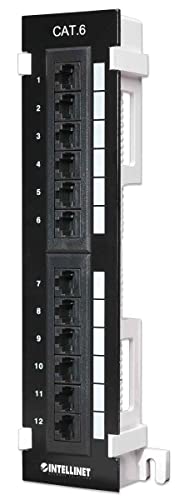 Intellinet 12-Port Cat6 Wall-Mount Patch Panel |
| Check price on Amazon |
Key takeaways
- Compare the best patch panels for home networks, from 24-port Cat6 and Cat6A panels to pass-through, blank keystone and compact 12-port wall-mount picks.
A patch panel is the fixed point where every in-wall Ethernet run in a house comes to an end. Instead of plugging fragile solid-core cable straight into a switch, you terminate each run once on the back of the panel, label the port, and make every later change with a short, replaceable patch cord at the front. That one habit turns a tangle of cables in a closet into a structured network you can document, expand, and troubleshoot.
The five panels below cover the formats a home network is most likely to need: a 24-port Cat6 punch-down panel, a shielded Cat6A panel, a pass-through panel for pre-terminated cables, a blank keystone frame for mixed media, and a compact 12-port wall-mount panel. Port counts, category ratings, and mounting styles are stated the way each listing states them.
As an Amazon Associate, we earn from qualifying purchases.
Quick answer
For most home racks, the Cable Matters 24-Port Cat6 Patch Panel is the best patch panel to build around: it terminates 24 runs in 1U, carries a UL listing, and works with 110 or Krone tools. Pick the Rapink Cat6A panel for shielded 10G runs, and the Intellinet 12-port panel for small wall-mount closets.
Cable Matters 24-Port Cat6 Patch Panel
- Specs:
- Model: Cable Matters 180011
- Ports: 24 RJ45 ports
- Category rating: Cat6, rated for 10 Gigabit Ethernet as listed
The Cable Matters 24-port panel fills the top pick class because it is the straightforward punch-down panel most home racks need. Twenty-four Cat6 ports sit in a single 1U of rack space, and the listing rates the panel for 10 Gigabit Ethernet, so the same panel serves a gigabit switch today and a faster one later. Each run punches down on the rear blocks with either a 110 or a Krone impact tool, and the listing carries a UL mark, which matters when the panel becomes a permanent part of the house wiring.
Mounting is flexible for a home setup. The 19-inch panel fits a standard rack or cabinet, and the listing also supports wall mounting on a suitable bracket. Numbered ports and room for labels keep documentation simple: write the room name beside the port once, and every later change is a front-side patch cord swap.
Choose this panel when your runs arrive as bare solid-core cable pulled through walls and ceilings, which is the usual case in a structured home install. Skip it only if your cables already end in plugs, because a punch-down panel cannot accept a finished RJ45 plug at the back.
Rapink 24-Port Cat6A Patch Panel with Inline Keystone
- Specs:
- Model: Rapink C6APP
- Ports: 24 ports, preloaded with Cat6A inline keystone couplers
- Category rating: Cat6A, STP shielded as listed
The Rapink Cat6A panel is the pick for homes wired with shielded Cat6A cable or planned around 10 Gigabit links at full distance. Cat6A holds its rating over longer runs than Cat6, and this panel is built as a shielded STP design, so it belongs in a properly grounded shielded channel rather than mixed into an unshielded one. The listing states 10G support and compatibility with Cat7, Cat6A, Cat6, and Cat5e cabling.
Instead of punch-down blocks, the panel arrives loaded with 24 Cat6A inline keystone couplers. Each port is a socket at the front and a socket at the back, so a run that already ends in a plug connects without termination work, and a damaged port can be swapped by replacing one coupler. A removable back bar supports the cables so their weight does not hang from the couplers.
Choose it when the house is wired with shielded cable, when a rack sits near electrically noisy equipment, or when you want Cat6A headroom without punching down 24 terminations. Shielding only works when the cable, the jacks, and the grounding all match, so this panel makes the most sense as part of a shielded plan from the beginning.
Rapink 24-Port Cat6 Pass-Thru Coupler Patch Panel
The Rapink Cat6 pass-through panel serves a different wiring reality: cables that already end in RJ45 plugs. Every one of its 24 ports is an inline coupler, with a socket on the front and a socket on the back wired straight through. You plug the existing cable into the rear, plug a patch cord into the front, and the run is documented and labeled like any other panel port, with no punch-down tool involved at all.
The listing states support for speeds up to 10 Gigabit Ethernet and compatibility with Cat6, Cat5e, and Cat5 cabling. The couplers use gold-plated 8P8C pins as listed, and each coupler can be removed and replaced on its own, so a single worn port does not retire the whole panel. A detachable back bar is included to carry the weight of 24 plugged-in cables, which is the main mechanical risk with this format.
Choose a pass-through panel for a retrofit where the runs were finished with plugs, for a rack that changes often, or to avoid learning punch-down technique. For brand-new in-wall runs, a punch-down or keystone panel remains the cleaner long-term choice, because plugs crimped onto solid-core cable are the weaker link.
- Specs:
- Model: Rapink C6PP
- Ports: 24 inline keystone couplers
- Category rating: Cat6, also listed for Cat5e and Cat5 cabling
- Speed support: up to 10 Gigabit Ethernet as listed
- Contacts: gold-plated 8P8C pins as listed
- Rack height: 1U, 19-inch rackmount
- Cable support: detachable back bar included as listed
- Dimensions: 20.2 x 4.3 x 2.2 inches as listed
Cable Matters 24-Port Keystone Patch Panel
- Specs:
- Model: Cable Matters 180013
- Ports: 24 blank keystone cutouts
- Jacks included: none, keystone jacks sold separately
A blank keystone panel is an empty frame, and that emptiness is the point. The Cable Matters keystone panel provides 24 standard keystone cutouts in 1U, and you fill only the positions you need with jacks you choose. One row can mix Cat6 or Cat6A Ethernet jacks with coaxial, HDMI, USB, or fiber keystone inserts, which makes this the natural panel for a media closet where network, television, and audio wiring all land in the same place.
Each jack terminates on its own before it snaps into the frame, so you can wire and label one run at a time on a workbench instead of leaning into a rack with a punch tool. A failed or outdated jack pops out and a new one clicks in, and empty positions stay blank until the house grows into them. The included support bar manages the cables behind the panel, and the frame mounts in a rack or on a wall bracket as listed.
Choose the blank frame when your closet mixes media types, when you want to pick a specific jack brand or category per port, or when the install will grow in stages. Budget for the jacks separately, because the panel ships without them, and the total cost of a fully loaded keystone panel is higher than a fixed punch-down panel.
Intellinet 12-Port Cat6 Wall-Mount Patch Panel
- Specs:
- Model: Intellinet 560269
- Ports: 12 RJ45 ports
- Category rating: Cat6
Not every home network needs a rack. The Intellinet 12-port panel is built for the smaller end of structured wiring: a dozen Cat6 ports on a compact panel that mounts directly to a wall or backboard with the included 89D bracket. Twelve ports cover a typical set of runs for a small house, such as a few bedrooms, a living room, an office, and a ceiling access point, without paying for a 24-port frame that stays half empty.
The listing describes gold-plated jack contacts at 50 micro-inches and compliance with the ANSI/TIA/EIA 568 B.2-1 standard, and the ports punch down in the usual 110 style. Because the panel sits flat against the wall, it suits a utility closet, a garage wall, or the inside of a structured media enclosure where a rack will never fit.
Choose it when the run count is honestly near twelve and space is tighter than budget. If there is any real chance of more drops later, a 24-port panel is the safer buy, because moving to a bigger panel means punching every run down a second time.
How to choose
Match the panel to the cable first. The category printed on your in-wall cable sets the ceiling for the whole channel, so a Cat6A panel cannot lift Cat5e runs to Cat6A performance, and a Cat6 panel is the honest match for Cat6 cable. Count your runs and then add spare ports for the rooms you are likely to wire later; moving up from 12 to 24 ports at purchase time is far easier than re-terminating a full panel.
Next, pick the termination style that matches how your cables arrive. Bare solid-core runs belong on a punch-down panel or in keystone jacks. Cables that already end in plugs belong on a pass-through coupler panel. A blank keystone frame suits mixed media and staged installs, at the cost of buying every jack separately.
Then decide on mounting. A 19-inch 1U panel assumes a rack, a cabinet, or a wall-mount rack bracket, while a compact wall-mount panel with an 89D bracket needs only a backboard. Finally, treat shielding as an all-or-nothing decision: a shielded panel earns its place only with shielded cable, shielded jacks, and a ground path. Cable support bars matter more than they look, because cables hanging from their terminations are a common cause of intermittent ports.
Who should skip
Skip a patch panel entirely if your network is two or three cables lying loose in one room; a small switch and labeled patch cords are enough there. Skip the pass-through format for new in-wall construction, because punch-down terminations on solid-core cable are the more durable permanent link. Skip shielded Cat6A panels if the rest of the channel is unshielded, since the shielding cannot do its job and grounding adds work for no benefit. And skip the 12-port panel if a renovation is likely to add runs, because outgrowing a panel means terminating everything twice.
Frequently Asked Questions
What does a patch panel actually do in a home network?
It gives every in-wall cable run a fixed, labeled termination point. The permanent cable ends at the back of the panel, and a short patch cord connects the front to your switch. Changes and troubleshooting then happen with patch cords instead of by disturbing the house wiring.
Which is better, a punch-down panel or a pass-through panel?
They serve different cables. A punch-down panel terminates bare solid-core cable and is the standard choice for permanent in-wall runs. A pass-through panel only connects cables that already end in RJ45 plugs, which makes it faster for retrofits and racks that change often, but it cannot accept unterminated cable.
Can one panel mix Ethernet with other connections?
Yes, with a blank keystone panel. Its cutouts accept standard keystone inserts, so Ethernet jacks can share a row with coaxial, HDMI, USB, or fiber inserts. Fixed punch-down and coupler panels are Ethernet-only, so a mixed media closet is the clearest reason to choose the blank frame.
How many ports should a home patch panel have?
Count the runs you have, add the ones you expect, and buy the next size up. Many homes land between eight and sixteen runs, which is why 12-port wall-mount and 24-port rack panels are the two common sizes. Spare ports cost little when the panel goes in and far more to add later.
Final verdict
For a typical home rack, the Cable Matters 24-Port Cat6 Patch Panel is the panel to build around: 24 punch-down ports, a 10 Gigabit rating as listed, a UL mark, and rack or wall mounting in 1U. Homes wired with shielded Cat6A should step to the Rapink Cat6A panel, retrofits with pre-terminated cables belong on the Rapink pass-through panel, mixed media closets suit the Cable Matters blank keystone frame, and small wall-mount installs suit the Intellinet 12-port panel. Pick the format that matches your cable and leave yourself spare ports.
Product and ASIN Reference
| Product | ASIN |
|---|---|
| Cable Matters 24-Port Cat6 Patch Panel | B0072K1OWY |
| Rapink 24-Port Cat6A Patch Panel with Inline Keystone | B092QX76QJ |
| Rapink 24-Port Cat6 Pass-Thru Coupler Patch Panel | B0CPVFZXSS |
| Cable Matters 24-Port Keystone Patch Panel | B0072JVT02 |
| Intellinet 12-Port Cat6 Wall-Mount Patch Panel | B000BSJJ1M |
More from Amazon
Programs that pair well with the guide above. Offers and eligibility are set by Amazon and may change.
A free business account with business pricing and bulk-buying tools for work, shop or home office.
Create a business accountFree shipping on eligible items, Prime Video and more. Eligible new members can start with a free trial.
Start a Prime free trialAudiobooks and podcasts to listen to on the go. Eligible new members can start with a free trial.
Try Audible freeAd-free music streaming. Eligible new subscribers can start with a free trial.
Try Music Unlimited freeAs an Amazon Associate we earn from qualifying purchases.






Write Your Review
No reviews yet. Be the first to share your experience!