

Key takeaways
- Compare the best SD card readers for Mac, from dual-slot UHS-II models to CFexpress readers, and pick the one that matches your cards and workflow.
A card reader looks like the simplest accessory in a camera bag, yet it decides how long you wait after a shoot. A slow reader turns a full 128 GB card into a long coffee break, while the wrong reader leaves a fast UHS-II card crawling at UHS-I speed. Before buying one, check your Mac: 14-inch and 16-inch MacBook Pros from 2021 on already carry a built-in SDXC slot with UHS-II speed, while a MacBook Air has no slot at all. The choice is about matching the reader to the cards you own and the ports on your Mac.
This guide is for photographers moving photos from a mirrorless camera, videographers offloading long clips, and drone pilots emptying microSD cards. The five readers below were picked from their Amazon listing names and specs — slot counts, card support, interface speed, and cable design — so the differences are about hardware, not marketing. One of them is the only reader here that takes CFexpress Type A cards.
Quick Picks
As an Amazon Associate we earn from qualifying purchases.
| Product | Best for | Key spec from title |
|---|---|---|
| ProGrade Digital SD UHS-II Dual-Slot Reader (PG08) | Offloading two full-size SD cards at once | Two SD UHS-II slots, USB 3.2 Gen 2 |
| SanDisk Professional PRO-READER SD and microSD | SanDisk Extreme PRO card owners | SD and microSD slots, QuickFlow Technology |
| Lexar Professional USB-C Dual-Slot Reader | Everyday SD and microSD offloads | SD and microSD UHS-II slots, up to 312 MB/s |
| Sony MRW-G2 CFexpress Type A/SD Card Reader | Sony Alpha shooters with CFexpress Type A | CFexpress Type A and SD combo slot, 10 Gbps |
| Anker MagGo USB-C SD 4.0 Card Reader | Pocket carry with an iPhone and a Mac | SD 4.0 support, up to 312 MB/s, 10 Gbps |
How to Choose
Match the Reader to Your Card Format
The card format sets the ceiling, and the reader can only reach it. A UHS-I card tops out near 104 MB/s no matter how fast the reader claims to be, so a UHS-I reader is fine for older cards but wastes a V90 UHS-II card. A UHS-II reader moves data at up to 312 MB/s. SD 4.0 cards reach the same 312 MB/s mark through a different bus, so the reader must name SD 4.0 support rather than UHS-II alone. CFexpress Type A and Type B cards are different sizes, and a reader built for one will not accept the other. Read the card support line on the listing before anything else.
Count the Slots You Actually Use
Slot count decides whether the reader fits your kit or fights it. Two full-size SD slots let a wedding photographer copy both cards from a dual-slot camera at the same time, while a single slot means one card waits. A reader with an SD slot and a microSD slot serves a photographer who also flies a drone, since drone footage lives on microSD. A combo slot that accepts either CFexpress Type A or SD sounds flexible, and it is, but it takes one card at a time, so it never copies two cards together. Count the cards in your bag, not the slots on the box, and buy the reader that covers every format you shoot.
Mind the Cable and the Port Beside It
The cable and the connector shape how the reader behaves on a real Mac. A stick reader that plugs straight into a USB-C port can block the port beside it on a thin MacBook, leaving no room for a charger or a drive. A reader with a short built-in cable sits clear of the neighbouring port, though a built-in cable cannot be swapped if it frays. A detachable cable is the most flexible option, since you can pick a longer one for a desk or a shorter one for a bag. Confirm the connector is USB-C if your Mac has only USB-C ports, and confirm the listing is a reader, not a hub with a reader tucked inside.
Weigh Size Against Speed for Travel
A desk reader and a travel reader solve different problems. A larger reader with an aluminium body sheds heat during a long transfer, which keeps speeds steady when hundreds of gigabytes move across in one sitting. A pocket reader weighs almost nothing and disappears into a camera bag, which matters when every gram counts on a hike or a flight. The trade is real: the smallest readers often carry a single slot and a short cable, while the fastest readers are bigger and need a flat surface. Pick the reader for the place you offload most often, and accept the compromise that comes with it.
The 5 Best Options
ProGrade Digital SD UHS-II Dual-Slot Reader (PG08)

The ProGrade PG08 is built for photographers who come home with two full cards and want both empty at the same time. Its two full-size SD UHS-II slots read simultaneously over a USB 3.2 Gen 2 connection, with a combined rate of up to 1.25 GB/s, so a pair of V90 cards clears far sooner than through a single-slot reader. A magnetic base holds it against a laptop lid or a metal surface, which keeps the reader from dangling off a desk edge during a long copy. Refresh Pro card-health support adds a small extra for photographers who want a warning before a card fails.
Specs
- Two full-size SD UHS-II slots that read simultaneously
- USB 3.2 Gen 2 interface, up to 1.25 GB/s combined
- Magnetic base for mounting on a laptop or metal surface
- Refresh Pro card-health support
- 2-year warranty
- Model number PGRWSDHCXCANA
Best for: Wedding and event photographers offloading two full-size SD cards at once.
Watch out for: It reads full-size SD cards only, with no microSD slot and no CFexpress slot, so confirm the listing is the PG08 dual-SD model and not the CFexpress and SD sibling with a similar name.
SanDisk Professional PRO-READER SD and microSD

The SanDisk Professional PRO-READER is the reader for photographers whose cards already say SanDisk on the label. It pairs an SD slot with a microSD slot, so a camera card and a drone card can go through the same device, and its aluminium enclosure doubles as a heat sink that keeps speeds steady during long transfers. QuickFlow Technology is tuned for SanDisk Extreme PRO UHS-I cards, which is where this reader earns its place. A write-protect switch guards against accidental deletion while browsing shots on a shared machine, and the reader stacks with the PRO-DOCK 4 station for a multi-reader desk setup.
Specs
- SD and microSD card slots
- USB 3.2 Gen 1 over USB-C
- QuickFlow Technology for SanDisk Extreme PRO UHS-I cards
- Aluminium enclosure that acts as a heat sink
- Write-protect switch
- Compatible with the SanDisk Professional PRO-DOCK 4 station
- 4.54 x 2.36 x 0.75 inches, 4.2 ounces
- Model number SDPR5A8-0000-GBAND
Best for: SanDisk Extreme PRO owners who want a rugged desk reader with a write-protect switch.
Watch out for: This model is built around SanDisk Extreme PRO UHS-I cards, so a V90 UHS-II card from another maker will not run at its headline speed here — check the card support line on the listing before buying.
Lexar Professional USB-C Dual-Slot Reader
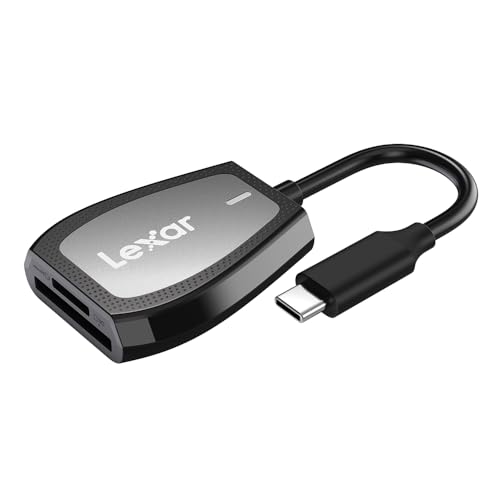
The Lexar Professional USB-C Dual-Slot Reader is the straightforward pick for photographers who shoot SD in the camera and microSD in the drone. Both slots support UHS-II cards at up to 312 MB/s, so a V90 card empties at full speed, and the built-in USB-C cable means there is no extra cable to lose in a bag. An LED activity light shows when a copy is running, which is handy when the file window sits behind another app. At 25 grams it adds almost nothing to a kit bag, and the two-year limited warranty covers the reader for longer than most budget readers last.
Specs
- SD and microSD UHS-II slots
- Up to 312 MB/s read speed
- USB 3.2 Gen 1 interface
- Built-in USB-C cable
- LED activity light
- 41.4 x 135 x 10.6 mm with cable, 25 g
- 2-year limited warranty
- Model number LRW470U-RNHNU
Best for: Photographers who need one small reader for both SD and microSD cards.
Watch out for: The cable is built into the reader and cannot be swapped, so check the cable length against your desk setup before buying — a frayed cable means replacing the whole reader.
Sony MRW-G2 CFexpress Type A/SD Card Reader

The Sony MRW-G2 is the only reader in this guide for photographers shooting CFexpress Type A cards in a Sony Alpha camera. Its combo slot accepts either a CFexpress Type A card or an SDXC/SDHC card, UHS-I or UHS-II, and moves data over SuperSpeed USB at 10 Gbps through a USB-C connector. That speed matters when a day of high-resolution stills and 4K video fills a card, since the reader becomes the bottleneck if it cannot keep up with the card. The compact body travels well, and Sony’s own File Rescue software pairs with the reader for recovering files from a damaged card.
Specs
- CFexpress Type A and SDXC/SDHC combo slot
- Supports UHS-I and UHS-II SD cards
- SuperSpeed USB 10 Gbps, USB 3.2 Gen 2
- USB-C connector
- Model number MRW-G2
Best for: Sony Alpha shooters who need CFexpress Type A support alongside SD.
Watch out for: The single combo slot takes one card at a time, CFexpress Type A or SD, never both together — and confirm your camera uses CFexpress Type A, not Type B, since this reader cannot accept a Type B card.
Anker MagGo USB-C SD 4.0 Card Reader

The Anker MagGo is the pocket reader for photographers who move between a phone and a Mac. It reads SD 4.0 cards at up to 312 MB/s over a 10 Gbps USB-C connection, with slots for a full-size SD card and a microSD card, and its built-in cable keeps the whole unit small enough to carry every day. A magnetic back lets it snap onto a USB-C iPhone, which suits photographers who shoot on a phone or offload to one in the field. On a Mac it works as a plain USB-C reader, so one device covers a phone shoot and a laptop edit.
Specs
- SD 4.0 support, up to 312 MB/s
- 10 Gbps USB-C connection
- SD and TF (microSD) card slots
- Built-in cable
- Magnetic attachment for USB-C iPhone models
- Model number A83D1
Best for: Photographers who want a pocket reader that works with both an iPhone and a Mac.
Watch out for: The magnetic back is made for a phone, not a Mac, and the short built-in cable keeps the reader close to the port — confirm the cable reaches comfortably when your Mac sits on a stand or a raised desk.
Which One Fits Your Situation
You Shoot Weddings and Offload Two Cards at Once
Pick the ProGrade PG08. Two full-size SD slots reading at the same time is the difference between emptying both cards from a dual-slot camera in one pass and waiting through two separate copies. The magnetic base keeps the reader in place on a desk while the copy runs, and the combined 1.25 GB/s rate suits V90 cards. Skip it if you also shoot microSD, since this reader has no microSD slot at all.
You Shoot Sony and Need CFexpress Type A
Pick the Sony MRW-G2. It is the only reader here that accepts a CFexpress Type A card, and its 10 Gbps USB-C link keeps up with the fastest cards a Sony Alpha camera can fill. The SD slot in the same body covers a second camera or a backup card. Accept the single combo slot, since it takes one card at a time, and do not buy it for a Type B camera.
You Carry a Reader in a Pocket Every Day
Pick the Anker MagGo. Its SD 4.0 support and 312 MB/s speed match the bigger readers, while the magnetic back and built-in cable make it the easiest of the five to carry. It works with a USB-C iPhone in the field and a Mac at the desk, so one reader covers both. The short cable is the compromise, so check it reaches your port comfortably.
You Want One Reader for SD and microSD
Pick the Lexar Professional USB-C Dual-Slot Reader. Both slots run UHS-II at up to 312 MB/s, so a camera card and a drone card empty at full speed through the same small device. The built-in cable and LED activity light keep the setup simple, and the 25-gram body disappears into a bag. Choose the SanDisk PRO-READER instead if your cards are SanDisk Extreme PRO and you want its write-protect switch.
Common Mistakes
- Buying a UHS-I reader for V90 UHS-II cards, which caps the card near 104 MB/s and wastes the speed you paid for in the card.
- Assuming every Mac needs an external reader, when 14-inch and 16-inch MacBook Pros from 2021 on already have a built-in UHS-II SDXC slot.
- Buying a hub when you need a reader, or a reader when you need a hub, without checking whether the listing is one device or the other.
- Forgetting that microSD cards need their own slot or an adapter, since a full-size SD slot alone cannot accept a bare microSD card.
- Buying a CFexpress Type B reader for a camera that takes Type A cards, or the reverse, since the two formats are different sizes and do not fit each other’s slots.
Frequently Asked Questions
Do I need a card reader if my MacBook Pro has an SD slot?
Not for full-size SD cards. MacBook Pros with 14-inch and 16-inch screens from 2021 on have a built-in SDXC slot with UHS-II speed, so a full-size card reads directly. You still need an external reader for microSD cards, CFexpress cards, older Macs, a MacBook Air, or an iPad, since none of those have a built-in slot for those formats.
Will a UHS-II reader make my UHS-I cards faster?
No. The card sets the ceiling, and a UHS-I card tops out near 104 MB/s in any reader. A UHS-II reader only helps when the card itself is UHS-II, such as a V60 or V90 card. If your cards are all UHS-I, a cheaper UHS-I reader moves them at the same speed, and the money is better spent on faster cards.
Can I use these readers with an iPad or iPhone?
Yes, when the device has a USB-C port. The readers in this guide connect over USB-C, and the Files app on iPadOS handles the import. The Anker MagGo is the most phone-friendly of the five, with a magnetic back made for USB-C iPhone models. Older iPhones with a Lightning port need a different reader, since none of these connect over Lightning.
Why is my transfer slower than the advertised speed?
Real speed is set by the slowest link in the chain. A UHS-II card in a UHS-I reader runs at UHS-I speed, a fast reader on a slow USB port runs at the port’s speed, and a nearly full card or a busy Mac can slow a copy further. Check the card format, the reader’s interface, and the port on your Mac, and the bottleneck usually shows itself.
More from Amazon
Programs that pair well with the guide above. Offers and eligibility are set by Amazon and may change.
A free business account with business pricing and bulk-buying tools for work, shop or home office.
Create a business accountFree shipping on eligible items, Prime Video and more. Eligible new members can start with a free trial.
Start a Prime free trialAudiobooks and podcasts to listen to on the go. Eligible new members can start with a free trial.
Try Audible freeAd-free music streaming. Eligible new subscribers can start with a free trial.
Try Music Unlimited freeAs an Amazon Associate we earn from qualifying purchases.

Write Your Review
No reviews yet. Be the first to share your experience!