

Key takeaways
- Five 25GbE switches with SFP28 ports compared for home labs and NAS rooms, from compact MikroTik aggregation to dense renewed Cisco Nexus hardware.
A home lab outgrows 10GbE quietly. One day the NAS serves NVMe storage over a link that cannot keep up, the virtualization host waits on the network instead of the disk, and the switch that felt generous two years ago becomes the bottleneck in every transfer. Moving to 25GbE fixes that, but the market is thin: this is enterprise gear, sold in small numbers, and most of the switches that look like 25GbE hardware on a spec sheet only reach 25GbE through breakout cables, not through native ports.
This guide is for home lab owners, small server rooms, and NAS rooms that have outgrown 10GbE and want native 25GbE SFP28 cages. The five switches below were chosen from names and specs on Amazon listings: three MikroTik models that cover compact, dense, and 100GbE-heavy designs, plus two renewed Cisco Nexus switches for buyers who need forty-eight 25GbE ports in one rack unit.
Quick Picks
As an Amazon Associate we earn from qualifying purchases.
| Product | Best for | Key spec from title |
|---|---|---|
| MikroTik CRS510-8XS-2XQ-IN | A compact desk-side aggregation switch | 8x 25GbE SFP28 plus 2x 100GbE QSFP28 |
| MikroTik CRS518-16XS-2XQ-RM | A dense 1U rack of 25GbE servers | 16x 25GbE SFP28 plus 2x 100GbE QSFP28 |
| MikroTik CRS520-4XS-16XQ-RM | A 100GbE-heavy fabric with a few 25GbE links | 4x 25GbE SFP28 plus 16x 100GbE QSFP28 |
| Cisco N9K-C93180YC-EX (Renewed) | Dense 25GbE access on a renewed budget | 48x 10/25GbE SFP+ plus 6x 100GbE QSFP28 |
| Cisco N9K-C93180YC-FX (Renewed) | A mixed rack with 1, 10, and 25GbE servers | 48x 1/10/25GbE SFP plus 6x 40/100GbE QSFP28 |
How to Choose
Count native 25GbE cages, not breakout promises
The number that matters is how many SFP28 cages the switch has, because only those are native 25GbE ports. A QSFP28 port can break out into four 25GbE links with the right cable, but each breakout consumes a 100GbE uplink, so the ports are not free. The MikroTik CRS520 in this guide has only four native SFP28 cages beside sixteen QSFP28 cages, which makes it a 100GbE switch with a 25GbE side, not a 25GbE switch. Count the cages on the front panel, then count the uplinks you still need, and buy the chassis whose native count matches the hosts you own today plus two spares.
SFP28 means optics and cables are part of the purchase
None of these switches has RJ45 data ports, so every connection needs a DAC, an optic, or a transceiver, and those are a real part of the budget. A passive DAC is the cheapest choice for short runs inside one rack, while fiber optics suit longer runs between rooms. SFP28 cages accept 10GbE and 1GbE modules as well, subject to module and peer compatibility, which helps when older servers join the same rack. Check the maker’s compatibility table before ordering modules in bulk, and read the delivered best-25g-sfp28-transceivers guide before choosing optics, because a wrongly coded module simply will not link.
The management CPU is not the switch
On the two smaller MikroTik models, a single 650 MHz core runs RouterOS while a Marvell switch chip moves the traffic, and that split decides what the box can do. Switching, VLANs, and supported Layer 3 routing run in the chip at line rate, while firewall rules, queues, VPNs, and other CPU work fall back to that modest core and slow down fast. RouterOS is powerful but has a learning curve, and it is not a dual-boot RouterOS and SwOS model on the CRS518. On the Cisco side, NX-OS software updates need a Cisco service contract, so confirm the contract position before buying a renewed unit.
Power, cooling, and noise decide where it lives
These are not fanless living-room switches. Every pick here has fans, dual power supplies on most models, and power draw that climbs with every optic installed, so plan cooling for the maximum figure, not the idle one. A compact desktop chassis suits a small NAS room, while a 1U rackmount model belongs in a rack with real airflow. The renewed Cisco switches use back-to-front airflow, which must match the rack, or the switch will fight the room. Measure the rack depth too: a short-depth chassis fits a wall cabinet that a full-depth enterprise switch cannot.
The 5 Best Options
MikroTik CRS510-8XS-2XQ-IN

The CRS510 is the compact pick in this guide: eight native 25GbE SFP28 ports and two 100GbE QSFP28 uplinks in a desktop chassis with rack ears, built for a small NAS room or a home lab that needs aggregation without a full rack of enterprise hardware. Its Marvell switch chip handles the forwarding while RouterOS v7 manages VLANs, ACLs, and supported Layer 3 offload. Dual hot-swap power supplies, plus DC and PoE-in options, give it flexible power for a small room, and the two fans keep it cool in a footprint barely larger than a paperback book is deep.
Specs
- 8x 25GbE SFP28 ports, 2x 100GbE QSFP28 ports
- Marvell Prestera 98DX4310 switch chip
- Qualcomm QCA9531 single-core 650 MHz CPU, 128 MB RAM, 32 MB flash
- RouterOS v7, Level 5 license
- Two fans; dual hot-swap AC power supplies
- 27 W maximum without attachments, 45 W maximum
- 10/100 Ethernet management port and RJ45 serial console
- 320 x 185 x 44 mm desktop chassis with rack ears
- 10,218-byte maximum MTU on SFP28 and QSFP28 ports
Best for: A compact desk-side or small-rack aggregation switch for a handful of 25GbE hosts.
Watch out for: MikroTik documents disagree on power draw (27 W versus 31 W without attachments, 45 W versus 51 W maximum), so size power for the higher figure; the two fans are audible, so this is not a silent living-room switch; the single-core CPU is for management only, so keep CPU-heavy RouterOS services off the box.
MikroTik CRS518-16XS-2XQ-RM

The CRS518 doubles the CRS510’s native 25GbE count to sixteen SFP28 cages in a 1U rackmount chassis, with the same two 100GbE QSFP28 uplinks, which makes it the dense MikroTik pick for a rack full of 25GbE servers or storage nodes. Its Marvell 98DX8525 chip carries the forwarding load, while the same modest 650 MHz management CPU runs RouterOS, so it should be bought as a switch, not as a router. Dual hot-swap 150 W power supplies and four hot-swap fans give it real redundancy for a small server room, and the chassis stays cool enough to tuck into a closet, though it is far from silent.
Specs
- 16x 25GbE SFP28 ports, 2x 100GbE QSFP28 ports
- Marvell Prestera 98DX8525 switch chip
- Qualcomm QCA9531 single-core 650 MHz CPU, 64 MB RAM
- RouterOS v7
- 1U rackmount chassis; dual hot-swap 150 W power supplies
- Four hot-swap fans
- 45 W maximum without attachments, up to 95 W maximum
- 1,200.2 Gbps Layer 1 switching capacity; 600.1 Gbps throughput at 1518-byte packets
- USB Type-A port, 10/100 Ethernet management port, RJ45 serial console
Best for: A dense 1U rack where a dozen or more servers need native 25GbE.
Watch out for: MikroTik’s own pages disagree on maximum power (77 W with attachments in one place, 95 W in the specification table), so plan cooling for 95 W; only two 100GbE uplinks, so a fabric needing four or more 100GbE links outgrows it; audible fans, not desk-silent.
MikroTik CRS520-4XS-16XQ-RM
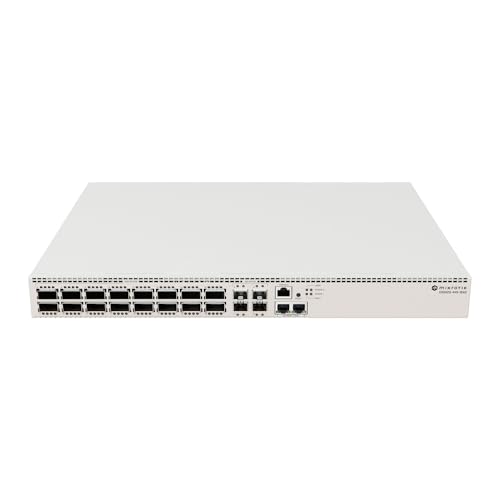
The CRS520 is the odd one out here: a 100GbE-first switch with sixteen QSFP28 cages and only four native 25GbE SFP28 cages, plus two multigigabit RJ45 ports. It belongs in this guide because those four native cages are real 25GbE, and because a fabric that is mostly 100GbE still needs a place to land its 25GbE hosts. Its quad-core ARM64 CPU and 4 GB of DDR4 RAM give it far more management headroom than the two smaller MikroTik models, which matters when the switch also runs heavier RouterOS features. Buy it for the 100GbE side, and treat the four 25GbE cages as a bonus, not the reason.
Specs
- 4x 25GbE SFP28 ports, 16x 100GbE QSFP28 ports
- 2x 2.5GbE RJ45 ports
- Quad-core ARM64 CPU, 4 GB DDR4 RAM
- RouterOS
Best for: A 100GbE-heavy fabric that still needs a few native 25GbE links.
Watch out for: only four native 25GbE cages, so count native ports before buying; it is the priciest chassis in this guide and most of its value is 100GbE aggregation, so a pure 25GbE rack wastes it.
Cisco N9K-C93180YC-EX (Renewed)

The renewed Cisco N9K-C93180YC-EX is the density pick: forty-eight native 10/25GbE SFP+ ports and six 100GbE QSFP28 uplinks in one rack unit, with a 3.6 Tbps switching capacity and sub-microsecond cut-through latency that no new switch near this guide’s scope can match. It runs NX-OS with VXLAN and ACI support, and it has hot-swappable power supplies and fans for a data-center life it was built for. As a renewed unit it is the cheapest way to put forty-eight 25GbE ports in a rack, but it is end-of-sale hardware, so the buyer must go in with eyes open about support and software.
Specs
- 48x 10/25GbE SFP+ ports, 6x 100GbE QSFP28 ports
- 3.6 Tbps switching capacity
- Sub-microsecond latency, cut-through switching architecture
- Cisco NX-OS with VXLAN and ACI support
- Hot-swappable power supplies and fans
- Back-to-front airflow
- Renewed condition
Best for: Dense 25GbE access for a full rack of servers on a renewed budget.
Watch out for: renewed, not new, so confirm what the seller includes (power supplies, fans, rails) and the warranty; Cisco ended sales in August 2022 and support ends in August 2027; NX-OS software updates need a Cisco service contract, so check that before buying; back-to-front airflow must match the rack.
Cisco N9K-C93180YC-FX (Renewed)

The renewed Cisco N9K-C93180YC-FX is the other Nexus 9300 in this guide, and its difference from the EX is the port-speed range: its forty-eight SFP cages accept 1GbE, 10GbE, and 25GbE, while its six QSFP28 uplinks run at 40GbE or 100GbE. That wider range suits a mixed rack where older 1GbE and 10GbE servers sit beside 25GbE hosts, because every cage can run at the speed of the server plugged into it. It carries the same renewed-condition caveats as the EX, the same NX-OS platform, and the same need to confirm airflow, accessories, and software contract before ordering.
Specs
- 48x 1/10/25GbE SFP ports, 6x 40/100GbE QSFP28 ports
- Cisco Nexus 9300 series
- Cisco NX-OS platform
- Renewed condition
Best for: A mixed rack where some servers still run 1GbE or 10GbE alongside 25GbE.
Watch out for: renewed, not new, so apply the same contract and warranty checks as the EX; the FX and EX names differ by one letter, so confirm the listing is the FX before ordering; confirm airflow direction and included accessories.
Which One Fits Your Situation
A small NAS room with four to eight 25GbE hosts
Pick the MikroTik CRS510. Eight native SFP28 cages cover a NAS, a virtualization host, and a workstation with room to spare, the two 100GbE uplinks leave a path to a faster core later, and the desktop chassis fits where a 1U rackmount switch cannot. Its dual power supplies and flexible power options suit a small room that has no redundant power of its own.
A full rack of 25GbE servers
Pick the MikroTik CRS518 for sixteen native ports in 1U, or the renewed Cisco N9K-C93180YC-EX when the rack needs forty-eight. The CRS518 is the simpler buy, with RouterOS and new hardware, while the Cisco gives far more ports per rack unit at the cost of renewed condition and an NX-OS contract question. Either way, count the uplinks: both have only two 100GbE uplinks on the MikroTik side and six on the Cisco.
A fabric that is mostly 100GbE with a few 25GbE links
Pick the MikroTik CRS520. Its sixteen QSFP28 cages carry the 100GbE core, its four native SFP28 cages land the 25GbE hosts, and its quad-core CPU with 4 GB of RAM handles management work the smaller MikroTik models cannot. Do not buy it for a pure 25GbE rack, because most of its value would sit unused.
A dense rack on a renewed budget
Pick the renewed Cisco N9K-C93180YC-EX for the most 25GbE ports per rack unit, or the FX when the rack mixes 1GbE, 10GbE, and 25GbE servers. Both are renewed, so confirm the seller’s warranty, the included power supplies and fans, the airflow direction, and the NX-OS software contract before ordering. The savings are real, but only when the whole package is verified.
Common Mistakes
- Buying a switch with QSFP28 ports and assuming breakout gives free 25GbE ports: each breakout consumes a 100GbE uplink, so the ports are not free.
- Buying SFP28 cages and forgetting optics, DACs, and transceivers: the chassis is only part of the spend, so budget per link and read the delivered best-25g-sfp28-transceivers guide before choosing optics.
- Treating the 10/100 management port as a data port: it connects to the management CPU, not the switch chip, and it will not carry user traffic at line rate.
- Picking the QNAP QSW-M5216-1T or the FS S5850-48S6Q: the QNAP has no Amazon US listing, and the FS 48S6Q is a 10GbE and 40GbE switch, not a 25GbE one (the 25GbE FS model is the S5850-48B8C, sold direct).
- Assuming a renewed Cisco switch includes a software contract: NX-OS updates need one, so verify before buying, and check the end-of-sale and end-of-support dates.
Frequently Asked Questions
Do I need 25GbE, or is 10GbE enough?
It depends on what the network carries. A single NVMe NAS can saturate a 10GbE link during large transfers, and several virtualization hosts sharing one uplink will do the same, so 25GbE pays when storage or virtual machines wait on the network. A rack of ordinary desktops gains nothing from it. Measure the current link first: if the 10GbE uplink runs near full during backups, 25GbE is the fix.
Can I use 10GbE optics in a 25GbE SFP28 cage?
Yes, in most cases. SFP28 cages accept 10GbE and 1GbE modules, subject to module and peer compatibility, which lets older servers share a rack with 25GbE hosts. The catch is coding: some switches accept only modules coded for them, so check the maker’s compatibility table and buy one module to confirm the link before ordering a full set.
What else do I need besides the switch?
Every connection needs a network card, a DAC or optic, and a cable, plus transceivers where fiber is involved, so budget per link, not per chassis. A full 16-port build can need substantial additional spend beyond the switch itself. The delivered best-25g-sfp28-transceivers guide covers optic and DAC choices, and the switch manual covers which breakout modes each port supports.
Are renewed Cisco switches a safe buy?
They can be, when the whole package is verified. Amazon-qualified vendors inspect and test renewed units, but the listing may not include power supplies, fans, or rails, and the warranty varies by seller. Confirm those items, the airflow direction, and the NX-OS software contract before ordering. The EX ended sales in August 2022 with support ending in August 2027, so factor that horizon into the decision.
More from Amazon
Programs that pair well with the guide above. Offers and eligibility are set by Amazon and may change.
A free business account with business pricing and bulk-buying tools for work, shop or home office.
Create a business accountFree shipping on eligible items, Prime Video and more. Eligible new members can start with a free trial.
Start a Prime free trialAudiobooks and podcasts to listen to on the go. Eligible new members can start with a free trial.
Try Audible freeAd-free music streaming. Eligible new subscribers can start with a free trial.
Try Music Unlimited freeAs an Amazon Associate we earn from qualifying purchases.

Write Your Review
No reviews yet. Be the first to share your experience!