

Key takeaways
- Heat is the main wear factor. Hot drives throttle and age faster. Do not leave a bus-powered case under a laptop or in a bag while it copies.
- Thermal pads compress. Reusing a case many times leaves dents in the pads, and a thinner pad lowers contact. Replace pads if the drive runs hotter than expected.
- Cables matter. A cheap or long cable can drop a 40Gbps link to 10Gbps. Use the supplied cable or a certified 40Gbps cable of 0.8 meters or shorter.
- Fans collect dust. Fan cases need occasional cleaning, and a stuck fan can cause overheating.
- Eject before unplugging. Pulling the cable during a write risks file corruption.
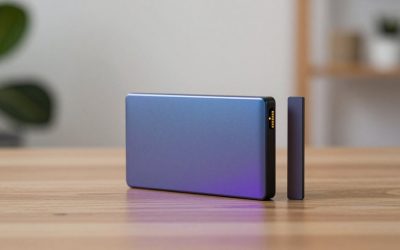
The best M.2 NVMe SSD enclosure for most people in 2026 is a 10Gbps model such as the Sabrent EC-SNVE or a UGREEN 10Gbps case, because it delivers roughly 1,000 MB/s for a small price and works with almost every laptop. If your computer has a USB4 or Thunderbolt port and you want the full speed of a fast NVMe drive, the Sabrent EC-U4TN, ACASIS TBU405 and ORICO M2V01 are the 40Gbps options worth comparing, with published speeds that top out between about 2,800 and 3,900 MB/s.
An enclosure turns a bare M.2 SSD into a portable drive. People buy them to reuse the drive from an old laptop, to pull files off a machine that no longer boots, to add cheap scratch space for video editing or to build a fast backup drive. The wrong enclosure wastes the drive: it may throttle from heat, refuse a SATA M.2 stick or cap a fast drive at a fraction of its speed. The sections below separate the real differences from marketing.
Our top picks




As an Amazon Associate we earn from qualifying purchases at no extra cost to you.
Quick comparison of the picks
| Pick | Best for | Interface | Published speed | Drive support | Cooling |
|---|---|---|---|---|---|
| Sabrent EC-U4TN | Best 40Gbps overall | USB4 / Thunderbolt compatible | Up to 3,900 MB/s on USB4; 2,700 MB/s on Thunderbolt | NVMe only, 2230 to 2280 | Aluminum, thermal pads, built-in fan |
| UGREEN 40Gbps (ASM2464PD) | Quiet fanless 40Gbps | USB4 / Thunderbolt compatible | Above 3,500 MB/s sequential read in published reviews | NVMe, 2230 to 2280 | Aluminum fins, fan version also sold |
| ACASIS TBU405 / TBU405 Pro | Value 40Gbps with optional fan | USB4 / Thunderbolt compatible | About 2,800 read and 2,700 write (maker figures) | M-key and B+M key NVMe, up to 8TB | Finned aluminum; Pro adds a fan |
| ORICO M2V01 | Rugged finned shell | USB4 40Gbps | Up to 3,700 MB/s (maker figure) | M-key NVMe, 2230 to 2280, up to 8TB | Finned aluminum with thermal pad, no fan |
| Sabrent EC-SNVE | Best budget, NVMe plus SATA | USB 3.2 Gen 2 (10Gbps) | Around 1,000 MB/s class | NVMe and SATA M.2, 2242 to 2280 | Passive aluminum top |
| UGREEN 10Gbps NVMe enclosure | Budget with two cables | USB 3.2 Gen 2 (10Gbps) | Around 1,000 MB/s class | M and B+M key, 2230 to 2280, up to 8TB | Aluminum shell with silicone pad |
| ORICO M2PV (10Gbps) | Simple low-cost case | USB 3.1 Gen 2 (10Gbps) | Around 1,000 MB/s class | NVMe, 2230 to 2280, up to 8TB | Aluminum body |
Speeds are the makers’ published ceilings or figures from review roundups. Your result depends on the SSD, the host port and the cable, and the sources do not always agree on the maximum drive size, so verify the exact model number before ordering.
How to choose an M.2 NVMe enclosure
1. Know your drive: NVMe or SATA, and which key
M.2 SSDs come in two protocols. NVMe drives use PCIe and have an M-key notch. SATA M.2 drives are slower and usually have a B+M notch. An NVMe-only enclosure will not accept a SATA M.2 drive, and a few budget cases accept only one length. Look at the label on the SSD: if it says “PCIe” or “NVMe” it needs an NVMe enclosure, and if it says “SATA” you need a bridge that supports it, such as the Sabrent EC-SNVE.
2. Match the enclosure to the port on your computer
A 10Gbps enclosure plugs into any USB-C port that supports USB 3.2 Gen 2, and it works on older USB-A ports at lower speeds with an adapter cable. A 40Gbps enclosure only reaches its top speed on a USB4 or Thunderbolt 3, 4 or 5 port. On a plain 10Gbps port it behaves like a 10Gbps case, so a 40Gbps case is wasted if your laptop lacks a faster port. Sabrent states roughly 3,900 MB/s over USB4, 2,700 MB/s over Thunderbolt and about 1,000 MB/s over USB 3.2 for the EC-U4TN, which shows how much the host matters.
3. Choose a cooling approach
Fast NVMe drives throttle when they overheat, and the thin walls of a small case struggle to shed heat during long transfers. Fanless finned designs, such as the ORICO M2V01, stay silent but can soak heat over time. Fan models, such as the Sabrent EC-U4TN and ACASIS TBU405 Pro, hold speed longer but add noise and a moving part that can fail. For intermittent file copies, passive cooling is fine. For multi-hundred-gigabyte transfers, a fan or a large finned body helps.
4. Decide how much tool-free convenience you need
Tool-free latch designs let you swap drives in seconds. Screw-mounted cases, such as the ORICO M2V01 with its included screwdriver, take a minute but hold the drive firmly. If you swap drives often, tool-free is worth the small premium.
5. Check for the drive’s own heatsink
Some SSDs ship with a bulky heatsink that does not fit inside an enclosure. Retail listings often flag this, and the Sabrent EC-SNVE specifically notes no clearance for drives that already carry a heatsink. Remove the drive’s heatsink only if the manufacturer allows it and the warranty is unaffected.
Best 40Gbps overall: Sabrent EC-U4TN
The Sabrent EC-U4TN is a tool-free USB4 enclosure for PCIe 4.0 x4 NVMe SSDs in 2230, 2242, 2260 and 2280 lengths. It is bus-powered, has an aluminum shell with thermal pads and an integrated fan, and does not support SATA M.2 drives. Sabrent quotes up to 3,900 MB/s on USB4, 2,700 MB/s on Thunderbolt 3 or 4 and about 1,000 MB/s on USB 3.2. Several roundups name it the premium sweet spot, and capacity is listed up to 8TB.
Who it suits: video editors, photographers and anyone moving large project folders who owns a USB4 or Thunderbolt computer.
Trade-offs: the fan adds some noise compared with fanless rivals, it will not read SATA M.2 drives and it costs several times more than a 10Gbps case. Market prices have generally sat in the mid price tier.
Best quiet 40Gbps option: UGREEN 40Gbps NVMe enclosure
UGREEN’s 40Gbps case uses the ASMedia ASM2464PD bridge chip. A fanless finned version and a fan version are sold, and both support 2230 to 2280 drives with S.M.A.R.T. monitoring on the fan model. Published review measurements showed sequential reads above 3,500 MB/s on Thunderbolt 4 or USB4 machines. Capacity limits conflict between sources, with some listings naming 4TB and others 8TB, so check the product page for the exact SKU.
Who it suits: gamers and creators who want fast external storage without fan noise.
Trade-offs: multiple UGREEN models with similar names exist, and capacity or key support varies by SKU. Sustained heavy writes may still slow down because the case relies on passive cooling.
Best value 40Gbps: ACASIS TBU405 and TBU405 Pro
ACASIS offers several 40Gbps cases. The TBU405 uses an Intel JHL7440 chip, is tool-free, supports M-key and B+M key PCIe NVMe drives and lists a maximum capacity of 8TB. ACASIS quotes about 2,800 MB/s read and 2,700 MB/s write with a Samsung 980 Pro. The Pro version adds a small cooling fan. One retailer lists the TBU405 at about 102 by 52 by 14 mm and 100 g. The Air variant works only with Thunderbolt or USB4 hosts, not USB 3.2 or lower.
Who it suits: buyers who want a 40Gbps case at a lower price than Sabrent and accept slightly lower peak speed.
Trade-offs: reviewers note the fan on some units needs manual activation, and sources conflict about which drive lengths are supported, so confirm before you buy a 2230 or 2242 drive.
Best rugged finned case: ORICO M2V01
The ORICO M2V01 is a USB4 40Gbps enclosure with a finned aluminum shell and a silicone thermal pad. ORICO states up to 3,700 MB/s, M-key NVMe support in 2230 to 2280 sizes and capacities up to 8TB, with a surface temperature of about 50.8 degrees Celsius under its own test conditions. It measures about 121.6 by 50 by 17.6 mm and weighs about 250 g, so it is the heaviest of the group. The screw-fixed design includes a screwdriver, a 2-in-1 USB-C and USB-A cable and carries a one-year warranty.
Who it suits: people who value a solid, heat-spreading body and do not mind installing with screws.
Trade-offs: the weight and one-year warranty, plus not being compatible with USB 2.0 or lower. Some listings state different capacity limits, so read the exact product page.
Best budget pick: Sabrent EC-SNVE
The Sabrent EC-SNVE is a tool-free 10Gbps enclosure built on the Realtek RTL9210B bridge. It handles both NVMe and SATA M.2 drives in 2242, 2260 and 2280 lengths, has a solid aluminum top with thermal padding and comes with a short USB-C to USB-C cable. The warranty extends to two years with registration. Sabrent prices it near the bottom of the market, and The SSD Review praised it as an excellent budget product.
Who it suits: anyone recycling a laptop SSD, building a backup drive or recovering files from a drive in a dead computer. Support for both NVMe and SATA makes it the safest bet when you are unsure which M.2 type you have.
Trade-offs: bandwidth is capped at 10Gbps, so fast PCIe 4.0 drives will run well below their rated speed, and it has no room for drives with their own heatsink.
Best 10Gbps with extras: UGREEN 10Gbps NVMe enclosure
UGREEN’s 10Gbps NVMe cases use a Realtek RTL9210-class controller, an aluminum body and a silicone thermal pad. Most versions support M-key and B+M key NVMe drives from 2230 to 2280 and up to 8TB, and ship with both a USB-C to USB-C cable and a USB-A to USB-C cable. Some variants add SATA support while the 90541 model does not, and a newer version has a built-in cable.
Who it suits: people who need to connect to both newer USB-C ports and older USB-A ports without buying extra cables.
Trade-offs: naming varies, so confirm SATA support if you need it. Speed is limited to the 10Gbps ceiling.
Simple low-cost alternative: ORICO M2PV 10Gbps
ORICO’s M2PV is a 10Gbps NVMe enclosure that supports 2230 to 2280 drives up to 8TB with UASP. It is a straightforward aluminum case aimed at basic external storage. A SATA-only ORICO model also exists but does not support NVMe drives, so make sure the product name matches your drive type.
Who it suits: buyers who want a plain, low-cost case for a single NVMe drive. Trade-off: fewer extras than the other 10Gbps picks.
Decision matrix: match your situation to an enclosure
| Your situation | Pick | Reason |
|---|---|---|
| Laptop has Thunderbolt 4 or USB4, editing 4K footage | Sabrent EC-U4TN | Fastest published speed and fan for long copies |
| Same laptop but you want silence | UGREEN 40Gbps fanless | No fan noise with strong sequential reads |
| Want 40Gbps on a tighter budget | ACASIS TBU405 | Lower price tier, optional Pro fan |
| Unsure whether your drive is NVMe or SATA | Sabrent EC-SNVE | Supports both M.2 types |
| Old and new USB ports in the same setup | UGREEN 10Gbps | Includes C-to-C and A-to-C cables |
| Rescuing files from a dead laptop | Sabrent EC-SNVE or UGREEN 10Gbps | Cheap, tool-free, safe read access |
A worked example: what speed will you actually see?
USB 3.2 Gen 2 runs at 10Gbps, which equals 1.25 GB/s of raw signaling. After encoding and protocol overhead, real transfers settle around 1,000 MB/s. Take a PCIe 4.0 SSD rated at 7,000 MB/s: in a 10Gbps case it will deliver about one-seventh of that, roughly 1,000 MB/s. Move the same drive to a 40Gbps case on a USB4 port and the ceiling rises to around 3,500 to 3,900 MB/s, still about half of the drive’s internal rating because the enclosure link, not the drive, is the limit.
Now apply it to a real job. Copying a 500 GB video project takes about 500,000 divided by 1,000, or 500 seconds (roughly 8 minutes) at 10Gbps, and about 500,000 divided by 3,500, or about 143 seconds (under 2.5 minutes) at 40Gbps. If you move a project like that once a week, the faster case saves around 6 minutes each time. If you only move a few gigabytes, the time difference is negligible and a 10Gbps case is the more sensible purchase.
Using an enclosure to get files off a failed computer
- Power off and remove the SSD. Follow the laptop maker’s service guide, and disconnect the battery first where possible.
- Insert the drive in an NVMe or SATA-compatible enclosure. Confirm the key type and length match.
- Connect it to a working computer. Prefer read-only access first and copy important folders before running any repair tools.
- Handle encryption. If the drive uses BitLocker or FileVault, you will need the recovery key to read it.
- Stop if the drive is not detected. Repeated reconnecting can worsen a failing drive. Consider a professional recovery service for irreplaceable data.
Durability and ownership realities
- Heat is the main wear factor. Hot drives throttle and age faster. Do not leave a bus-powered case under a laptop or in a bag while it copies.
- Thermal pads compress. Reusing a case many times leaves dents in the pads, and a thinner pad lowers contact. Replace pads if the drive runs hotter than expected.
- Cables matter. A cheap or long cable can drop a 40Gbps link to 10Gbps. Use the supplied cable or a certified 40Gbps cable of 0.8 meters or shorter.
- Fans collect dust. Fan cases need occasional cleaning, and a stuck fan can cause overheating.
- Eject before unplugging. Pulling the cable during a write risks file corruption.
Common mistakes when buying an NVMe enclosure
- Buying a 40Gbps case for a laptop that only has 10Gbps USB-C.
- Assuming every M.2 drive is NVMe and getting an NVMe-only case for a SATA drive.
- Choosing a case without clearance for a drive that has its own heatsink.
- Ignoring the drive length, especially for 2230 drives used in handheld consoles.
- Trusting headline speeds without checking the host port and cable.
Frequently Asked Questions
What is the difference between a 10Gbps and a 40Gbps NVMe enclosure?
A 10Gbps case uses USB 3.2 Gen 2 and tops out around 1,000 MB/s, while a 40Gbps case uses USB4 or Thunderbolt and can reach roughly 2,800 to 3,900 MB/s depending on the model. The faster case only helps if your computer has a matching USB4 or Thunderbolt port.
Can I use a SATA M.2 SSD in an NVMe enclosure?
Usually not. NVMe-only enclosures do not recognize SATA M.2 drives, which use a different protocol and notch. Choose a dual-protocol case such as the Sabrent EC-SNVE if you may use either type.
Do NVMe enclosures need a fan?
Not for casual use. Fanless aluminum cases are enough for occasional copying. Fans help during long, sustained transfers on fast drives, since NVMe SSDs slow down when they overheat.
Will an external enclosure slow down my SSD?
The interface sets the ceiling. A fast internal drive in a 10Gbps case will perform at about 1,000 MB/s, which is below its internal speed. The drive is not harmed, but you do not get its full rated performance.
Can I use a PS5 or laptop SSD in an enclosure?
Yes, as long as the physical size and the interface match. Most enclosures support 2230, 2242, 2260 and 2280 lengths, but some are limited to 2280, so check the length before buying for a short-format drive.
Is it safe to recover files from a dead computer using an enclosure?
It is a common and generally safe approach if the SSD is still detected. Copy files rather than running repair tools first, and consider a professional service if the drive is not recognized or contains irreplaceable data.


Write Your Review
No reviews yet. Be the first to share your experience!