

Key takeaways
- Compare the best NAS hard drives for 24/7 use, from CMR NAS drives to complete NAS units, with workload, RAID and warranty details.
The Seagate IronWolf Pro 14TB is the best bare drive for a NAS that runs around the clock: it uses CMR recording, 7200 rpm spindles, a 256MB cache and a design aimed at multi-bay RAID systems, with a long warranty and data-recovery coverage behind it. It suits anyone building or upgrading a NAS who wants a drive rated for continuous operation. “24/7 use” means the drive stays spinning all day, so it needs NAS-class firmware, vibration tolerance and a workload rating, unlike a desktop drive. Four Buffalo NAS units with drives included and one surveillance drive round out the list as ready-made and specialist alternatives.
Quick List
- BUFFALO TeraStation Essentials 4-Bay (24TB) – best for a complete four-drive NAS that arrives populated; a complete system, not a bare drive
- Seagate IronWolf Pro 14TB – best bare NAS hard drive for continuous multi-bay operation
- BUFFALO LinkStation 210 2TB – best for a small single-drive home file share; a complete NAS, not a bare drive
- BUFFALO LinkStation 210 4TB – best for a single-drive home NAS with more room; a complete NAS
- Seagate SkyHawk AI 16TB – best for camera recording and always-on video writes; a surveillance drive, so a runner-up for NAS use
- BUFFALO LinkStation 220 12TB (2-Bay) – best for a two-drive home NAS with mirroring; a complete NAS
Which One Is Right for You?
| If you… | Choose |
|---|---|
| already own a NAS and need drives built for constant spinning in RAID | Seagate IronWolf Pro 14TB |
| want a ready-made small-office NAS with four drives already installed | BUFFALO TeraStation Essentials 4-Bay |
| record security cameras or other continuous video streams | Seagate SkyHawk AI 16TB |
| want an inexpensive home file share with mirroring across two drives | BUFFALO LinkStation 220 12TB |
| just want one drive in a box for backups and photos | BUFFALO LinkStation 210 4TB |
| need only a small starter share for documents | BUFFALO LinkStation 210 2TB |
Only one product here is a bare NAS-rated drive, which means the real decision is whether you are buying drives for an existing NAS or buying a finished NAS that includes its drives. If you already have a NAS chassis, go to the IronWolf Pro. If you do not, the Buffalo units are turnkey, but their drives are chosen by the maker, so confirm the drive model on the listing before relying on it for heavy use.
All 6 Picks in Detail
1. BUFFALO TeraStation Essentials 4-Bay – Best Complete Four-Drive NAS
As an Amazon Associate we earn from qualifying purchases at no extra cost to you.

This is a finished four-bay desktop NAS with four 6TB drives included, which makes it a complete system rather than a bare drive. We include it because it answers the real-world question behind this topic: what drives will run all day without attention. It suits small offices and advanced home users who want shared storage, redundancy and no assembly.
- Four 3.5-inch bays, populated with 4 x 6TB drives (24TB raw)
- Annapurna Labs quad-core CPU at 1.4GHz and 1GB of DDR3 memory per most retailer listings
- 2.5GbE Ethernet and two USB 3.2 Gen 1 ports
- RAID 0, 1, 5, 6, 10 and JBOD; reported to ship as RAID 5 with about 18TB usable
- 256-bit drive encryption and cloud sync features listed
Retailers disagree on a few details, such as the CPU model and default RAID level, so confirm the specifics on the page. The drive brand and model inside are not named in the listing title.
What matters on a turnkey box like this is how it behaves after the novelty wears off. The four drives spin all day, so the chassis fans, power supply and firmware updates become part of the reliability picture, not just the drives. The default parity layout keeps the volume online if one drive fails, and replacing the failed disk triggers a rebuild that can take many hours at this capacity. Plan for a separate backup target, because a single shared volume with parity is still one point of failure for deletion and ransomware.
Pros
- Ready to use out of the box with redundancy
- 2.5GbE network port is faster than basic gigabit
Cons
- Drive model is not named in the listing
- Limited memory and CPU for heavy apps
It is the large-format counterpart of the LinkStation 220, offering four drives and parity RAID where the 220 offers two drives and mirroring.
2. Seagate IronWolf Pro 14TB – Best Bare Drive for Continuous Multi-Bay NAS

The IronWolf Pro is a 3.5-inch internal NAS hard drive using CMR (conventional magnetic recording), a recording method that handles the constant small writes of RAID rebuilds and file serving better than shingled designs. It suits anyone filling a multi-bay NAS who wants a drive designed for 24/7 operation and backed by a long warranty.
- 14TB capacity, 3.5-inch SATA 6Gb/s interface
- CMR recording with a 256MB cache, 7200 rpm per distributor listings
- Designed for RAID and multi-bay network storage
- Five-year limited warranty and Rescue Data Recovery Services; the term of the recovery plan varies by source, so confirm
- Workload rating is 300TB per year on some model numbers and 550TB per year on newer ones; confirm the exact model
Seagate also pairs its IronWolf line with IronWolf Health Management on supported NAS systems, which reports drive condition to the NAS software. Check your NAS brand for compatibility.
When you buy a bare drive, the surrounding system sets how much of its rating you actually use. In a four-bay home NAS, a 14TB drive with a workload rating in the hundreds of terabytes per year has plenty of headroom, and the extra capability mainly shows up as endurance during rebuilds and scrubs. Pairing identical drives, leaving space around the chassis for airflow and enabling the NAS software’s scheduled health checks are the habits that turn the specification sheet into real-world longevity.
Pros
- CMR and NAS-tuned firmware for continuous use
- Warranty and recovery coverage that reaches beyond basic drives
Cons
- 7200 rpm drives run warmer and louder than slower models
- Spec details differ between model numbers
Compared with the SkyHawk AI, it is the better match for file serving and RAID, while the SkyHawk is aimed at video writes.
3. BUFFALO LinkStation 210 2TB – Best Entry-Level Single-Drive NAS

The LinkStation 210 2TB is a one-bay personal NAS with a hard drive included, suited to a household that wants a small shared folder for documents, photos and music. It is a complete product, not a bare drive, and it is a modest machine.
- One bay with a 2TB drive included
- Marvell ARMADA 370 processor at about 800MHz with 256MB DDR3, per the maker’s information
- Gigabit Ethernet and one USB 2.0 port
- No RAID, since there is only one drive
- Protocols include SMB, AFP, FTP and DLNA, with Time Machine compatibility on related models
For the household this model targets, the biggest question is whether one drive is enough protection. It is not, by itself: the usual pattern is to treat the LinkStation as a convenient shared folder and back its important contents up elsewhere. The built-in media server features let smart TVs and phones browse music and video on the local network, which is a practical use for a low-power box that stays on all day. Expect modest transfer speeds compared with newer NAS hardware.
Pros
- Very simple setup for basic sharing
- Low power draw compared with a larger box
Cons
- A single drive means a failure loses the data
- Older hardware with USB 2.0 and gigabit-only networking
It is the smaller sibling of the 4TB LinkStation 210, which uses identical hardware with a larger drive.
4. BUFFALO LinkStation 210 4TB – Best Single-Drive NAS with More Space
This is the same one-bay LinkStation 210 platform with a 4TB drive included. It suits users who want a bit more room for family photos or a media library but do not need redundancy or fast transfers.
- One bay with a 4TB drive included
- Same ARMADA 370 processor and 256MB memory as the 2TB model
- Gigabit Ethernet, USB 2.0 port
- Single drive, no RAID
- Drive brand and model are not stated in the listing; confirm on the page
Capacity is the main reason to step up from the 2TB model, and a single 4TB drive can hold a surprising amount of documents and photos. Still, with one bay the drive is both the storage and the single point of failure, so a failure ends the volume. If you find yourself relying on the NAS for the only copy of family files, either add a second backup destination or step up to a two-bay model with mirroring.
Pros
- Easy and quiet for light home use
- More capacity for the same simple design
Cons
- No protection against drive failure without a separate backup
- Not meant for many users or heavy workloads
Choose it over the 2TB version when your library is already past a terabyte or two, and over the LinkStation 220 only if you do not want to pay for a second drive.
5. Seagate SkyHawk AI 16TB – Best for Always-On Video Recording (Runner-Up for NAS)

The SkyHawk AI is a surveillance drive built for network video recorders, which is why we place it as a runner-up in a NAS guide. It is designed to write continuously, so it does survive 24/7 operation, but its firmware is tuned for video streams rather than the mixed reads and writes of a file-sharing NAS. It suits people who run cameras into a NVR or a NAS that records video most of the time.
- 16TB, 3.5-inch SATA 6Gb/s, 256MB cache per the listing
- Designed for DVR and NVR systems, with SkyHawk Health Management on supported recorders
- Workload rating published as 550TB per year by Seagate
- Stream support quoted up to 64 HD video streams and 32 AI streams
- MTBF and warranty details vary by model number; confirm on the page
A surveillance drive belongs in this guide only as an adjacent option. If your NAS software records camera streams to disk day and night, the SkyHawk’s design makes sense: it is rated for heavy continuous writing and offers health reporting on compatible recorders. If you use the NAS mainly to serve files to several people, the IronWolf Pro is the more natural fit. Before buying for a non-recorder NAS, check the manufacturer’s compatibility list for your enclosure, since some vendors only certify drives from their own NAS-labeled families.
Pros
- Very high workload rating for constant recording
- Large 16TB capacity per drive
Cons
- Not a NAS-labeled drive, so compatibility lists may not include it
- Tuned for sequential writes more than random file access
Compared with the IronWolf Pro, it favors continuous video ingest while the IronWolf favors multi-user file serving.
6. BUFFALO LinkStation 220 12TB – Best Two-Drive Home NAS with Mirroring
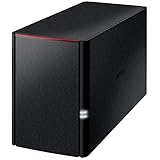
The LinkStation 220 12TB is a two-bay personal NAS with two drives included, suited to a household that wants a shared folder with protection against one drive failing. It is a complete system rather than a bare drive.
- Two bays populated with 2 x 6TB drives, per retailer listings of the 12TB model
- ARMADA 370 processor at about 800MHz and 256MB DDR3
- Gigabit Ethernet and a USB 2.0 port
- RAID 0, RAID 1 and JBOD; reported to ship as RAID 1, which leaves about 6TB usable
- DLNA media server, Time Machine compatibility and BitTorrent client listed
The two-bay design is a good teaching case for how RAID trades capacity for safety. Two 6TB drives in the default mirror give you 6TB of usable space and survive one failure; switching to RAID 0 doubles the space but doubles the risk. Because both drives spin all day and share one small chassis, monitoring drive temperature and replacing aging disks on schedule matters. The USB 2.0 port is useful for attaching an external drive for backup but will be slow for large copies.
Pros
- Mirroring protects against one drive failing
- Straightforward for non-technical users
Cons
- Usable space is half the total in the default mode
- Gigabit and USB 2.0 limit transfer speeds
Next to the TeraStation Essentials, it is the cheaper-to-run and simpler step, giving up speed and parity RAID.
Specs Compared
| Model | Type | Bays | Capacity | Interface / network | RAID | Notes |
|---|---|---|---|---|---|---|
| BUFFALO TeraStation Essentials | Complete NAS, drives included | 4 | 24TB (4 x 6TB) | 2.5GbE, USB 3.2 Gen 1 | 0/1/5/6/10/JBOD | Drive model: confirm on listing |
| Seagate IronWolf Pro 14TB | Bare NAS HDD | n/a | 14TB | SATA 6Gb/s | For RAID NAS | CMR, 256MB cache, workload by model |
| BUFFALO LinkStation 210 2TB | Complete NAS | 1 | 2TB | Gigabit, USB 2.0 | None | Drive model: confirm |
| BUFFALO LinkStation 210 4TB | Complete NAS | 1 | 4TB | Gigabit, USB 2.0 | None | Drive model: confirm |
| Seagate SkyHawk AI 16TB | Surveillance HDD | n/a | 16TB | SATA 6Gb/s | For NVR use | 550TB/year workload, 256MB cache |
| BUFFALO LinkStation 220 12TB | Complete NAS | 2 | 12TB (2 x 6TB) | Gigabit, USB 2.0 | 0/1/JBOD | Ships RAID 1 per listings |
How We Chose These
This guide uses the six products supplied for the topic, and we sorted them by what they actually are: one bare NAS-class drive, one surveillance drive and four complete Buffalo NAS units that include drives. For each, we compared published specifications from Seagate and Buffalo and from retailer listings. The criteria were suitability for continuous operation, recording technology, workload rating, interface, bay count, RAID support and warranty or recovery coverage. We did not run our own measurements. Where listings or model numbers disagreed, as with the IronWolf Pro workload rating, we say so and advise confirming the exact model number. We also cross-checked overlapping fields, such as bay counts, capacity limits and interface names, across more than one source whenever possible.
What to Look For
NAS-rated drives versus desktop drives
Desktop drives are built for eight hours of use a day in a single-drive PC. NAS drives are built for constant spinning, tolerate the vibration of neighboring drives, and use firmware that gives up on a bad sector quickly, so a RAID controller does not hang waiting for a recovery that never comes. That firmware setting is often called error recovery control. For a NAS that stays on all day, buying a drive marked for NAS or RAID use is the safer default, and the price gap is usually modest compared with the cost of the data.
CMR versus SMR
CMR (conventional magnetic recording) writes tracks side by side, while SMR (shingled magnetic recording) overlaps them to squeeze in more capacity. SMR drives slow down badly during long writes and RAID rebuilds because they must rewrite neighboring tracks. For a NAS, especially one using RAID 5 or RAID 6, CMR is the safe choice. The IronWolf Pro listing states CMR, and the SkyHawk AI listing describes a CMR design for video. For other models, confirm the recording type on the specification page before buying.
Workload rating, MTBF and warranty
The workload rating is the amount of data a drive is designed to read and write per year. A rating of 300TB per year equals roughly 0.8TB a day, while 550TB per year equals about 1.5TB a day. A home NAS rarely approaches either figure, but a small office with backups and video editing can. MTBF figures, quoted in millions of hours, are statistical and best used to compare drives within a brand. Warranty length is a better signal of confidence: five years is common on the pro tier, three on the standard tier. Data-recovery plans bundled with the drive add value if the data is irreplaceable.
Capacity, bays and cooling
In a RAID 5 array, you lose one drive’s worth of space, so four 6TB drives give about 18TB usable, matching the TeraStation’s default. In RAID 1, usable space equals one drive, so two 6TB drives give 6TB. Large drives take longer to rebuild after a failure, which is why many people choose RAID 6 or keep a separate backup with 14TB-plus disks. Heat also matters: drives running all day need airflow, and 7200 rpm models run warmer than slower ones. Keep the NAS away from heaters and avoid stacking it in a closed cabinet.
Matching drive choice to your NAS workload
Start by estimating how many people use the NAS and what they do. A household of four that streams video and backs up phones writes only a few gigabytes a day, so any NAS-class drive will have large margin. A small office that edits video from the NAS and runs nightly backups can reach several terabytes a week, which is when a higher workload rating becomes meaningful. As a rule of thumb, divide the rated annual workload by 365 to get a daily budget, then compare it with your busiest day. If the two are close, step up to a higher-rated drive or spread the load over more drives.
Last, check compatibility before you buy. NAS makers publish lists of drives they have validated, and sticking to the list avoids surprises with firmware, power-on behavior and warranty support. A bare drive that is not on your vendor’s list may still work, but you should verify that the NAS reads its health data. Complete units such as the Buffalo models remove that question, because the maker chose the drives, although you should still confirm the drive model on the listing.
Questions
What makes a hard drive suitable for 24/7 use?
A drive built for constant operation has a rated workload, firmware tuned for RAID, vibration tolerance and a long warranty. Desktop drives can run all day, but they are not designed or warranted for it. NAS and surveillance drives are made for that duty cycle.
Is the SkyHawk AI okay for a NAS?
It is rated for continuous operation and has a high workload rating, so it can run constantly. However, it is designed for video recorders, and a NAS maker may not list it as compatible. Treat it as a runner-up for NAS use unless your NAS is mainly recording video.
Do I need a NAS drive if I use only one bay?
A single-bay NAS has no RAID, so the vibration and error-recovery features matter less. A drive designed for continuous operation is still sensible if the NAS runs constantly. Pair it with a separate backup, because one drive offers no protection.
How many drives should I buy at once?
For RAID, buying drives of the same model is cleanest. Some people stagger purchase dates to avoid drives from one batch failing around the same time. Either way, keep a spare plan for when one fails.
Is RAID a backup?
No. RAID keeps a NAS available when a drive fails, but it will not recover deleted files, ransomware damage or a fire. Keep at least one copy of important data on a separate device or offsite.
Why do the listings show different specs for the same drive?
Drive makers release revised models under the same product name, with different cache sizes, workload ratings and warranty terms. Check the model number printed on the drive label or in the specification sheet to be sure you are comparing the right version.
Update History
- October 20, 2026 – Initial publication; product set drawn from current catalog listings.
- Check the product page for current specifications and availability before buying.
Sources
- Manufacturer product and specification pages for Seagate (IronWolf Pro and SkyHawk AI) and Buffalo (TeraStation and LinkStation)
- Retailer listing titles and specification fields for each product
- Published hardware reviews and distributor data sheets for the IronWolf Pro 14TB workload and warranty details



Write Your Review
No reviews yet. Be the first to share your experience!