

Key takeaways
- Socket fit. Chunky adapters can block neighboring sockets on a power strip or hang awkwardly from recessed wall sockets. Compact designs with fewer protruding pieces tend to sit more securely, and a heavy adapter in a loose socket can slowly slide out.
- Grounding. Some travel adapters pass an earth connection through, others do not. Laptop chargers with a three-prong plug may be designed to be grounded. Follow the device manual.
- Fuse rating. Many adapters include a replaceable fuse, with ratings listed on the label. Do not exceed the stated total load.
- Heat. Slim GaN units warm up under full load. Do not cover them with clothing or bedding while charging, and unplug if the casing becomes uncomfortably hot.
- High-draw appliances. Heating appliances such as kettles and hair dryers draw far more power than a travel adapter is built for. Leave them at home or use local equipment.
- Cables. A high-wattage port is no use with a basic charging cable. For 60W and above, use a cable the maker rates for that power.
A single GaN-based adapter with two or three USB-C ports suits most travelers, a 65W to 70W single-port model suits anyone charging a USB-C laptop on the road, and a credit-card-sized folding adapter suits carry-on-only packers who just need to top up a phone. The right choice depends less on brand than on three numbers: the total wattage the adapter can deliver, how that wattage is split when several devices are plugged in, and which wall socket shapes the plug set covers.
Our top picks



As an Amazon Associate we earn from qualifying purchases at no extra cost to you.
Quick Comparison of the Models Reviewers Mention Most
The figures below come from the makers’ listings as relayed by review roundups from CNN Underscored, Finding the Universe, Technobezz and The Consumer’s Guide. Wattage figures differ between sources for some models, so treat them as the stated headline numbers and read the label on the unit you own.
| Model | Best for | Stated key specs | Limits |
|---|---|---|---|
| EPICKA Universal (TA-105S) | All-round family travel | GaN design, three USB-C and two USB-A ports, up to 45W, slide-out plugs for 200+ countries | 45W is the shared ceiling; large laptops may charge slowly |
| EPICKA Air 65W | Light laptop charging | Single USB-C port at 65W, slim body around 149g per Finding the Universe | One port only, so phones need a second charger |
| Ceptics GaN 70W | Laptop plus phone | 70W Power Delivery, built-in retractable USB-C cable per Technobezz | Built-in cable can be a single point of failure |
| EPICKA Pulse Duo 140W | Premium, multi-device desks | Two AC outlets, 65W on two USB-C ports at once, display for power draw and temperature | Bulkier and heavier than slim models |
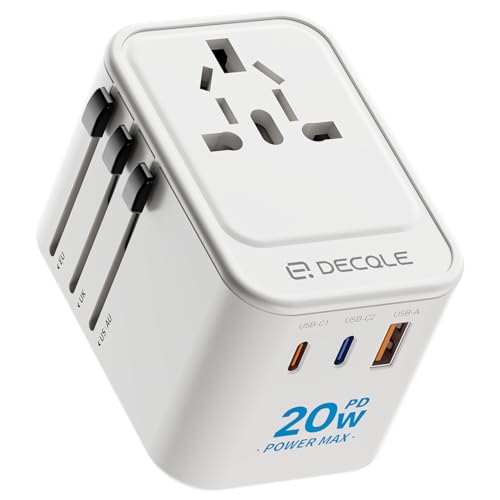
| TESSAN travel adapter | Budget buyers | Three USB-C ports at an entry-level tier, 20W maximum in one listing | Low total output; phones and tablets only |
| Anker Nano travel adapter | Minimalist packers | Credit-card-sized with foldable pins per Technobezz | Check the label for exact output and region coverage |
| Ceptics 35W World Travel Adapter Kit | Surge protection and swappable heads | Interchangeable plug heads per The Consumer’s Guide | Loose heads are easy to misplace |
| Satechi GaN travel charger | Tidy desk-style charging | Listed by CNN Underscored among its picks | Confirm plug coverage for your destinations |
What “Universal” Actually Means
A universal travel adapter changes the shape of the plug, not the electricity. Most phone chargers, laptop bricks and camera chargers are dual-voltage, which means the printed label says something like 100-240V and 50/60Hz. Those devices work in nearly every country once the plug shape fits. Devices that list only 110-120V, such as many hair dryers, curling irons and some beard trimmers, need a voltage converter, and a plug adapter alone can damage them. This is the single most common mistake, so read the label on every device before packing.
Four plug families cover most of the world. Types A and B are the flat-pin styles used in North America and parts of Asia and Latin America. Type C is the two-round-pin style used across much of Europe. Type G is the three-rectangular-pin style used in the United Kingdom and Ireland, with a fuse built into the plug. Type I is the angled-blade style used in Australia, New Zealand and parts of China and Argentina. Adapters that advertise coverage of 150 or 200 countries are usually combining these four families in slide-out or rotating pins. Some regions, including Italy, Switzerland and Israel, use their own variants, and reviewers advise reading the maker’s compatibility list if you are visiting them.
USB-C Power Delivery: The Part That Matters Most
The reason to seek out USB-C on a travel adapter is to drop the separate charger bricks. A USB-C port that supports Power Delivery negotiates voltage and current with the device. Phones commonly accept around 20W to 30W, tablets slightly more, and ultrabook laptops typically need 45W to 65W. Larger laptops with discrete graphics may ask for 90W or more and will simply charge slowly, or not at all under load, on a lower-wattage port.
Fypower’s advice, as summarized in 2026 roundups, is that anyone carrying a USB-C laptop should look for at least 45W of Power Delivery on a port. The makers’ own pages are the right place to find out how output is shared. Many multi-port adapters list a headline number such as 45W total, then divide it as more ports are used. A 45W adapter with three USB-C ports might deliver 45W to one laptop alone, but only a fraction of that to each device when a phone and earbuds are plugged in too. If you travel with a laptop, a phone and a tablet, add up the wattage you want at once and compare it to the combined figure on the label.
GaN, short for gallium nitride, is the semiconductor material that lets these adapters be smaller and cooler than older silicon designs at the same power. It is the reason a 65W model can weigh roughly as much as a smartphone. It is a design choice rather than a guarantee of quality, so safety certifications and a fuse rating on the label matter more than the material.
Pick X If… Decision Table
| If you… | Pick | Why |
|---|---|---|
| Travel with a family and phones, tablets and earbuds | EPICKA Universal (TA-105S) | Five ports in total and slide-out plugs, the model most 2026 roundups place first |
| Carry one USB-C laptop and want a small kit | EPICKA Air 65W | A single 65W port in a slim body |
| Want laptop and phone with one built-in cable | Ceptics GaN 70W | Retractable USB-C cable reduces loose cords |
| Work remotely from hotels with multiple devices | EPICKA Pulse Duo 140W | Two AC outlets and a power display for the desk |
| Need the lowest outlay and only charge phones | TESSAN | Three USB-C ports at an entry-level tier |
| Pack in a small bag and visit one region | Anker Nano or a single-region adapter | Compact folding pins; CNN Underscored notes a dedicated adapter can save luggage space for a single-country trip |
| Prefer swappable heads and want protection | Ceptics 35W World Travel Adapter Kit | Interchangeable heads and surge protection per The Consumer’s Guide |
Budget, Mid-Range and Premium Trade-Offs
Budget tier
Budget adapters, with TESSAN the name that appears most in roundups, put several USB-C ports on a body that delivers modest total power. That is sensible for a phone, earbuds and a smartwatch. The trade-off is that total output is low, so a laptop will either charge very slowly or refuse. Entry-level units also tend to have the least information about internal protection, so look for visible certification marks on the casing.
Mid-range tier
The mid-range is where most travelers will land. The EPICKA Universal sits here, with enough shared wattage for a phone and a small tablet or an ultrabook at moderate speed. Reviewers report that it covers a wide range of countries in one compact block. The caveat is the shared ceiling: plug in everything at once and each device gets a share.
Premium tier
Premium adapters such as the EPICKA Pulse Duo 140W and 65W to 70W laptop-focused models deliver enough output for a real working setup. You pay in size and weight, and the largest units are less pleasant in a carry-on than a slim wall plug. Choose this tier only if you routinely charge a laptop and several accessories simultaneously.
Fit, Size and Safety Notes
- Socket fit. Chunky adapters can block neighboring sockets on a power strip or hang awkwardly from recessed wall sockets. Compact designs with fewer protruding pieces tend to sit more securely, and a heavy adapter in a loose socket can slowly slide out.
- Grounding. Some travel adapters pass an earth connection through, others do not. Laptop chargers with a three-prong plug may be designed to be grounded. Follow the device manual.
- Fuse rating. Many adapters include a replaceable fuse, with ratings listed on the label. Do not exceed the stated total load.
- Heat. Slim GaN units warm up under full load. Do not cover them with clothing or bedding while charging, and unplug if the casing becomes uncomfortably hot.
- High-draw appliances. Heating appliances such as kettles and hair dryers draw far more power than a travel adapter is built for. Leave them at home or use local equipment.
- Cables. A high-wattage port is no use with a basic charging cable. For 60W and above, use a cable the maker rates for that power.
If you have doubts about a particular outlet, a faulty hotel socket or a device that gets unusually hot, stop using it and ask the accommodation for another outlet. For anything involving fixed wiring, consult a qualified electrician.
Alternatives to a Single Do-It-All Adapter
- Region-specific plug adapters plus a multiport charger. CNN Underscored points out that if you visit one country, a small dedicated adapter takes less space than a full universal block. Pair it with a USB-C wall charger you already own.
- Power strip with a travel adapter. A compact power strip plugged into a single adapter lets you charge a mixture of devices that use your home plugs. Check that the strip is dual-voltage first.
- Power bank with Power Delivery. For long days out, a power bank with a high-wattage USB-C port charges a laptop or phone without any wall socket and sidesteps plug shape entirely. It still needs a compatible charger to refill.
How to Choose in Four Steps
- List your devices and the wattage on each charger label. Add up what you want to charge at the same time.
- Confirm every device is dual-voltage, marked 100-240V. If not, leave it at home or buy a proper converter.
- Choose total output at least equal to your largest charger, with headroom if you plan to charge a second device.
- Check the destination plug types against the maker’s coverage list and pick a design with a fuse and visible safety marks.
Frequently Asked Questions
Does a universal travel adapter convert voltage?
No. It only changes the plug shape. Dual-voltage devices marked 100-240V work abroad with a plug adapter alone, while single-voltage appliances need a separate voltage converter or should stay at home.
How many watts do I need to charge a laptop?
Match the wattage printed on the laptop’s own charger. Reviewers suggest at least 45W for many USB-C laptops, and 65W to 70W for larger ones. A lower-wattage port may charge slowly or not keep up while the laptop is in use.
Can I charge several devices at once?
Yes, but multi-port adapters usually share a total output. A headline figure such as 45W is the combined limit, so each device receives less as more are connected. Read the maker’s table to see how power is split.
Is a GaN adapter safer than a regular one?
GaN mainly makes adapters smaller and cooler for their output. Safety depends on certification marks, internal protection and the maker’s stated fuse rating, so look for these on the label rather than relying on the material.
Will one adapter work in every country?
Models that advertise 200 or more countries combine the common plug families, but a few regions use unusual sockets. Read the maker’s coverage list for your destination and carry a spare plug type if you are visiting several places.
Can I use a travel adapter with a hair dryer?
Usually not. Heating appliances draw much more power than a compact adapter is designed to handle and are often single-voltage. Use the hotel’s dryer, or follow your appliance manual and the adapter maker’s stated limits.










Write Your Review
No reviews yet. Be the first to share your experience!