

Key takeaways
- An external SSD cannot play PS5 games, but it can store them and run your PS4 library. Compare five USB drives by speed, capacity, and ruggedness.
A PlayStation 5 ships with 825 GB of internal storage, and once the system software takes its share, a dozen modern games can fill what remains. Deleting a game to make room and downloading it again later costs hours on a slow connection, so an external USB SSD looks like the obvious fix. It is a fix, but only for half the problem: a USB drive holds PS5 games in cold storage and plays PS4 games directly, while PS5 games must move back to the console before they launch.
This guide is for three groups: players with a large PS4 library who want those games running from a fast drive, players who rotate PS5 games and want a parking bay instead of re-downloading, and anyone whose console sits in a shared living room where a drive gets knocked around. The five drives below were chosen from names and specs on their Amazon listings, and each one is a USB external SSD, not an internal M.2 drive.
Quick Picks
As an Amazon Associate we earn from qualifying purchases.
| Product | Best for | Key spec |
|---|---|---|
| Samsung T7 Shield 2TB (Beige) | A drive that gets knocked around the living room | 2 TB, up to 1050 MB/s, IP65 rated |
| SanDisk Extreme Portable SSD 2TB (New Model) | The fastest headline speed in this group | 2 TB, up to 2000 MB/s, USB 3.2 Gen 2×2 |
| Crucial X9 2TB | The simplest, lightest everyday drive | 2 TB, up to 1050 MB/s, 32 g |
| WD_BLACK P50 Game Drive SSD 2TB | A console-first drive with a long warranty | 2 TB, up to 2000 MB/s, 5-year warranty |
| SABRENT Rocket Nano V2 2TB | The smallest drive that still holds 2 TB | 2 TB, up to 1500 MB/s, aluminium body |
How to Choose
USB Speed on the PS5 Is Capped at 10 Gbps
Every USB port on a PS5 runs at 10 Gbps, which is USB 3.2 Gen 2 speed, so a drive rated at 2000 MB/s will never reach that figure on the console. In practice the ceiling is close to 1000 MB/s, still fast enough to move a 100 GB game in minutes and play PS4 games without stutter. Do not pay extra for a Gen 2×2 drive purely for PS5 use, because the console cannot use the second lane. The faster drives below earn their place for other reasons, such as ruggedness or capacity, and their extra speed only shows up when the same drive is plugged into a computer with a 20 Gbps port.
Capacity: 2 TB Is the Sweet Spot
A 1 TB external drive holds roughly ten full-size PS5 games at 100 GB each, which is barely more than the console already holds, so it solves little. A 4 TB drive costs far more per terabyte and makes sense only for a library of dozens of titles. Two terabytes sits in the middle: around twenty large games in cold storage, plus a PS4 library, without the jump in cost that 4 TB demands. Every drive in this guide is a 2 TB model for that reason, so the comparison stays honest. If your library is mostly small indie titles and PS4 games, 2 TB will feel generous for years.
Ruggedness and Size for a Living-Room Console
An external drive for a PS5 lives on a shelf or behind a television, where it gets bumped by controllers, pets, and cleaning. A rubber shell, a drop rating, and water resistance matter more here than they do on a desk drive. Weight matters too: a light drive hangs from its cable without pulling on the port, while a heavier metal drive should sit flat on the shelf. Check the cable length as well, because a short cable forces the drive to dangle behind the console where it collects dust and heat. A drive with a carabiner loop or a grippy sleeve is easier to grab and move without dropping.
Formatting, Cables, and the One-Drive Rule
The PS5 formats an external drive as extended USB storage, and it only accepts the exFAT format for that job, so a drive that arrives formatted for Windows may need a reformat on the console before the PS5 will use it. Reformatting erases everything on the drive, so do it before copying games onto it. The PS5 also allows only one extended USB storage drive connected at a time, which means a second drive cannot sit beside the first as extra space. Finally, use the cable that ships in the box: a random charging cable may only carry USB 2.0 speeds, and the drive will feel slow for no good reason.
The 5 Best Options
Samsung T7 Shield 2TB (Beige)

The T7 Shield is the drive to buy when the console lives in a busy room and the drive will get knocked off a shelf sooner or later. Its rubberised shell, IP65 water and dust resistance, and drop resistance up to 3 metres make it the toughest drive in this group, and the beige finish is the same drive as the black version, just in a lighter colour. Speed is up to 1050 MB/s over USB 3.2 Gen 2, which matches the PS5 port exactly, so nothing is wasted. At 98 g it is light enough to hang from its cable without straining the port.
Specs
- Capacity: 2 TB
- Read and write speeds: up to 1050 MB/s
- Interface: USB 3.2 Gen 2, USB-C
- Protection: IP65 water and dust resistance, drop resistant up to 3 m
- Model number: MU-PE2T0K/AM (Beige)
- Weight: 98 g
Best for: a shared living room where the drive gets bumped, moved, and occasionally dropped.
Watch out for: confirm the listing is the 2 TB beige model MU-PE2T0K/AM, not the 1 TB version, and check that the listing is the drive alone rather than a bundle with a case.
SanDisk Extreme Portable SSD 2TB (New Model)

The new SanDisk Extreme is the fastest drive here on paper, with read and write speeds up to 2000 MB/s over USB 3.2 Gen 2×2, and it is the pick for someone who also uses the drive on a computer with a 20 Gbps port. On the PS5 itself it runs at the console 10 Gbps ceiling like everything else, so its speed advantage only appears away from the console. The carabiner loop makes it easy to clip to a bag, and the compact body slips into a drawer beside the console. It is a current model, so availability is straightforward.
Specs
- Capacity: 2 TB
- Read and write speeds: up to 2000 MB/s
- Interface: USB 3.2 Gen 2×2, USB-C
- Model number: SDSSDE70-2T00-G25
- Design: compact body with a carabiner loop
Best for: someone who wants the fastest drive in the group and also plugs it into a fast computer.
Watch out for: confirm the model number SDSSDE70 in the listing, because the older SanDisk Extreme at 1050 MB/s is still sold under a similar name; also note the 2000 MB/s figure needs a 20 Gbps port, which the PS5 does not have.
Crucial X9 2TB

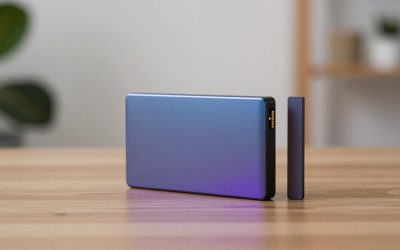
The Crucial X9 is the honest pick: no rugged shell, no gaming branding, just a small, light drive that does the job at the speed the PS5 can actually use. At 32 g and roughly the size of a credit card, it is the lightest drive in this group, and it works with Windows, Mac, and Android as well as the console. Its 1050 MB/s ceiling matches the PS5 USB port, so there is no wasted speed and no premium for a faster interface. This is the drive for someone who wants storage, not a statement piece, and who keeps it on a dry shelf.
Specs
- Capacity: 2 TB
- Read and write speeds: up to 1050 MB/s
- Interface: USB 3.2 Gen 2, USB-C
- Model number: CT2000X9SSD902
- Dimensions: 2.56 x 1.97 x 0.39 inches
- Weight: 32 g
Best for: a simple, light drive that stays on the shelf and just works.
Watch out for: the X9 has no water or dust rating, so keep it dry; do not confuse it with the Crucial X9 Pro, which is a different drive with a tougher shell and a higher cost.
WD_BLACK P50 Game Drive SSD 2TB
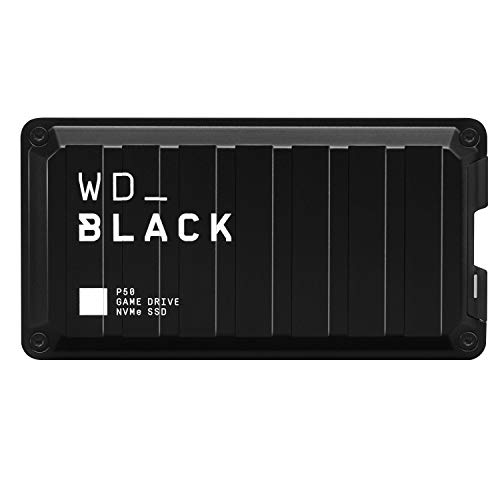
The WD_BLACK P50 is the only drive here designed from the ground up for consoles, with a metal housing shaped like a small ammo box and a 5-year warranty, the longest in the group. Its headline speed is up to 2000 MB/s over USB 3.2 Gen 2×2, and its listing names PlayStation compatibility directly, which is rare among general-purpose drives. On the PS5 it runs at the console 10 Gbps ceiling, so the extra speed is a bonus for computer use, not the console. It is heavier than the plastic drives here, so it belongs flat on a shelf rather than dangling from a cable.
Specs
- Capacity: 2 TB
- Read and write speeds: up to 2000 MB/s
- Interface: USB 3.2 Gen 2×2, USB-C
- Model number: WDBA3S0020BBK-WESN
- Dimensions: 4.65 x 2.44 x 0.55 inches
- Weight: 115 g
- Warranty: 5-year limited warranty
Best for: a player who wants a console-first drive with the longest warranty in the group.
Watch out for: this is an older model, so confirm a live offer before ordering; also confirm the listing is the drive alone, not a bundle, and remember the 2000 MB/s figure needs a 20 Gbps port.
SABRENT Rocket Nano V2 2TB

The Rocket Nano V2 is the smallest 2 TB drive in this group, an aluminium stick barely larger than a key fob, built for a tight shelf behind the console. Its 1500 MB/s headline speed sits between the 1050 MB/s drives and the 2000 MB/s pair, and it ships with a silicone sleeve that adds grip and a little drop protection. The aluminium body also sheds heat better than plastic during a long copy session. Because it is so small, it is easy to lose in a drawer, so keep it plugged in or in a fixed spot rather than loose in a bag.
Specs
- Capacity: 2 TB
- Transfer speeds: up to 1500 MB/s
- Interface: USB 3.2 Gen 2×2, USB-C
- Model number: SB-2TB-NAV2
- Enclosure: aluminium body with a silicone sleeve
Best for: a tight shelf where a full-size drive will not fit, and for moving large games quickly.
Watch out for: confirm the V2 model SB-2TB-NAV2 in the listing, not the original Rocket Nano at 1000 MB/s; its 1500 MB/s figure also needs a 20 Gbps port, so expect around 1000 MB/s on the PS5.
Which One Fits Your Situation
You Mainly Play PS4 Games on Your PS5
Pick the Samsung T7 Shield 2TB. PS4 games run directly from a USB drive, so pick the toughest one, and the T7 Shield is the only drive here with an IP65 rating and a 3-metre drop rating. Its 1050 MB/s speed matches the PS5 port, and at 98 g it can hang from the cable without pulling on the port. Keep it in the rear USB port so the front port stays free for a controller cable.
You Rotate a Large PS5 Library
Pick the SanDisk Extreme Portable SSD 2TB (New Model). Rotating games means copying them between the drive and the console, and the new SanDisk is the fastest drive here when plugged into a computer, while matching the rest on the console. Two terabytes holds around twenty large games in cold storage, and the carabiner loop makes it easy to carry the library to a second console. Each PS5 game must still copy back to internal storage before it launches.
Your Console Sits in a Busy Living Room
Pick the Samsung T7 Shield 2TB again, or the WD_BLACK P50 if you prefer a metal body. The T7 Shield survives drops and spills that would crack a bare plastic drive, while the P50 metal housing shrugs off knocks and comes with the longest warranty in the group. Either way, set the drive flat on the shelf, not dangling from the cable, and use the cable that ships in the box so the drive runs at full USB speed.
You Want the Smallest Drive Possible
Pick the SABRENT Rocket Nano V2 2TB. It is barely larger than a key fob, so it fits behind the console where a full-size drive will not, and its aluminium body handles heat during long copy sessions better than plastic. If the budget is the priority instead of size, the Crucial X9 is the plain alternative: same 2 TB, same usable speed on the PS5, and the lightest body in the group at 32 g.
Common Mistakes
- Buying an external drive expecting PS5 games to play from it: USB storage holds PS5 games for cold storage only, and they must copy back to the console before they launch.
- Paying extra for a 2000 MB/s Gen 2×2 drive purely for PS5 use: the console ports cap at 10 Gbps, so the extra speed never appears on the PS5.
- Confusing an external USB drive with an internal M.2 drive: PS5 games play from internal storage, and a heatsink belongs with an M.2 drive, not a USB drive.
- Ordering the older 1050 MB/s SanDisk Extreme when you meant the new 2000 MB/s model, or the original Rocket Nano when you meant the V2: check the model number in the listing.
- Skipping the format step or unplugging the drive mid-copy: the PS5 needs exFAT for extended storage, and pulling the cable during a transfer can corrupt the library.
Frequently Asked Questions
Can I play PS5 games directly from an external SSD?
No. The PS5 treats a USB drive as extended storage, which holds PS5 games in cold storage and plays PS4 games directly. A PS5 game must copy back to internal storage before it launches. Copying a 100 GB game back takes a few minutes over USB, far quicker than downloading it again, so the drive works as a parking bay, not a second internal drive.
How many games fit on a 2 TB external SSD?
Roughly twenty full-size PS5 games at 100 GB each, or far more if your library leans toward smaller indie titles and PS4 games. A 2 TB drive also leaves room for a PS4 library alongside the PS5 cold storage. If your collection is mostly large blockbusters, 2 TB fills faster than the number suggests, so count your installed games before choosing between 2 TB and a larger drive.
Do I need a heatsink for an external SSD?
No. A heatsink belongs with an internal M.2 drive installed inside the PS5, where the console manual requires one. An external USB drive sits outside the console in open air, and its metal or plastic shell sheds heat on its own. If a listing bundles a heatsink with a USB drive, that bundle is meant for a different purchase, so buy the drive alone and skip the extra hardware.
Can I use two external drives on a PS5 at the same time?
No. The PS5 allows only one extended USB storage drive connected at a time, so a second drive cannot add space beside the first. If you need more room, swap in a larger single drive, or move finished games back to the console and delete them from the drive. The console also needs the drive to stay connected while PS4 games run from it, so do not unplug it mid-session.
More from Amazon
Programs that pair well with the guide above. Offers and eligibility are set by Amazon and may change.
A free business account with business pricing and bulk-buying tools for work, shop or home office.
Create a business accountFree shipping on eligible items, Prime Video and more. Eligible new members can start with a free trial.
Start a Prime free trialAudiobooks and podcasts to listen to on the go. Eligible new members can start with a free trial.
Try Audible freeAd-free music streaming. Eligible new subscribers can start with a free trial.
Try Music Unlimited freeAs an Amazon Associate we earn from qualifying purchases.
Write Your Review
No reviews yet. Be the first to share your experience!